
HTML表内容对齐中心不工作于一个元素
HTML表内容对齐中心不工作于一个元素
提问于 2022-05-18 02:04:10
我有一个表格,它将单元格中心的所有单元格内容对齐。我使用了回购骰子,因为我需要一个快速的动画骰子。不幸的是,我对CSS的理解还不够深入,不知道为什么骰子不在单元格的中心对齐,就像所有其他项目一样。
这就是它在加载时的样子:
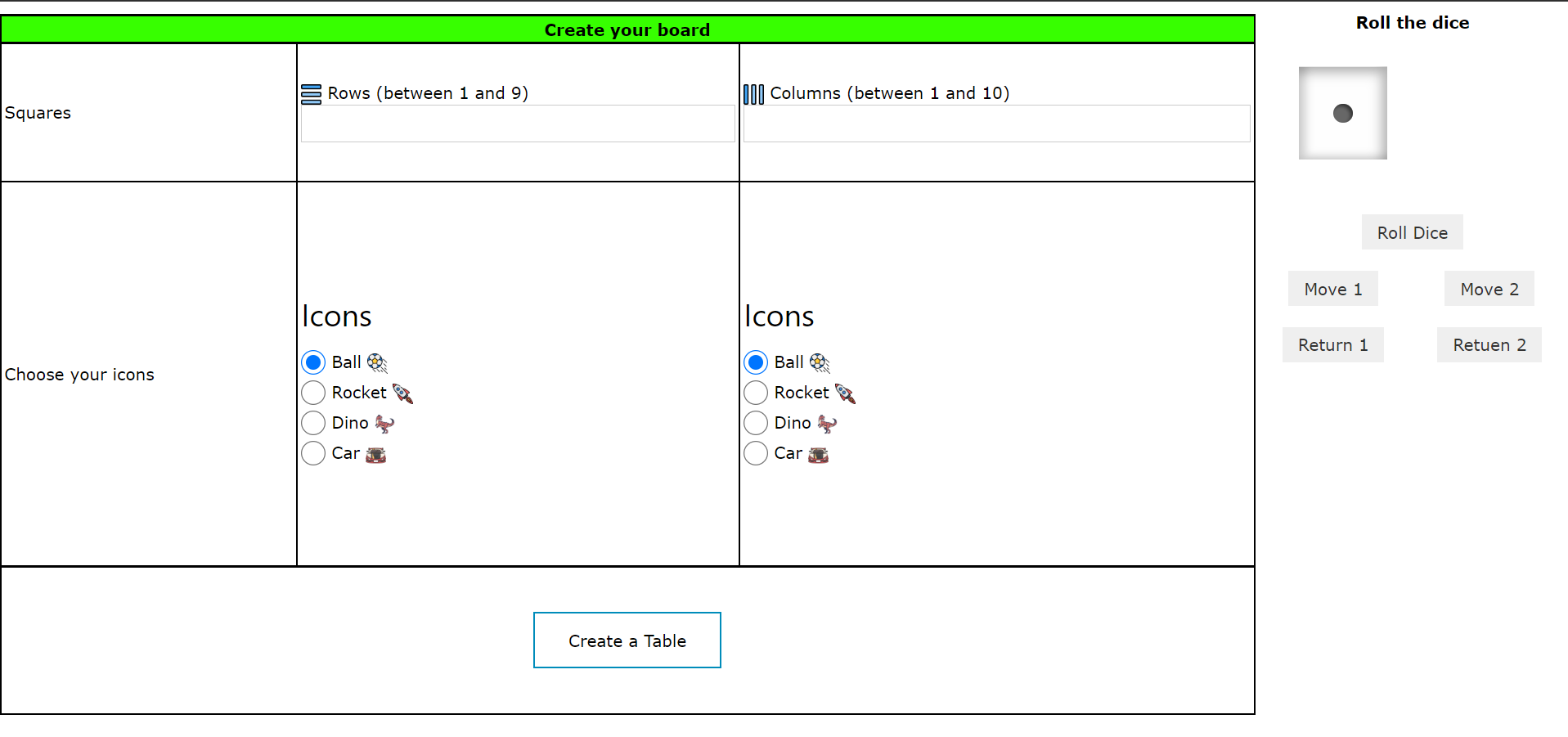
这就是我翻滚6的样子
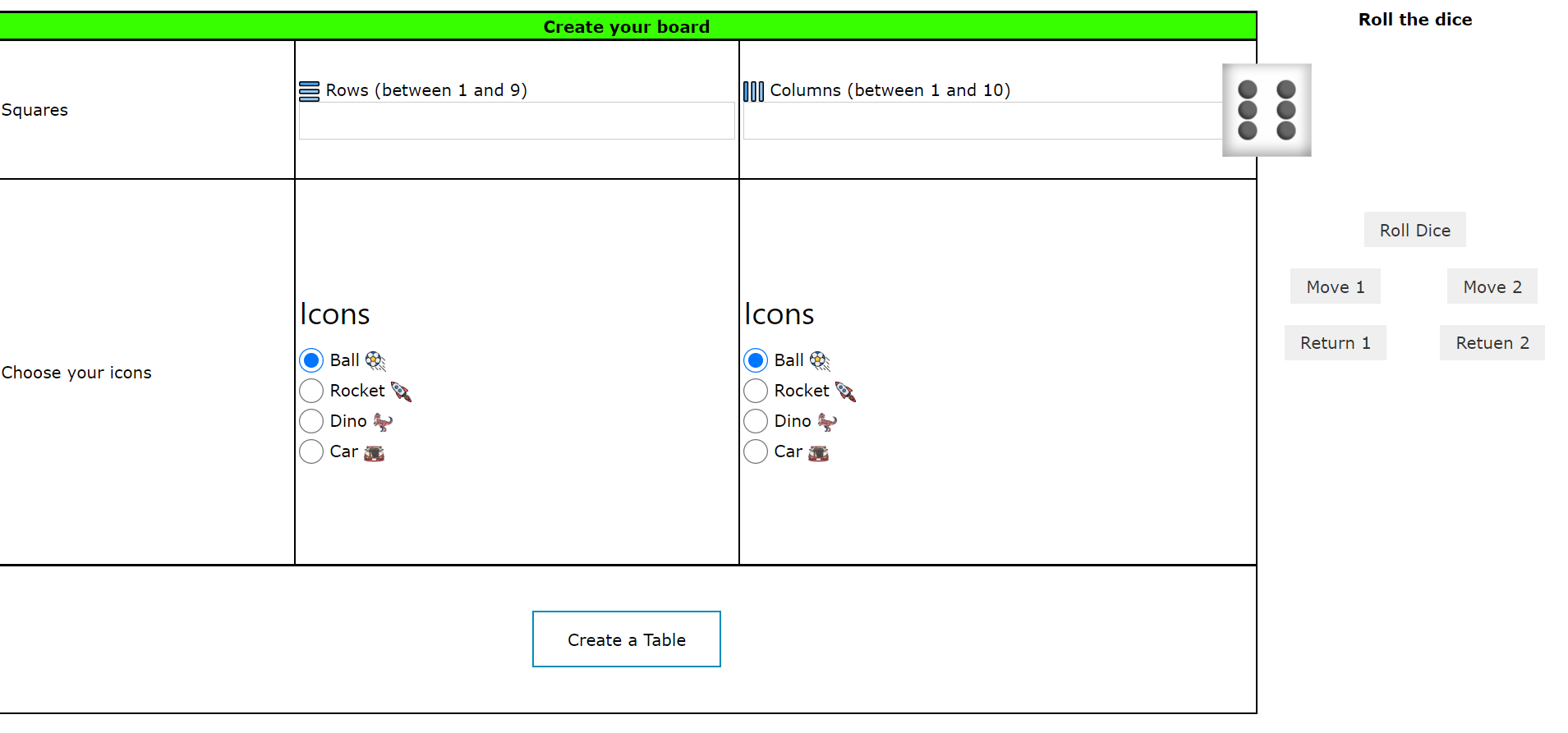
如您所见,骰子现在从单元格中流出,溢出到表的左侧。
这是我的html:
<table id="diceTable" class="halfTable">
    <th colspan="2">
        Roll the dice
    </th>
    <tr>
        <td colspan="2" class="tableCellCenter">
            <ol class="die-list " data-roll="1" id="die-2">
                <li class="die-item" data-side="1">
                    <span class="dot"></span>
                </li>
                <li class="die-item" data-side="2">
                    <span class="dot"></span>
                    <span class="dot"></span>
                </li>
                <li class="die-item" data-side="3">
                    <span class="dot"></span>
                    <span class="dot"></span>
                    <span class="dot"></span>
                </li>
                <li class="die-item" data-side="4">
                    <span class="dot"></span>
                    <span class="dot"></span>
                    <span class="dot"></span>
                    <span class="dot"></span>
                </li>
                <li class="die-item" data-side="5">
                    <span class="dot"></span>
                    <span class="dot"></span>
                    <span class="dot"></span>
                    <span class="dot"></span>
                    <span class="dot"></span>
                </li>
                <li class="die-item" data-side="6">
                    <span class="dot"></span>
                    <span class="dot"></span>
                    <span class="dot"></span>
                    <span class="dot"></span>
                    <span class="dot"></span>
                    <span class="dot"></span>
                </li>
            </ol>
        </td>
    </tr>
    <tr>
        <td colspan="2" class="tableCellCenter">
            <button type="button" id="roll-button1">Roll Dice</button>
        </td>
    </tr>
    <tr>
        <td class="tableCellCenter">
            <button type="button" id="btnMove1">Move 1</button>

        </td>
        <td class="tableCellCenter">
            <button type="button" id="btnMove2">Move 2</button>
        </td>
    </tr>
    <tr>
        <td class="tableCellCenter">
            <button type="button" id="btnReturn1">Return 1</button>
        </td>
        <td class="tableCellCenter">
            <button type="button" id="btnReturn2">Retuen 2</button>
        </td>
    </tr>
</table>
和CSS:
.die-list {
  display: grid;
  grid-template-columns: 1fr;
  grid-template-rows: 1fr;
  height: 6rem;
  list-style-type: none;
  transform-style: preserve-3d;
  width: 6rem;
}

.die-item {
  background-color: #fefefe;
  box-shadow: inset -0.35rem 0.35rem 0.75rem rgba(0, 0, 0, 0.3),
    inset 0.5rem -0.25rem 0.5rem rgba(0, 0, 0, 0.15);
  display: grid;
  grid-column: 1;
  grid-row: 1;
  grid-template-areas:
    "one two three"
    "four five six"
    "seven eight nine";
  grid-template-columns: repeat(3, 1fr);
  grid-template-rows: repeat(3, 1fr);
  height: 100%;
  padding: 1rem;
  width: 100%;
}

.td, .tableCellCenter {
  text-align: center;
}
有人能帮我对一下中间的骰子吗?提前谢谢你。
回答 1
Stack Overflow用户
回答已采纳
发布于 2022-05-18 02:24:35
将其添加到CSS文件/节的顶部。这将从所有元素中删除浏览器添加的填充和边距(padding: 0和margin: 0),并确保填充和边框是任何元素(box-sizing: border-box)的宽度和高度的一部分。
* {
    box-sizing: border-box;
    padding: 0;
    margin: 0;
}然后在你的..die列表规则集中,包括margin: 0 auto;。这将以模具列表元素为中心。
.die-list {
    margin: 0 auto;
}页面原文内容由Stack Overflow提供。腾讯云小微IT领域专用引擎提供翻译支持
原文链接:
https://stackoverflow.com/questions/72282475
复制相关文章
相似问题
腾讯云开发者

Copyright © 2013 - 2026 Tencent Cloud. All Rights Reserved. 腾讯云 版权所有
深圳市腾讯计算机系统有限公司 ICP备案/许可证号:粤B2-20090059  粤公网安备44030502008569号
腾讯云计算(北京)有限责任公司 京ICP证150476号 | 京ICP备11018762号