
C# MS Office应用Azure信息保护
我需要创建PowerPoints,但是当我保存文件(SaveAs方法)时,有Azure分类添加--其中需要手动单击(公共/内部/机密)以完成对ppt文件的保存。
using Microsoft.Office.Interop.PowerPoint;
var pptApplication = new Application();
var pptPresentation = pptApplication.Presentations.Add();
pptPresentation.SaveAs(@"C:\temp\test.pptx", PpSaveAsFileType.ppSaveAsDefault, MsoTriState.msoTrue);
pptPresentation.Close();
pptApplication.Quit();
我在网上找到了应用标签的PowerShell方法,但是即使它有效,它也是在已经存在(保存)的文件上完成的。
另一个发现是https://stackoverflow.com/a/57413086/11305428,但我不知道如何应用标签MSIP_Label__Enabled=True
我的组织中使用了标签的GUID。
strMSIPClassConfidential =“MSIP_strMSIPClassConfidential_-GUID-strMSIPClassConfidential=true;
但我还没有找到如何将它应用到具有互操作的元数据中。有人知道吗?
使用PowerPoint互操作,因为我还没有找到任何免费的库。
回答 2
Stack Overflow用户
发布于 2022-05-19 16:03:10
开始起作用了。如果有人想对代码进行评论,可以随意编辑。
void ApplyAIPLabel(Presentation pptPresentation) {
  var customDocumentProperties = pptPresentation.CustomDocumentProperties;
  var typeDocCustomProps = customDocumentProperties.GetType();
  var propertyName = "MSIP_Label_<GUID>_Enabled";
  var propertyValue = "True";
  object[] oArgs = { propertyName, false, MsoDocProperties.msoPropertyTypeString, propertyValue };
  typeDocCustomProps.InvokeMember("Add", BindingFlags.Default | BindingFlags.InvokeMethod, null, customDocumentProperties, oArgs);
}Stack Overflow用户
发布于 2022-10-23 02:44:06
发现这一条目的人的进一步信息:
当您选择适当的Lable时,当手动保存启用AIP时,Office文件中添加了许多自定义属性。
它们以"MSIP_Label__“格式命名(自定义属性),该属性具有关联的值。
要确定哪些标签是可用的(即:为您的组织配置的),您可以在网上找到关于PowerShell命令的各种信息,以询问并列出它们。
但是,如果您只对编程任务的几个标签选项(例如机密、非官方、官方的)感兴趣,那么您可以首先手工创建不同的示例office文件,并使用不同的灵敏度标签保存它们。
然后依次打开每个单词API_BlankDocument_CofidentialMedialAIPLable.docx (注意:旧格式的.doc不工作),然后单击File -> Info,然后单击Properties v Header,然后从弹出的唯一选项中选择Advanced。
对话框将打开,现在单击“自定义”选项卡,您将看到(部分可见)各种MSIP_Label_?该词适用于保存文档时。
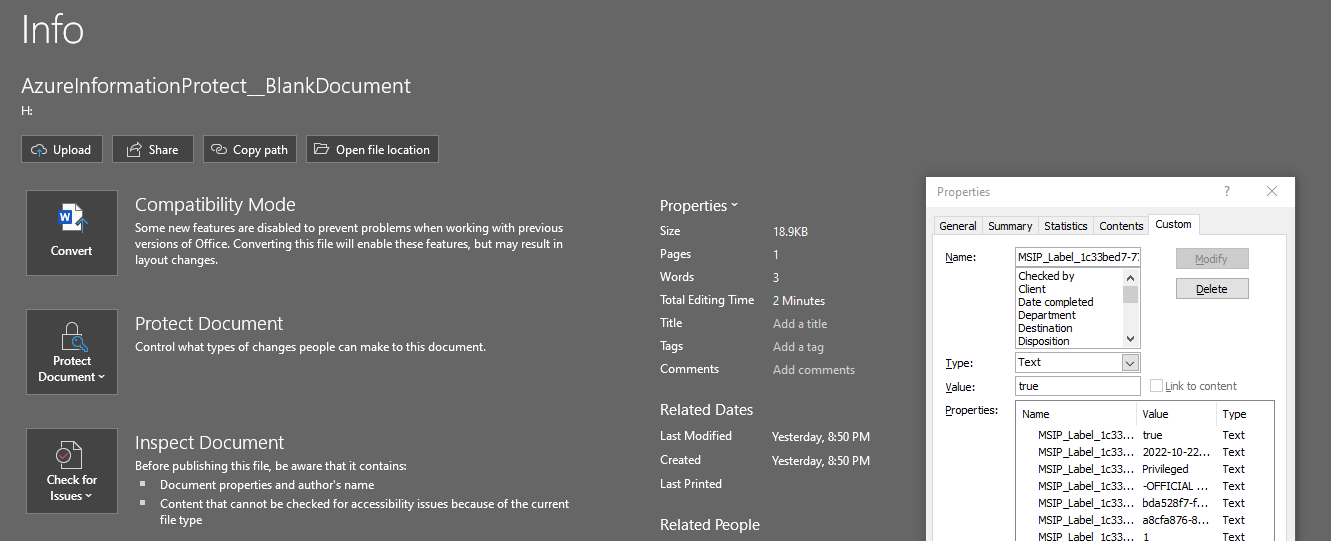
然后,您可以依次单击每个自定义属性,并从" Name“和" Value”字段复制/粘贴属性,从而提取属性名称和值。注意,所有的值都是“文本”类型(尽管其中一个是ISO日期和一个数字)。
您可以使用Office (docobj、pptobj、xlsobj) CustomProperties属性及其.Add方法动态创建所需的标签(**这个逻辑假设对象还没有这些属性**)。
在VBA中,这是我创建的例程,传递的是docobj,它还添加了必需的属性:
Sub Add_AzureInformationProtection(docobj As Object)

Const msoPropertyTypeString = 4

docobj.CustomDocumentProperties.Add Name:="MSIP_Label_1c33bed7-778e-416d-a71d-8913a1a68f5f_Enabled", LinkToContent:=False, TYPE:=msoPropertyTypeString, Value:="true"
docobj.CustomDocumentProperties.Add Name:="MSIP_Label_1c33bed7-778e-416d-a71d-8913a1a68f5f_Method", LinkToContent:=False, TYPE:=msoPropertyTypeString, Value:="Privileged"
docobj.CustomDocumentProperties.Add Name:="MSIP_Label_1c33bed7-778e-416d-a71d-8913a1a68f5f_Name", LinkToContent:=False, TYPE:=msoPropertyTypeString, Value:="-OFFICIAL Sensitive - Medical in confidence"
docobj.CustomDocumentProperties.Add Name:="MSIP_Label_1c33bed7-778e-416d-a71d-8913a1a68f5f_SetDate", LinkToContent:=False, TYPE:=msoPropertyTypeString, Value:=Format(Now(), "yyyy-mm-ddThh:MM:ssZ")
docobj.CustomDocumentProperties.Add Name:="MSIP_Label_1c33bed7-778e-416d-a71d-8913a1a68f5f_SiteId", LinkToContent:=False, TYPE:=msoPropertyTypeString, Value:="bda528f7-fca9-432f-bc98-bd7e90d40906"
docobj.CustomDocumentProperties.Add Name:="MSIP_Label_1c33bed7-778e-416d-a71d-8913a1a68f5f_ActionId", LinkToContent:=False, TYPE:=msoPropertyTypeString, Value:="a8cfa876-8f13-42a4-b1f3-5f5795a32c0c"
docobj.CustomDocumentProperties.Add Name:="MSIP_Label_1c33bed7-778e-416d-a71d-8913a1a68f5f_ContentBits", LinkToContent:=False, TYPE:=msoPropertyTypeString, Value:="1"

End Sub
关于这些标签的信息(其中一些在未来的AIP版本中可能会被替代),我在这里发现:
https://learn.microsoft.com/en-us/information-protection/develop/concept-mip-metadata
https://stackoverflow.com/questions/72263532
复制相似问题
腾讯云开发者

Copyright © 2013 - 2026 Tencent Cloud. All Rights Reserved. 腾讯云 版权所有
深圳市腾讯计算机系统有限公司 ICP备案/许可证号:粤B2-20090059  粤公网安备44030502008569号
腾讯云计算(北京)有限责任公司 京ICP证150476号 | 京ICP备11018762号