
SwiftUI -过渡动画错误(已解决:不是bug!)
SwiftUI -过渡动画错误(已解决:不是bug!)
提问于 2022-05-16 08:38:16
这是对先前的一个问题的跟进,这个问题已经解决了,然后还没有解决。
情况是,我在屏幕上有一个文本网格,它是通过另一个视图的转换来呈现的。我不能使用LazyVGrid来表示网格,因为一个列的宽度需要匹配其中最长的文本。因此,我的解决方案是使用HStacks并设置列的宽度。要将该宽度设置为最长文本的宽度,我使用GeometryReader读取文本的大小,然后通过anchorPreference将该信息发送到视图树上的@State变量,该变量用于设置列中所有标签的宽度。
听起来很复杂但很管用。至少..。直到我试图过渡到它。然后又出现了一个旧的bug,在这里,anchorPreference和onPreferenceChange(...)函数的使用似乎改变了动画,带来了视图,并导致文本滑动得太快。根据这个屏幕截图:
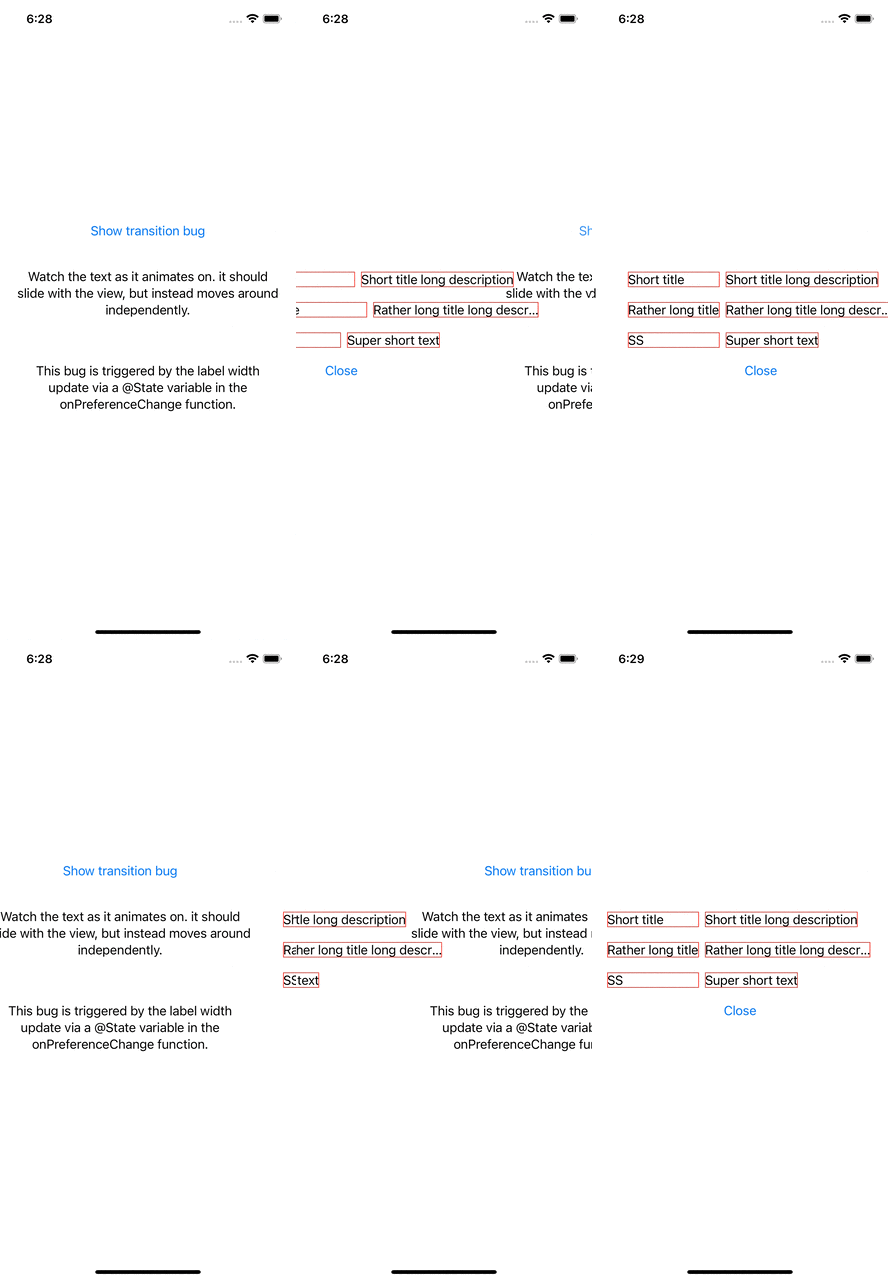
目前,我不知道如何纠正动画,因此文本幻灯片与父视图。有什么建议吗?
下面是这个bug的完整代码:
import SwiftUI

@main
struct TransitionAnimationBug: App {

    var body: some Scene {
        WindowGroup {
            ContentView()
        }
    }
}

struct ContentView: View {

    @State var displaySettings = false

    var body: some View {

        Group {
            if displaySettings {
                DataView(displaySettings: $displaySettings)
                    .transition(.slide)
            } else {
                MainView(displaySettings: $displaySettings)
                    .transition(.slide)
            }
        }
        .animation(.easeInOut, value: displaySettings)
    }
}

struct MainView: View {

    let displaySettings: Binding<Bool>

    var body: some View {
        VStack(spacing: 20) {
            Button("Show transition bug") {
                displaySettings.wrappedValue.toggle()
            }
            Text("Watch the text as it animates on. it should slide with the view, but instead moves around independently.")
                .padding(20).multilineTextAlignment(.center)
            Text("This bug is triggered by the label width update via a @State variable in the onPreferenceChange function.")
                .padding(20).multilineTextAlignment(.center)
        }
    }
}

// The preference key used to advise the parent view of a label's width.
struct LabelWidthPreferenceKey: PreferenceKey {
    static var defaultValue = 0.0
    static func reduce(value: inout Double, nextValue: () -> Double) {
        if value != nextValue() {
            value = max(value, nextValue())
        }
    }
}

struct DataView: View {

    let displaySettings: Binding<Bool>
    @State private var labelWidth: CGFloat = 0.0

    var body: some View {
        VStack(spacing: 30) {
            row(title: "Short title", desc: "Short title long description")
            row(title: "Rather long title", desc: "Rather long title long description")
            row(title: "SS", desc: "Super short text")
            Button("Close") { displaySettings.wrappedValue.toggle() }
        }
        .onPreferenceChange(LabelWidthPreferenceKey.self) {
            // Updating the label width here triggers the bug.
            if $0 != labelWidth {
                labelWidth = $0
            }
        }
    }

    private func row(title: String, desc: String) -> some View {
        GeometryReader { geometry in
            HStack(alignment: .center) {
                Text(title)
                    .frame(minWidth: labelWidth, alignment: .leading)
                    .border(.red)
                    .anchorPreference(key: LabelWidthPreferenceKey.self, value: .bounds) {
                        geometry[$0].width.rounded(.up)
                    }
                Text(desc)
                    .border(.red)
            }
        }
        .fixedSize(horizontal: false, vertical: true)
        .padding([.leading, .trailing], 20)
    }
}回答 1
Stack Overflow用户
回答已采纳
发布于 2022-05-16 11:58:35
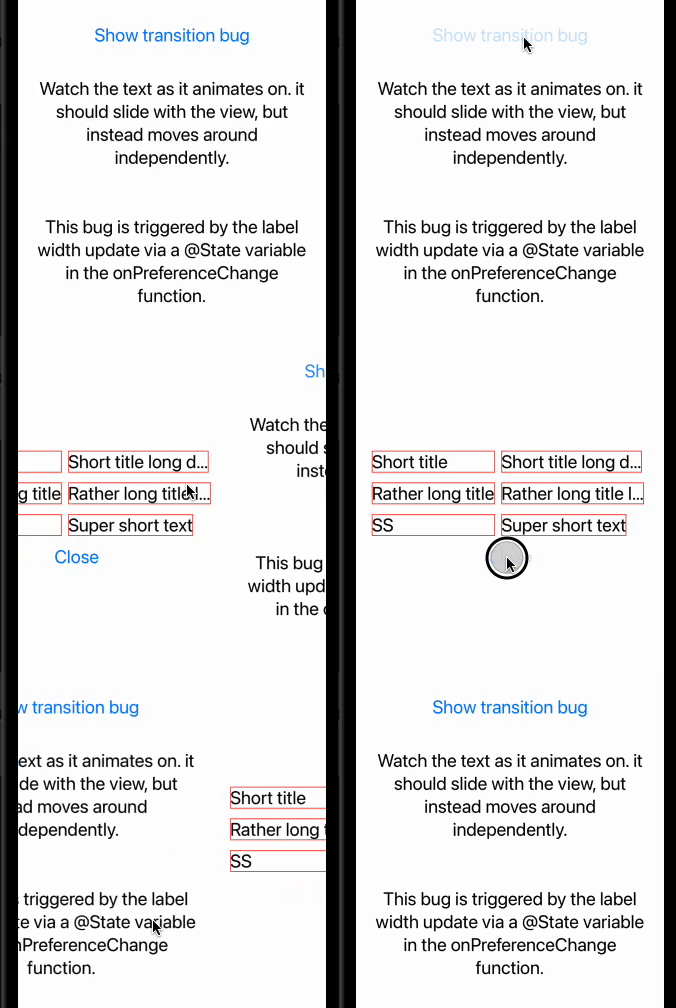
不是SwiftUI的错误。在下面找到一个修复程序(用Xcode 13.3 / iOS 15.4进行测试)
    VStack(spacing: 30) {
        row(title: "Short title", desc: "Short title long description")
        row(title: "Rather long title", desc: "Rather long title long description")
        row(title: "SS", desc: "Super short text")
        Button("Close") { displaySettings.wrappedValue.toggle() }
    }
    .animation(nil, value: labelWidth)                     // << here !!
    .onPreferenceChange(LabelWidthPreferenceKey.self) {
页面原文内容由Stack Overflow提供。腾讯云小微IT领域专用引擎提供翻译支持
原文链接:
https://stackoverflow.com/questions/72256321
复制相关文章
相似问题
腾讯云开发者

Copyright © 2013 - 2026 Tencent Cloud. All Rights Reserved. 腾讯云 版权所有
深圳市腾讯计算机系统有限公司 ICP备案/许可证号:粤B2-20090059  粤公网安备44030502008569号
腾讯云计算(北京)有限责任公司 京ICP证150476号 | 京ICP备11018762号