
我怎样才能在卷轴机车上把这幅画粘起来?
我怎样才能在卷轴机车上把这幅画粘起来?
提问于 2022-05-14 11:17:25
当我滚动的时候,我想把我的照片粘起来,我用的是机车卷轴和VueJS.
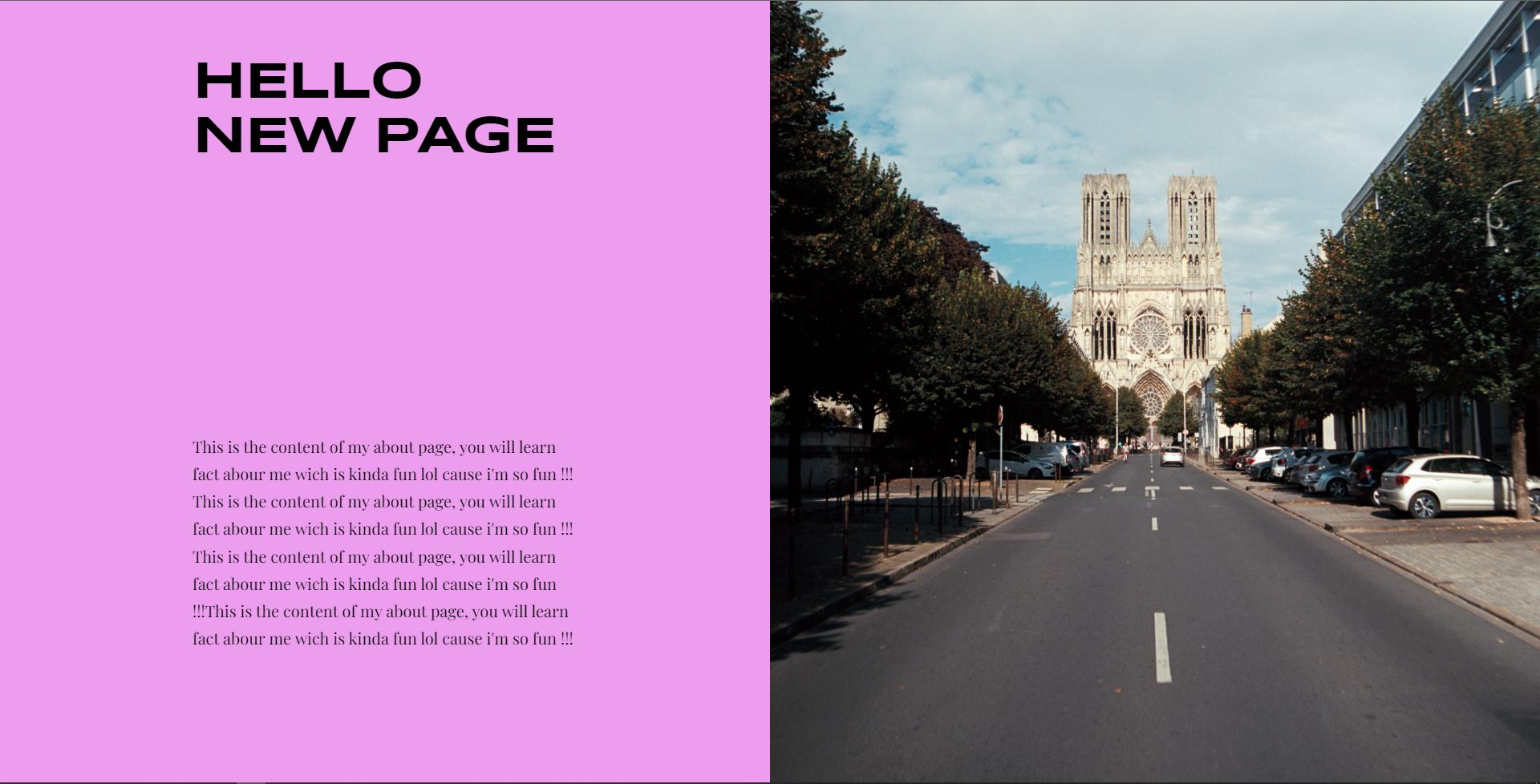
所以我想要左边的内容移动,而不是右边的图像。
在此之前我有内容,所以当图片的顶部在页面顶部时,我希望它是粘性的。如果有可能在内容从页面中完全消失时将其取消。
这是我的代码,HTML:
<div id="aboutMe" data-scroll-section>
  <h2 class="paragraph-header top-left" data-scroll data-scroll-speed="6">
    Hello new page
  </h2>
  <p class="content top-left" data-scroll data-scroll-speed="3">
    This is the content of my about page, you will learn fact about me which
    is kind of fun lol cause I'm so fun !!! This is the content of my about
    page, you will learn fact about me which is kind of fun lol cause I'm so
    fun !!! This is the content of my about page, you will learn fact about
    me which is kind of fun lol cause I'm so fun !!!This is the content of my
    about page, you will learn fact about me which is kind of fun lol cause I'm
    so fun !!!
  </p>
  <img
    src="../assets/pictures/cathedrale.jpg"
    alt="picture of Notre Dame de Reims"
    class="picture top-right"
    data-scroll
  />
</div>
CSS:
#aboutMe {
  overflow: hidden;
  display: grid;
  grid-template-columns: repeat(8, 12.5vw);
  grid-template-rows: repeat(12, 25vh);

  margin: 0;
  padding: 0;

  background: #ec9ded;
  color: #000;
}
.paragraph-header {
  font-family: syncopate-bold;
  text-transform: uppercase;
  align-self: flex-end;

  font-size: 65px;
  letter-spacing: -2px;
  margin: 0;
  padding: 0;

  transform: scaleY(2);
}
.content {
  font-family: playfair;

  font-size: 15pt;
  line-height: 3.5vh;
  margin: 0;

  color: #000;
}
.picture {
  width: 50vw;
  height: 150vh;
}
.picture.top-right {
  grid-column: 5 / span 4;
  grid-row: 1 / span 6;
}
.paragraph-header.top-left {
  grid-column: 2 / span 2;
  grid-row: 2;
  justify-self: start;
}
.content.top-left {
  grid-column: 2 / span 2;
  grid-row: 3 / span 2;
  justify-self: end;
  align-self: flex-end;
}
联署材料:
import locomotiveScroll from "locomotive-scroll";
export default {
  name: "locoScroll",
  data() {
    return {
      scrollIns: false,
    };
  },
  mounted() {
    this.$nextTick(() => {
      this.initScroll();
    });
  },
  methods: {
    initScroll() {
      const scroll = new locomotiveScroll({
        el: document.querySelector("[data-scroll-container]"),
        smooth: true,
        smoothMobile: true,
        getDirection: true,
        getSpeed: true,
      });
      setTimeout(() => {
        let target = document.getElementById("aboutMe");
        scroll.scrollTo(target);
      }, 5000);
    },
  },
};
我已经尝试了文档,但它不工作,图像仍在滚动与页面,所以我需要您的帮助,请。这个问题可能来自于我使用网格显示的事实,但我不确定。
function data() {
    return {
      scrollIns: false,
    };
  }
  function mounted() {
    this.$nextTick(() => {
      this.initScroll();
    });
  }
    function initScroll() {
      const scroll = new LocomotiveScroll({
        el: document.querySelector("[data-scroll-container]"),
        smooth: true,
        smoothMobile: true,
        getDirection: true,
        getSpeed: true,
      });
      setTimeout(() => {
        let target = document.getElementById("aboutMe");
        scroll.scrollTo(target);
      }, 5000);
}#aboutMe {
/* display: grid;
grid-template-columns: repeat(8, 12.5vw);
grid-template-rows: repeat(12, 25vh); */
margin: 0;
padding: 0;
background: #ec9ded;
color: #000;
}
#container {
height: 200vh;
width: 100%;
}
#about-cols {
display: flex;
flex-flow: row nowrap;
margin: 10% 0;
height: 100%;
}
#left {
height: 100%;
width: 50%;
}
#right {
height: 150vh;
width: 50%;
}
.picture {
height: 100%;
width: 100%;
}<html>
<head>
<script src="https://cdnjs.cloudflare.com/ajax/libs/vue/2.5.17/vue.js"></script>
<script src="https://cdn.jsdelivr.net/npm/locomotive-scroll@4.1.4/dist/locomotive-scroll.min.js"></script>
</head>
<body>
<div data-scroll-container>
<div id="aboutMe" data-scroll-section>
<div id="container">
<div id="about-cols" data-scroll>
<div id="left">
<h2
class="paragraph-header top-left"
data-scroll
data-scroll-speed="6"
>
Hello new page
</h2>
<p class="content top-left" data-scroll data-scroll-speed="3">
This is the content of my about page, you will learn fact about me
which is kind of fun lol cause I'm so fun !!! This is the content of
my about page, you will learn fact about me which is kind of fun lol
cause I'm so fun !!! This is the content of my about page, you
will learn fact about me which is kind of fun lol cause I'm so fun
!!!This is the content of my about page, you will learn fact about
me which is kind of fun lol cause I'm so fun !!!
</p>
</div>
<div id="right" data-scroll >
<div
data-scroll
data-scroll-sticky
data-scroll-target="#about-cols"
>
<img
src="../assets/pictures/cathedrale.jpg"
alt="picture of Notre Dame de Reims"
class="picture top-right"
data-scroll
/>
</div>
</div>
</div>
</div>
</div>
</div>
</body>
</html>
编辑:我更改了代码片段,我试图复制一个使用我想要的东西的网站,我试着跟踪文档,但这仍然不起作用。
回答 2
Stack Overflow用户
回答已采纳
发布于 2022-05-14 12:19:55
您可以使用以下规则:
position: fixed;right: 0;
function data() {
    return {
      scrollIns: false,
    };
  }
  function mounted() {
    this.$nextTick(() => {
      this.initScroll();
    });
  }
    function initScroll() {
      const scroll = new LocomotiveScroll({
        el: document.querySelector("[data-scroll-container]"),
        smooth: true,
        smoothMobile: true,
        getDirection: true,
        getSpeed: true,
      });
      setTimeout(() => {
        let target = document.getElementById("aboutMe");
        scroll.scrollTo(target);
      }, 5000);
}html,
body {
overflow-x: hidden;
margin: 0;
padding: 0;
}
#aboutMe {
overflow: hidden;
display: grid;
grid-template-columns: repeat(8, 12.5vw);
grid-template-rows: repeat(12, 25vh);
margin: 0;
padding: 0;
background: #ec9ded;
color: #000;
}
.paragraph-header {
font-family: syncopate-bold;
text-transform: uppercase;
align-self: flex-end;
font-size: 65px;
letter-spacing: -2px;
margin: 0;
padding: 0;
transform: scaleY(2);
}
.content {
font-family: playfair;
font-size: 15pt;
line-height: 3.5vh;
margin: 0;
color: #000;
}
.picture {
width: 50vw;
height: 150vh;
}
.picture.top-right {
grid-column: 5 / span 4;
grid-row: 1 / span 6;
}
.paragraph-header.top-left {
grid-column: 2 / span 2;
grid-row: 2;
justify-self: start;
}
.content.top-left {
grid-column: 2 / span 2;
grid-row: 3 / span 2;
justify-self: end;
align-self: flex-end;
}<html>
<head>
<script src="https://cdnjs.cloudflare.com/ajax/libs/vue/2.5.17/vue.js"></script>
<script src="https://cdn.jsdelivr.net/npm/locomotive-scroll@4.1.4/dist/locomotive-scroll.min.js"></script>
</head>
<body>
<div data-scroll-container>
<div id="aboutMe" data-scroll-section>
<h2 class="paragraph-header top-left" data-scroll data-scroll-speed="6">
Hello new page
</h2>
<p class="content top-left" data-scroll data-scroll-speed="3">
This is the content of my about page, you will learn fact abour me wich
is kinda fun lol cause i'm so fun !!! This is the content of my about
page, you will learn fact abour me wich is kinda fun lol cause i'm so
fun !!! This is the content of my about page, you will learn fact abour
me wich is kinda fun lol cause i'm so fun !!!This is the content of my
about page, you will learn fact abour me wich is kinda fun lol cause i'm
so fun !!!
</p>
<img
src="../assets/pictures/cathedrale.jpg"
alt="picture of Notre Dame de Reims"
class="picture top-right"
data-scroll
style="position: fixed; right: 0;"
/>
</div>
</div>
</body>
</html>
Stack Overflow用户
发布于 2022-05-14 12:03:01
请阅读这篇文章,希望能得到 Locomotive-scroll how to make element fixed on scroll的答案
页面原文内容由Stack Overflow提供。腾讯云小微IT领域专用引擎提供翻译支持
原文链接:
https://stackoverflow.com/questions/72239681
复制相关文章
相似问题
腾讯云开发者

Copyright © 2013 - 2026 Tencent Cloud. All Rights Reserved. 腾讯云 版权所有
深圳市腾讯计算机系统有限公司 ICP备案/许可证号:粤B2-20090059  粤公网安备44030502008569号
腾讯云计算(北京)有限责任公司 京ICP证150476号 | 京ICP备11018762号