
使用`plot_gg()` from‘`rayshader` ` package -R的问题
我正在尝试复制用rayshader包生成的示例:gg.html
我特别关注直方图。以下是我报告的代码:
library(ggplot2)
library(viridis)
library(rayshader)
library(tidyverse)


mtplot <- ggplot(mtcars) +
 geom_point(aes(x=mpg,y=disp,color=cyl)) +
 scale_color_continuous(limits=c(0,8))
mtplot

plot1 <- plot_gg(mtplot, width=3.5, sunangle=225, preview = TRUE)


plot2 <- plot_gg(mtplot, width=3.5, multicore = TRUE, windowsize = c(1400,866), sunangle=225,
       zoom = 0.60, phi = 30, theta = 45)
render_snapshot(clear = TRUE)
我的第一个问题是,当我试图使plot1和plot2得到以下错误时:
山坡上的错误,1*刻度::rescale(阴影图,c(max_darken,1)): 阵列不兼容
我想了解为什么和是否有可能纠正这一错误。
我的第二个问题是,在工作的情况下,如何导出plot1和plot2生成的图像?我尝试过使用ggsave()的其他示例,但它不起作用。还有别的办法吗?
提前感谢各位的支持。
回答 2
Stack Overflow用户
发布于 2022-05-13 11:43:25
只需使用master分支在GitHub上的最新版本再试一次。这个问题似乎已经注意到并解决了一段时间(参见#176),但是CRAN上还没有进行必要的更改。
## if package is missing, run `install.packages("remotes")` first
remotes::install_github(
  "tylermorganwall/rayshader"
)

library(rayshader)
library(ggplot2)为了保存这两幅图,您可以为preview = TRUE使用内置的PNG图形设备(您可能希望从tempfile()更改为更永久的):
ofl1 = tempfile(fileext = ".png")

png(ofl1, width = 12, height = 8, units = "cm", res = 300)

plot1 = plot_gg(
  mtplot
  , width = 3.5
  , sunangle = 225
  , preview = TRUE
)

dev.off()至于preview = FALSE (默认),请使用如下render_snapshot():
plot2 = plot_gg(
  mtplot
  , width = 3.5
  , multicore = TRUE
  , windowsize = c(1400, 866)
  , sunangle = 225
  , zoom = 0.60
  , phi = 30
  , theta = 45
)

ofl2 = tempfile(fileext = ".png")

render_snapshot(
  filename = ofl2
  , clear = TRUE
)Stack Overflow用户
发布于 2022-05-13 11:37:56
也许这个能帮上忙。首先,要使“绘图”工作,如果要修改height参数,似乎还需要修改width参数。
library(ggplot2)
library(rayshader)
library(rgl)

mtplot <- ggplot(mtcars) +
  geom_point(aes(x=mpg,y=disp,color=cyl)) +
  scale_color_continuous(limits=c(0,8))
mtplot

    plot_gg( mtplot
             , width = 3.5
             , height = 3.5
             , sunangle = 225
             )

     plot_gg(mtplot
            , width=3.5
            , height = 3.5
            , multicore = TRUE
            , windowsize = c(1400,866)
            , sunangle=225
            , zoom = 0.60
            , phi = 30
            , theta = 45
            )
在这里,第一个:
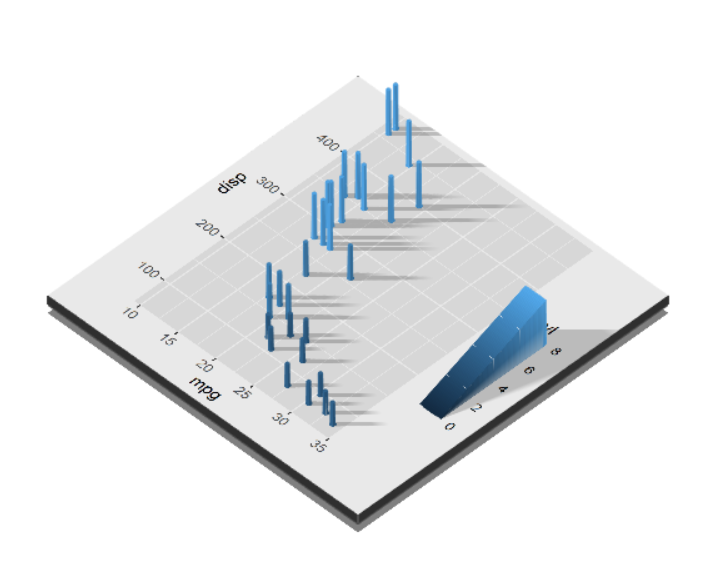
如果要将它们保存为.png,则使用正确的函数,但必须打开rgl窗口,即首先启动绘图,然后保存它。就像这样:
plot_gg( mtplot
        , width = 3.5
        , height = 3.5
        , sunangle = 225
         )

render_snapshot("path\\to\\your\\folder\\plot1.png",clear = TRUE)
# close rgl window
rgl.close()https://stackoverflow.com/questions/72228610
复制相似问题
腾讯云开发者

Copyright © 2013 - 2026 Tencent Cloud. All Rights Reserved. 腾讯云 版权所有
深圳市腾讯计算机系统有限公司 ICP备案/许可证号:粤B2-20090059  粤公网安备44030502008569号
腾讯云计算(北京)有限责任公司 京ICP证150476号 | 京ICP备11018762号