
cornerRadius on message SwiftUI
cornerRadius on message SwiftUI
提问于 2022-05-13 04:52:27
我有个问题,我的信息在另一边没有拐角。这就是它的样子:
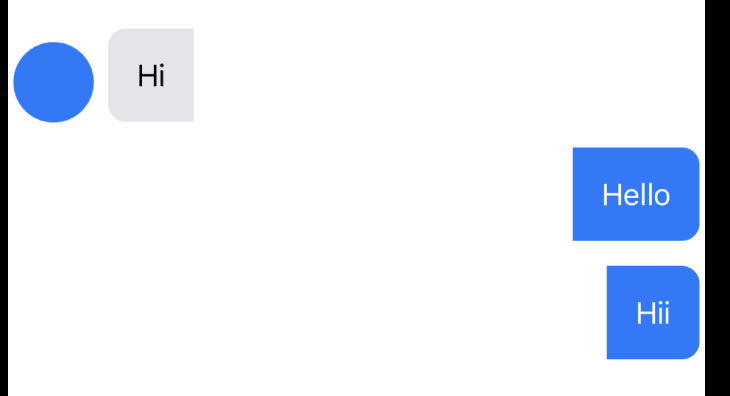
它的密码是:
HStack {
    HStack {
        Text(text)
            .fixedSize(horizontal: false, vertical: true)
            .foregroundColor(isSender ? Color.white : Color(.label))
            .padding()
        }
    .background(isSender ? Color.blue : Color(.systemGray5))
    .padding(isSender ? .leading : .trailing,
             isSender ? UIScreen.main.bounds.width*0.28 : UIScreen.main.bounds.width*0.2)
}
.cornerRadius(10)
我怎么才能把它的另一边也弄圆呢?
回答 2
Stack Overflow用户
回答已采纳
发布于 2022-05-13 06:06:36
实际上,您所做的是在背景之后应用填充,这样您的填充将应用于您的背景视图,而现在您的背景视图不再位于角落,这就是为什么在特定的一侧没有圆角的原因,您可以在背景之前放置填充以实现您想要的目标:
HStack {
        HStack {
            Text(text)
                .fixedSize(horizontal: false, vertical: true)
                .foregroundColor(isSender ? Color.white : Color(.label))
                .padding()
            }
        .padding(isSender ? .leading : .trailing,
                 isSender ? UIScreen.main.bounds.width*0.28 : UIScreen.main.bounds.width*0.2) //HERE
        .background(isSender ? Color.blue : Color(.systemGray5))
    }
    .cornerRadius(10)
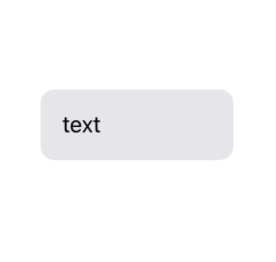
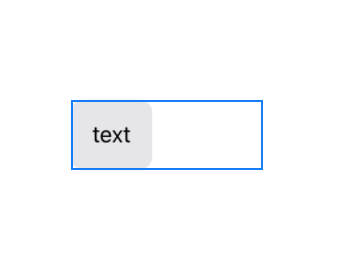
此外,您还可以为现有代码实现圆角,但只需将cornerRadius从HStack转移到背景视图,如下所示:
HStack {
        HStack {
            Text("text")
                .fixedSize(horizontal: false, vertical: true)
                .foregroundColor(isSender ? Color.white : Color(.label))
                .padding()
            }
        .background(isSender ? Color.blue : Color(.systemGray5))
        .cornerRadius(10) //HERE
        .padding(isSender ? .leading : .trailing,
                 isSender ? UIScreen.main.bounds.width*0.28 : UIScreen.main.bounds.width*0.2)
    }
Stack Overflow用户
发布于 2022-05-13 06:00:56
修饰符的排序很重要。
您首先要应用填充,然后是cornerRadius。这给(看不见的)填充一个圆角。如果您以相反的方式执行--首先是cornerRadius,然后是填充--它可以工作:
            HStack {
                Text(text)
                    .fixedSize(horizontal: false, vertical: true)
                    .foregroundColor(isSender ? Color.white : Color(.label))
                    .padding()
            }
            .background(isSender ? Color.blue : Color(.systemGray5))
            .cornerRadius(10) // << first radius, then padding
            .padding(isSender ? .leading : .trailing,
isSender ? UIScreen.main.bounds.width*0.28 : UIScreen.main.bounds.width*0.2)页面原文内容由Stack Overflow提供。腾讯云小微IT领域专用引擎提供翻译支持
原文链接:
https://stackoverflow.com/questions/72224610
复制相关文章
相似问题
腾讯云开发者

Copyright © 2013 - 2026 Tencent Cloud. All Rights Reserved. 腾讯云 版权所有
深圳市腾讯计算机系统有限公司 ICP备案/许可证号:粤B2-20090059  粤公网安备44030502008569号
腾讯云计算(北京)有限责任公司 京ICP证150476号 | 京ICP备11018762号