
将System.Drawing替换为ImageSharp用于条形码.net核心6
将System.Drawing替换为ImageSharp用于条形码.net核心6
提问于 2022-05-12 01:49:35
当我们升级到net 6时,我们正在重写一些代码库。我们在AspNet核心中有一个标签助手,它生成一个条形码。目前使用的是System.Drawing和ZXing。
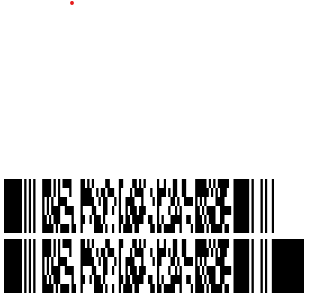
TagHelper使用System.Drawing的旧版本-工作(顶部条形码)
public override void Process(TagHelperContext context, TagHelperOutput output)
{
    var margin = 0;
    var qrCodeWriter = new ZXing.BarcodeWriterPixelData
    {
        Format = ZXing.BarcodeFormat.PDF_417,
        Options = new ZXing.Common.EncodingOptions
        {
            Height = this.Height > 80 ? this.Height : 80,
            Width = this.Width > 400 ? this.Width : 400,
            Margin = margin
        }
    };
    var pixelData = qrCodeWriter.Write(QRCodeContent);
    // creating a bitmap from the raw pixel data; if only black and white colors are used it makes no difference
    // that the pixel data ist BGRA oriented and the bitmap is initialized with RGB
    using (var bitmap = new Bitmap(pixelData.Width, pixelData.Height, System.Drawing.Imaging.PixelFormat.Format32bppRgb))
    using (var ms = new MemoryStream())
    {
        var bitmapData = bitmap.LockBits(new Rectangle(0, 0, pixelData.Width, pixelData.Height),
        System.Drawing.Imaging.ImageLockMode.WriteOnly, System.Drawing.Imaging.PixelFormat.Format32bppRgb);
        try
        {
            // we assume that the row stride of the bitmap is aligned to 4 byte multiplied by the width of the image
            System.Runtime.InteropServices.Marshal.Copy(pixelData.Pixels, 0, bitmapData.Scan0,
            pixelData.Pixels.Length);
        }
        finally
        {
            bitmap.UnlockBits(bitmapData);
        }
        // save to stream as PNG
        bitmap.Save(ms, System.Drawing.Imaging.ImageFormat.Png);
        output.TagName = "img";
        output.Attributes.Clear();
        output.Attributes.Add("width", Width);
        output.Attributes.Add("height", Height);
        output.Attributes.Add("alt", Alt);
        output.Attributes.Add("src",
        $"data:image/png;base64,{Convert.ToBase64String(ms.ToArray())}");
    }
}
TagHelper新版本使用ImageSharp -几乎工作,但不完全(底部条形码)
public override void Process(TagHelperContext context, TagHelperOutput output)
{
    var margin = 0;
    var barcodeWriter = new ZXing.ImageSharp.BarcodeWriter<SixLabors.ImageSharp.PixelFormats.La32>
    {
        Format = ZXing.BarcodeFormat.PDF_417,
        Options = new ZXing.Common.EncodingOptions
        {
            Height = this.Height > 80 ? this.Height : 80,
            Width = this.Width > 400 ? this.Width : 400,
            Margin = margin
        }
    };

    var image = barcodeWriter.Write(QRCodeContent);
    output.TagName = "img";
    output.Attributes.Clear();
    output.Attributes.Add("width", Width);
    output.Attributes.Add("height", Height);
    output.Attributes.Add("alt", Alt);
    output.Attributes.Add("src", $"{image.ToBase64String(PngFormat.Instance)}");
}
问题是,如前所述,第二个条形码略有不同,最后似乎延伸了最后一个条形码。
我遗漏了什么?
回答 1
Stack Overflow用户
发布于 2022-05-18 07:54:37
这是ZXing.Net绑定到ImageSharp的呈现器实现中的一个错误。https://github.com/micjahn/ZXing.Net/issues/422,它是固定在最新的nuget包的绑定。https://www.nuget.org/packages/ZXing.Net.Bindings.ImageSharp/ https://www.nuget.org/packages/ZXing.Net.Bindings.ImageSharp.V2/
页面原文内容由Stack Overflow提供。腾讯云小微IT领域专用引擎提供翻译支持
原文链接:
https://stackoverflow.com/questions/72209275
复制相关文章
相似问题
腾讯云开发者

Copyright © 2013 - 2026 Tencent Cloud. All Rights Reserved. 腾讯云 版权所有
深圳市腾讯计算机系统有限公司 ICP备案/许可证号:粤B2-20090059  粤公网安备44030502008569号
腾讯云计算(北京)有限责任公司 京ICP证150476号 | 京ICP备11018762号