
当对象交换位置时,RaycastHit不返回命中
当对象交换位置时,RaycastHit不返回命中
提问于 2022-05-11 19:52:37
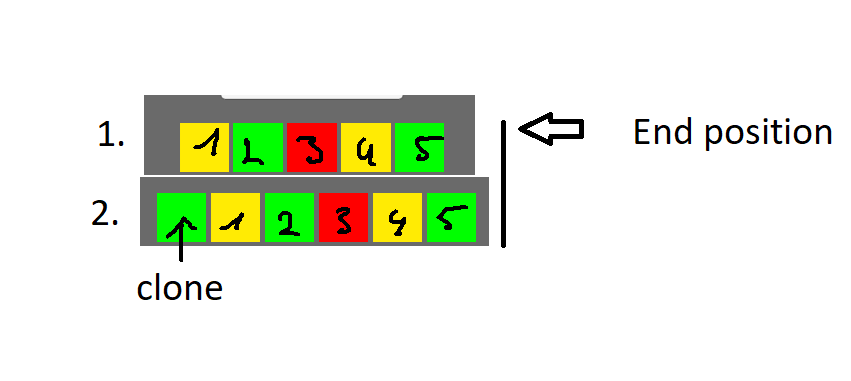
我正在移动一排盒子,想要创造一个无限的效果。每个最后一个框都将在开始时与克隆块交换其位置(请参见图像)。
为了调试目的,我对每个盒子使用了一个盒播作为射线广播。它不像盒子那样移动,而是像第一行(1)那样移动。在照片里。
在我用克隆盒改变第5盒的位置并关闭克隆盒之前,盒播工作很好。我的第一盒投击中6-10帧的对撞机后,位置已被交换,即使方框5 transform.position正好在盒播位置。
我试过在包装箱之前更新物理变换。尝试不同的雷管(重叠盒,雷,.)。
    private void MoveRowOfBlocks(float m)
    {
//debug variable set true when setting box position to clone position
        bool exceed = false;
        for (int i = 0; i < movingBlockRow.Length; i++)
        {
            GameBlock go = movingBlockRow[i].GetComponent<GameBlock>();
            // Block exceeds valid area -> Swap with clone block
            while (movingDir == Vector2.right && go.transformPositionCache.x + m > GameField.xFieldExtent_M - GameField.blockWidth / 2
               || movingDir == Vector2.left && go.transformPositionCache.x + m < -GameField.xFieldExtent_M + GameField.blockWidth / 2
               || movingDir == Vector2.up && go.transformPositionCache.y + m > GameField.yFieldExtent_M - GameField.blockWidth / 2
               || movingDir == Vector2.down && go.transformPositionCache.y + m < -GameField.yFieldExtent_M + GameField.blockWidth / 2)
            {
                exceed = true;
                go.transformPositionCache -= GameField.totalWidth * movingDir;
                //go.transform.position = go.transformPositionCache + (m * new Vector2(Mathf.Abs(movingDir.x), Mathf.Abs(movingDir.y)));
                blockExceedCount += movingSign;
                Debug.Log(go.name + " Exceeds field. Position from beginning. " + "New Position: " + go.transformPositionCache
+ " movingDir: " + movingDir + " Frame: " + debugFrameCount);
                if (blockClone != null || clonedBlock != null)
                {
                    blockClone.SetActive(false);
                    blockClone = null;
                    clonedBlock = null;
                }
                cachedExceededBlock = go;
                debugCount++;
            }
            debugCount = 0;
            go.transform.position = go.transformPositionCache + (m * new Vector2(Mathf.Abs(movingDir.x),Mathf.Abs(movingDir.y)));
            if (exceed) Debug.LogError(go.transform.position);
        }


        // Move Cloned Object
        if (blockClone != null)
        {
            Vector2 dest = (Vector2)clonedBlock.transform.position + (GameField.totalWidth * cloneMovingDir) * -1;
            blockClone.transform.position = dest;
        }
        if (exceed)
        {
            Physics.SyncTransforms();
            Debug.LogError(movingBlockRow[4].transform.position);
        }
// Using Boxcasts foreach init box position for debugging
        foreach (Vector3 v in gameField.gridPointsWorldPosition) // gridpointsworldposition is initial box position (1.)
        {
            RaycastHit2D rayHit = Physics2D.BoxCast(v, new Vector2(GameField.blockWidth/2, GameField.blockWidth/2), 0, Vector2.zero);
            if (rayHit.collider == null)
            {
                Debug.LogError("NO BOX FOUND IN CELL " + v + " Box position: " + movingBlockRow[4].GetComponent<BoxCollider2D>().transform.position
                     + " Frame: " + debugFrameCount); // Rayhit.collider is null even though box position = v
            }
        }
        debugFrameCount++;
}回答 2
Stack Overflow用户
回答已采纳
发布于 2022-05-12 15:33:02
在每个盒子里增加一个刚体解决了我的问题。
编辑:嗯,只有当我没有像上面所示的那样放置Boxcast检查时,它才能起作用。当我把它放在下一个框架调用的movingblocks方法之前的Update中时,它就可以工作了。
因此,通过使用刚体,它仍然没有击中确切的框架,但在下一个!因此,我通过调用Coroutine并等待一个帧来解决我的问题。
Stack Overflow用户
发布于 2022-05-12 16:09:36
如果您希望对象的行为就像它没有刚体一样,请将刚体设置为静态。
页面原文内容由Stack Overflow提供。腾讯云小微IT领域专用引擎提供翻译支持
原文链接:
https://stackoverflow.com/questions/72206903
复制相关文章
相似问题
腾讯云开发者

Copyright © 2013 - 2026 Tencent Cloud. All Rights Reserved. 腾讯云 版权所有
深圳市腾讯计算机系统有限公司 ICP备案/许可证号:粤B2-20090059  粤公网安备44030502008569号
腾讯云计算(北京)有限责任公司 京ICP证150476号 | 京ICP备11018762号