
柏树黄瓜文件夹结构的变化
柏树黄瓜文件夹结构的变化
提问于 2022-05-10 05:34:14
我使用柏树和黄瓜编写了一些测试用例,如果文件夹结构如下所示,测试用例将成功运行:
/integration
    /login
        login.js
    /registration
        registration.js
    login.feature
    registration.feature
但是,我希望将所有功能文件保存在一个文件夹中,而js文件保存在另一个文件夹中,如下所示:
/integration
    /featureFiles
        login.feature
        registration.feature
    /testFiles
        login.js
        registration.js
如果我使文件夹结构像这样,我得到错误。没有测试用例运行。能把这个结构做成这样吗?有人能告诉我怎么做吗?
这是我的package.json文件:
{
  "devDependencies": {
    "cypress": "^9.5.4",
    "multiple-cucumber-html-reporter": "^1.20.0"
  },
  "dependencies": {
    "cypress-cucumber-preprocessor": "^4.3.1"
  },
  "cypress-cucumber-preprocessor": {
    "nonGlobalStepDefinitions": true,
    "cucumberJson": {
      "generate": true,
      "outputFolder": "cypress/cucumber-json",
      "filePrefix": "",
      "fileSuffix": ".cucumber"
    }
  }
}
和cypress.json文件:
{
    "testFiles": "**/*.feature"
}回答 2
Stack Overflow用户
发布于 2022-09-15 11:36:52
可以使用以下文件夹结构创建通用文件,此处包含的步骤可在所有功能文件中访问
cypress\integration\公共\公共步骤
Stack Overflow用户
发布于 2022-11-15 13:13:21
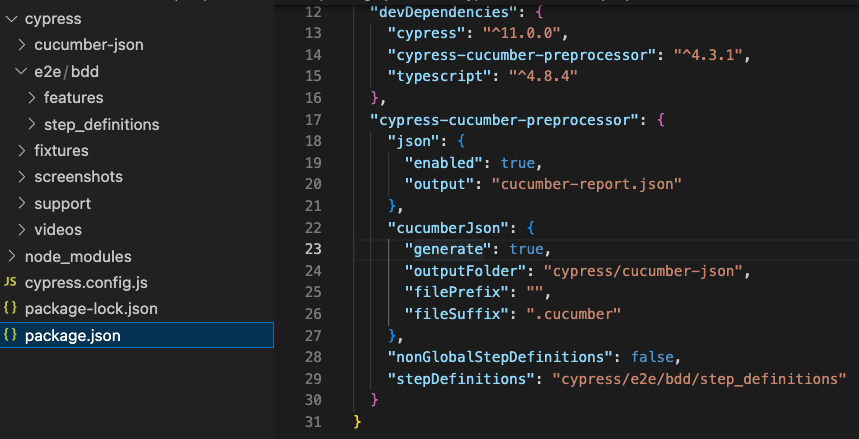
尝试将这些行添加到package.json中的柏树-黄瓜-预处理部分。
"nonGlobalStepDefinitions": false, "stepDefinitions":"cypress/integration/featureFiles"
页面原文内容由Stack Overflow提供。腾讯云小微IT领域专用引擎提供翻译支持
原文链接:
https://stackoverflow.com/questions/72181183
复制相关文章
相似问题
腾讯云开发者

Copyright © 2013 - 2026 Tencent Cloud. All Rights Reserved. 腾讯云 版权所有
深圳市腾讯计算机系统有限公司 ICP备案/许可证号:粤B2-20090059  粤公网安备44030502008569号
腾讯云计算(北京)有限责任公司 京ICP证150476号 | 京ICP备11018762号