
我不能添加一个类名在反应与useEffect或?
我不能添加一个类名在反应与useEffect或?
提问于 2022-05-05 19:45:20
我有一个数独解决方案在反应。我想用react或css来修饰它。我两种方法都试过了,最后陷入了困惑。网格组件是我的主要组件,我希望板的样式如下:
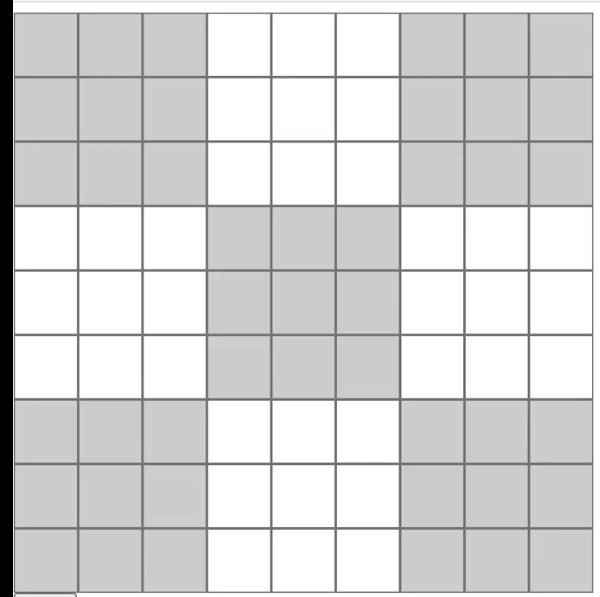
下面是我的简单CSS代码
    .odd {
      background-color: gray;
    }
还有我的Grid.jsx
    import React, { useEffect } from 'react'
    import '../App.css';


    export default function Grid() {
        // for every input make sure only one number per an input field can be entered
        const checkInput = (e) => {
            if (e.target.value.length > 1) {
                e.target.value = e.target.value.slice(0, 1)
            }
        }

        // Driver function for the grid
        const grid = document.querySelectorAll('.grid input')

        useEffect(() => {
            grid.forEach(item => {
                item.addEventListener('input', checkInput)
            })

            return () => {
                grid.forEach(item => {
                    item.removeEventListener('input', checkInput)
                })
            }
        }, [grid])

        // styling for grid element


        useEffect(() => {
            const colorChanger = () => {
                grid.forEach((item, i) => {
                    if (
                        ((i % 9 === 0 || i % 9 === 1 || i % 9 === 2) && i < 21) ||
                        ((i % 9 === 6 || i % 9 === 7 || i % 9 === 8) && i < 27) ||
                        ((i % 9 === 3 || i % 9 === 4 || i % 9 === 5) && (i > 27 && i < 53)) ||
                        ((i % 9 === 0 || i % 9 === 1 || i % 9 === 2) && i > 53) ||
                        ((i % 9 === 6 || i % 9 === 7 || i % 9 === 8) && i > 53)
                    ) {
                        item.classList.add('odd')
                    }
                })
            }
            colorChanger()
        }, [grid])

        return (
            <div className='grid'>
                <input type="number" min='1' max='9' />
                <input type="number" min='1' max='9' />
                <input type="number" min='1' max='9' />
                <input type="number" min='1' max='9' />
                <input type="number" min='1' max='9' />
                <input type="number" min='1' max='9' />
                <input type="number" min='1' max='9' />
                <input type="number" min='1' max='9' />
                <input type="number" min='1' max='9' />
                <input type="number" min='1' max='9' />
                <input type="number" min='1' max='9' />
                <input type="number" min='1' max='9' />
                <input type="number" min='1' max='9' />
                <input type="number" min='1' max='9' />
                <input type="number" min='1' max='9' />
                <input type="number" min='1' max='9' />
                <input type="number" min='1' max='9' />
                <input type="number" min='1' max='9' />
                <input type="number" min='1' max='9' />
                <input type="number" min='1' max='9' />
                <input type="number" min='1' max='9' />
                <input type="number" min='1' max='9' />
                <input type="number" min='1' max='9' />
                <input type="number" min='1' max='9' />
                <input type="number" min='1' max='9' />
                <input type="number" min='1' max='9' />
                <input type="number" min='1' max='9' />
                <input type="number" min='1' max='9' />
                <input type="number" min='1' max='9' />
                <input type="number" min='1' max='9' />
                <input type="number" min='1' max='9' />
                <input type="number" min='1' max='9' />
                <input type="number" min='1' max='9' />
                <input type="number" min='1' max='9' />
                <input type="number" min='1' max='9' />
                <input type="number" min='1' max='9' />
                <input type="number" min='1' max='9' />
                <input type="number" min='1' max='9' />
                <input type="number" min='1' max='9' />
                <input type="number" min='1' max='9' />
                <input type="number" min='1' max='9' />
                <input type="number" min='1' max='9' />
                <input type="number" min='1' max='9' />
                <input type="number" min='1' max='9' />
                <input type="number" min='1' max='9' />
                <input type="number" min='1' max='9' />
                <input type="number" min='1' max='9' />
                <input type="number" min='1' max='9' />
                <input type="number" min='1' max='9' />
                <input type="number" min='1' max='9' />
                <input type="number" min='1' max='9' />
                <input type="number" min='1' max='9' />
                <input type="number" min='1' max='9' />
                <input type="number" min='1' max='9' />
                <input type="number" min='1' max='9' />
                <input type="number" min='1' max='9' />
                <input type="number" min='1' max='9' />
                <input type="number" min='1' max='9' />
                <input type="number" min='1' max='9' />
                <input type="number" min='1' max='9' />
                <input type="number" min='1' max='9' />
                <input type="number" min='1' max='9' />
                <input type="number" min='1' max='9' />
                <input type="number" min='1' max='9' />
                <input type="number" min='1' max='9' />
                <input type="number" min='1' max='9' />
                <input type="number" min='1' max='9' />
                <input type="number" min='1' max='9' />
                <input type="number" min='1' max='9' />
                <input type="number" min='1' max='9' />
                <input type="number" min='1' max='9' />
                <input type="number" min='1' max='9' />
                <input type="number" min='1' max='9' />
                <input type="number" min='1' max='9' />
                <input type="number" min='1' max='9' />
                <input type="number" min='1' max='9' />
                <input type="number" min='1' max='9' />
                <input type="number" min='1' max='9' />
                <input type="number" min='1' max='9' />
                <input type="number" min='1' max='9' />
                <input type="number" min='1' max='9' />
            </div>
        )
    }


<!-- language: lang-html -->

    <script src="https://cdnjs.cloudflare.com/ajax/libs/react/16.6.3/umd/react.production.min.js"></script>
    <script src="https://cdnjs.cloudflare.com/ajax/libs/react-dom/16.6.3/umd/react-dom.production.min.js"></script>
那么,我如何才能在图片中实现同样的结果呢?
回答 3
Stack Overflow用户
回答已采纳
发布于 2022-05-05 20:30:46
我建议您使用更标准的React方法,即使用组合。基本上,在你的网格中,你有单元格,这是最小的组件,然后你有9个平方,这是9个单元的子单位。
这是一个完美的构图例子:
const useEffect = React.useEffect
const useState = React.useState

const cells = Array(9)
  .fill("")
  .map((el, i) => i);
const squares = [...cells]

const Cell = () => {
  const [val, setVal] = useState(1);

  const onChange = (e) => setVal(+e.target.value);

  return (
    <input
      className="cell"
      type="number"
      min="1"
      max="9"
      onChange={onChange}
      value={val}
    />
  );
};

const Square = ({ type }) => (
  <div className={`square ${type}`}>
    {cells.map((c) => (
      <Cell key={c} />
    ))}
  </div>
);

const Grid = () => (
  <div className="grid">
    {squares.map((el, i) => (
      <Square key={el} type={i % 2 !== 0 ? "light" : "dark"} />
    ))}
  </div>
);


ReactDOM.render(<Grid />, document.getElementById("root")).grid {
width: 396px;
height: 396px;
}
.cell {
width:40px;
height:40px;
padding:0;
background:none;
}
.square {
display:inline-block;
width: 132px;
height: 132px;
margin:0;
padding:0;
}
.dark {
background: gray;
}<div id="root"></div>
<script crossorigin src="https://unpkg.com/react@18/umd/react.development.js"></script>
<script crossorigin src="https://unpkg.com/react-dom@18/umd/react-dom.development.js"></script>
Stack Overflow用户
发布于 2022-05-05 20:02:33
我的第一个疑问是,如果它在原则上是非常静态的,你为什么要动态地这样做。
import React, { useEffect } from "react"
import "../App.css"

export default function Grid() {
  // for every input make sure only one number per an input field can be entered
  const checkInput = (e) => {
    if (e.target.value.length > 1) {
      e.target.value = e.target.value.slice(0, 1)
    }
  }

  // Driver function for the grid
  const grid = document.querySelectorAll(".grid input")

  useEffect(() => {
    grid.forEach((item) => {
      item.addEventListener("input", checkInput)
    })

    return () => {
      grid.forEach((item) => {
        item.removeEventListener("input", checkInput)
      })
    }
  }, [grid])

  // styling for grid element

  const sudoku = [
    [1, 1, 1, 0, 0, 0, 1, 1, 1],
    [1, 1, 1, 0, 0, 0, 1, 1, 1],
    [1, 1, 1, 0, 0, 0, 1, 1, 1],
    [0, 0, 0, 1, 1, 1, 0, 0, 0],
    [0, 0, 0, 1, 1, 1, 0, 0, 0],
    [0, 0, 0, 1, 1, 1, 0, 0, 0],
    [1, 1, 1, 0, 0, 0, 1, 1, 1],
    [1, 1, 1, 0, 0, 0, 1, 1, 1],
    [1, 1, 1, 0, 0, 0, 1, 1, 1],
  ]

  var inputs = []
  const iterate = [0, 1, 2, 3, 4, 5, 6, 7, 8]

  iterate.forEach((i) =>
    iterate.forEach((j) =>
      inputs.append(
        <input
          type="number"
          className={sudoku[i][j] === 1 ? "odd" : ""}
          min="1"
          max="9"
        />
      )
    )
  )

  return <div className="grid">{inputs}</div>
}Stack Overflow用户
发布于 2022-05-05 20:19:19
现在是这样的
  const inputs = [];

  [0, 1, 2, 3, 4, 5, 6, 7, 8].forEach((i) => {
    [0, 1, 2, 3, 4, 5, 6, 7, 8].forEach((j) => {
      inputs.push(
        <input
          key={`${i}${j}`}
          type="number"
          className={sudoku[i][j] === 1 ? "odd" : ""}
          min="1"
          max="9"
        />
      )
    })
  })
return <div className="grid">{inputs}</div><script src="https://cdnjs.cloudflare.com/ajax/libs/react/16.6.3/umd/react.production.min.js"></script>
<script src="https://cdnjs.cloudflare.com/ajax/libs/react-dom/16.6.3/umd/react-dom.production.min.js"></script>
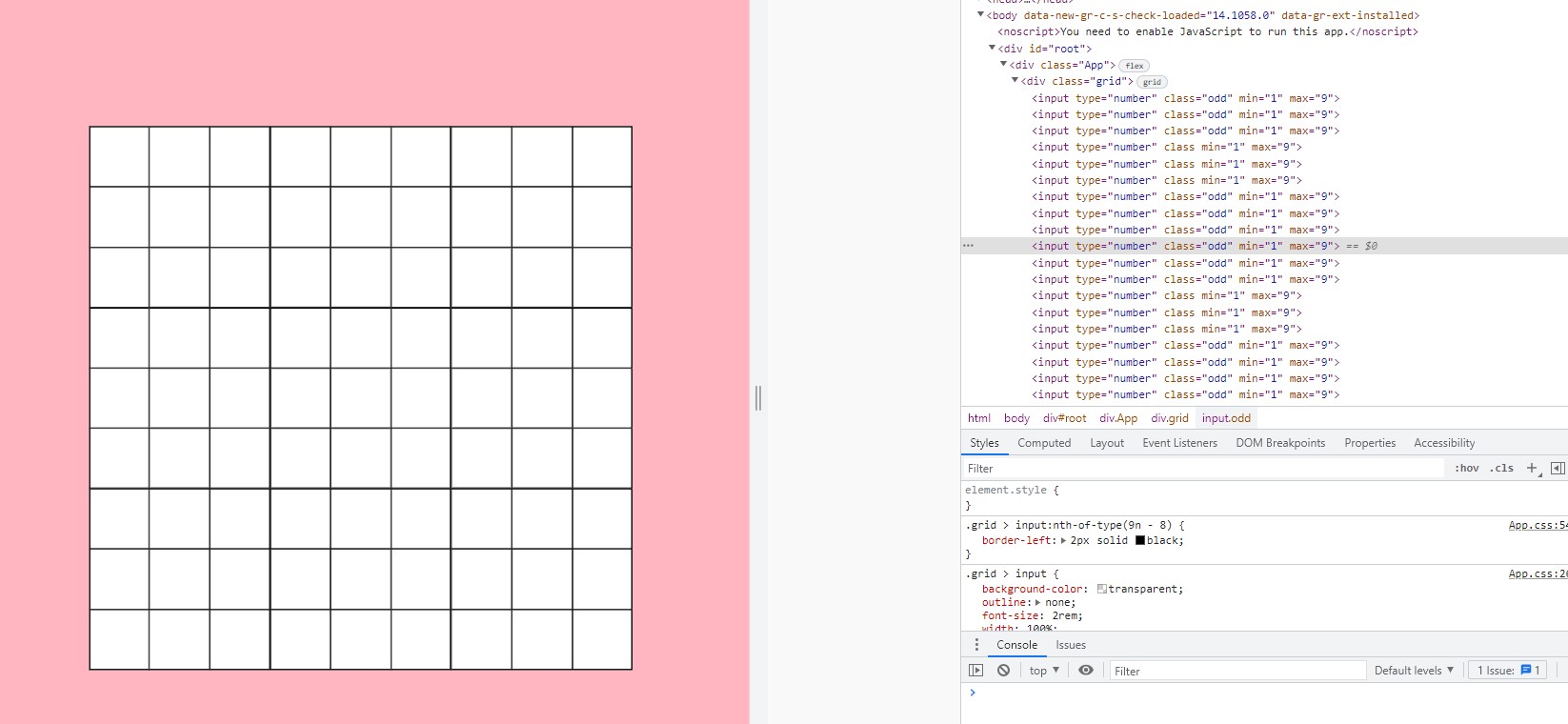
当我在see时,会附加类名,但是我看不到背景色的变化。
页面原文内容由Stack Overflow提供。腾讯云小微IT领域专用引擎提供翻译支持
原文链接:
https://stackoverflow.com/questions/72132829
复制相关文章
相似问题
腾讯云开发者

Copyright © 2013 - 2026 Tencent Cloud. All Rights Reserved. 腾讯云 版权所有
深圳市腾讯计算机系统有限公司 ICP备案/许可证号:粤B2-20090059  粤公网安备44030502008569号
腾讯云计算(北京)有限责任公司 京ICP证150476号 | 京ICP备11018762号