
Okteto不同步文件更改,即使同步报告更改
我使用的是奥克托 CLI2.2.1版,MacOS蒙特雷(Macbook 2015)。我已经克隆并部署了他们的游乐场应用程序,并创建了以下Okteto配置:
name: movies-with-compose

# The build section defines how to build the images of your development environment
# More info: https://www.okteto.com/docs/reference/manifest/#build
build:

  # You can use the following env vars to refer to this image in your deploy commands:
  #  - OKTETO_BUILD_API_REGISTRY: image registry
  #  - OKTETO_BUILD_API_REPOSITORY: image repo
  #  - OKTETO_BUILD_API_IMAGE: image name
  #  - OKTETO_BUILD_API_TAG: image tag
  api:
    context: api
    dockerfile: api/Dockerfile

  # You can use the following env vars to refer to this image in your deploy commands:
  #  - OKTETO_BUILD_FRONTEND_REGISTRY: image registry
  #  - OKTETO_BUILD_FRONTEND_REPOSITORY: image repo
  #  - OKTETO_BUILD_FRONTEND_IMAGE: image name
  #  - OKTETO_BUILD_FRONTEND_TAG: image tag
  frontend:
    context: frontend
    dockerfile: frontend/Dockerfile

  # You can use the following env vars to refer to this image in your deploy commands:
  #  - OKTETO_BUILD_INIT_REGISTRY: image registry
  #  - OKTETO_BUILD_INIT_REPOSITORY: image repo
  #  - OKTETO_BUILD_INIT_IMAGE: image name
  #  - OKTETO_BUILD_INIT_TAG: image tag
  init:
    context: api
    dockerfile: api/Dockerfile

  # You can use the following env vars to refer to this image in your deploy commands:
  #  - OKTETO_BUILD_MOVIES_REGISTRY: image registry
  #  - OKTETO_BUILD_MOVIES_REPOSITORY: image repo
  #  - OKTETO_BUILD_MOVIES_IMAGE: image name
  #  - OKTETO_BUILD_MOVIES_TAG: image tag
  movies:
    context: reverse-proxy
    dockerfile: reverse-proxy/Dockerfile

# The deploy section defines how to deploy your development environment
# More info: https://www.okteto.com/docs/reference/manifest/#deploy
deploy:
  compose:
    file: docker-compose.yml

# The dependencies section defines other git repositories to be deployed as part of your development environment
# More info: https://www.okteto.com/docs/reference/manifest/#dependencies
# dependencies:
#   - https://github.com/okteto/sample


# The dev section defines how to activate a development container
# More info: https://www.okteto.com/docs/reference/manifest/#dev
dev:
  api:
    command:
      - yarn
      - start
    sync:
      - api:/usr/src/app
    environment:
      - MONGODB_DATABASE=okteto
      - MONGODB_HOST=mongodb
      - MONGODB_PASSWORD=mongodb123
      - MONGODB_USERNAME=okteto
    forward:
      - 8081:8080
  frontend:
    image: okteto/node:14
    command: bash
    workdir: /src
    sync:
      - frontend:/src
    forward:
      - 9229:9229
      - 8080:80
  movies:
    command: bash
    workdir: /usr/src/app
    sync:
      - .:/usr/src/app
    forward:
      - 9229:9229
- 8080:80我正在部署api容器,无论我对server.js执行什么文件更改,它们都不会反映在部署中。我运行okteto status --info以获取远程同步URL,当我单击最近的更改时,它会显示server.js被更改:

我通过运行okteto up启动了okteto,这是我得到的输出:
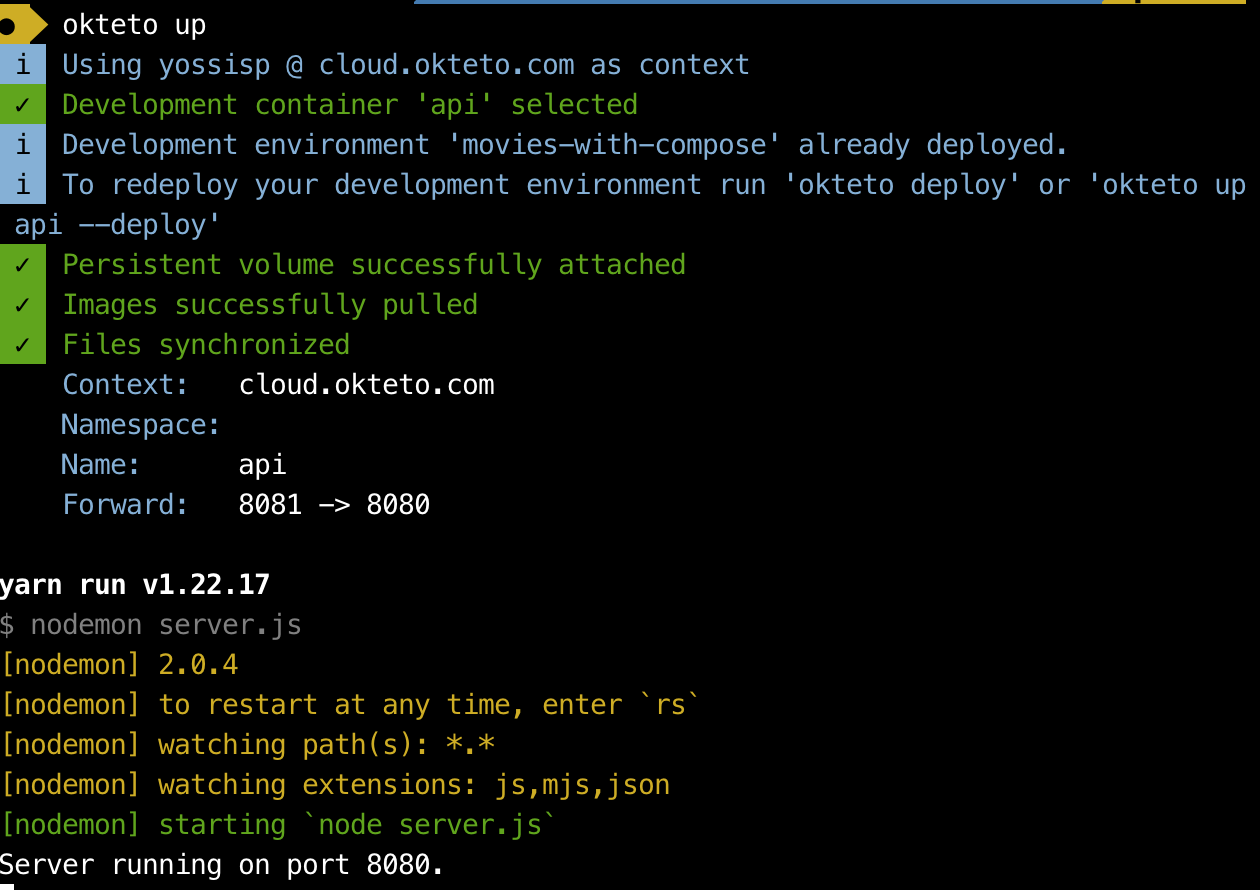
我不知道为什么我在本地机器上对文件所做的更改没有反映在okteto部署中(只有当我运行okteto build然后重新部署时,它们才会被反映)。也许我误解了Okteto文档,但我希望在okteto部署中立即反映文件更改。
我从Okteto开始的服务的dockerfile是:
FROM node:14

WORKDIR /src

COPY package.json yarn.lock ./
RUN yarn install

COPY . .

EXPOSE 8080

CMD ["yarn", "start"]编辑:问题不应该再发生了,因为修复问题的拉请求被合并了
回答 1
Stack Overflow用户
发布于 2022-05-06 09:39:58
问题是,docker-compose.yml中用于api服务的卷是:
    volumes:
- api:/usr/src/app这是不正确的,因为nodejs应用程序位于/src文件夹中。然后,在运行okteto init时,okteto清单将自动将同步文件夹设置为api:/usr/src/app,因此任何本地文件更改都不会导致okteto集群中的更新。将docker-compose.yml中的卷设置为:
volumes:
- api:/src会解决这个问题。通常,我不确定是否应该在docker-compose.yml中定义卷,我认为只需在okteto.yml中定义同步文件夹就足够了(至少它对我有效,因为我认为Syncthing syncs文件与docker卷无关)。
https://stackoverflow.com/questions/72132599
复制相似问题
腾讯云开发者

Copyright © 2013 - 2026 Tencent Cloud. All Rights Reserved. 腾讯云 版权所有
深圳市腾讯计算机系统有限公司 ICP备案/许可证号:粤B2-20090059  粤公网安备44030502008569号
腾讯云计算(北京)有限责任公司 京ICP证150476号 | 京ICP备11018762号