
Web抓取Selenium、多个页面和产品问题
我正在使用selenium进行抓取,但无法获得所有25页的href和所有626个列出的产品,从产品中获取所有的href和多个功能,我想在25页上刮掉所有的产品。但是在提取所有的25页href时,它只给出了1比7,然后直接跳转到25页,无法获得所有25页的链接。还有上面列出的产品。
然后,通过发送密钥并将所有产品的href存储在页面的url中,单击产品链接。
import selenium
import pandas as pd
from selenium import webdriver
import getpass, time
from selenium.webdriver.support.ui import WebDriverWait
from selenium.webdriver.support import expected_conditions as EC
from selenium.webdriver.common.by import By
from selenium.webdriver.common.keys import Keys
from selenium.common.exceptions import NoSuchElementException, ElementNotVisibleException,StaleElementReferenceException

#First we will connect to webdriver
driver=webdriver.Chrome(r'/Users/ankit/chromedriver')
#Open the webpage with webdriver
driver.get('https://www.getapp.com/hr-employee-management-software/human-resources/')om/hr-employee-management-software/human-resources/')
URL2 = []  # for product pages
URL = []  # for storing all the pages
URL3=[] # for storing all video links
for i in range(1, 28):
    URL.append(
        f"https://www.getapp.com/hr-employee-management-software/human-resources/page-{i}/")
   # visiting all the pages and scraping the products/Read More About... Links
for p in URL:
    driver.get(p)
    for i in driver.find_elements_by_xpath(
        '//a[@data-testid="listing-item_text-link_read-more-about-product"]'
    ):
        URL2.append(i.get_attribute("href"))

for i in URL2:
    try:
        wait = WebDriverWait(
            driver, 5
        )  # time waiting for element to be found or accessable [Wait variable use below]
        driver.get(i)  # going through each page
        elements = driver.find_elements_by_xpath("//img[contains(@src,'ytimg')]")
        for element in elements[0:1]:
            while True:  # making videos properly available for clicking the  right arrow
                try:
                    element.click()
                    break
                except Exception as e:
                    elemt = wait.until(
                        EC.element_to_be_clickable(
                            (By.XPATH, '//button[@data-evac="slide-to_right"]/div')
                        )
                    )
                    elemt.click()
                    time.sleep(0.7)

            driver.implicitly_wait(3)
        try:
            URL3.append(
                 driver.find_element_by_xpath(
                    '//iframe[contains(@id,"yt-player")]'
                ).get_attribute("src")
            )  # collecting and adding it up
        except NoSuchElementException:
                 URL3.append('--')
                 elemt = wait.until(
                EC.element_to_be_clickable((By.XPATH, '//div[@title="Close"]'))
            )
                 elemt.click()  # finally closing
    except Exception as e:
        print("failed" ,e, i)
#we will open 1st  product link  to get all the necessary paths.
click=driver.find_element_by_xpath("/html/body/div[1]/div[2]/div/div[2]/div[2]/div[2]/div[2]/div[2]/a/p").click()

NAME=[]
OVERVIEW=[]
Image_url1=[]
Image_url2=[]
Image_url3=[]
Image_url4=[]
Image_url5=[]
#extracting and storing the Features of the product
FEATURE1=[]
FEATURE2=[]
FEATURE3=[]
FEATURE4=[]
FEATURE5=[]
PRICING=[]
for i in URL2:
    driver.get(i)
    try:
        name=driver.find_element_by_xpath("/html/body/div[1]/div[2]/div[2]/section[1]/h2/span")
        NAME.append(name.text.replace('product overview', '-'))
    except NoSuchElementException:
        NAME.append('--')
    try:
        overview=driver.find_element_by_xpath('//*[@id="__next"]/div[2]/div[2]/section[1]/div/div[1]/div/div[1]/div[1]/div/div[2]/p')
        OVERVIEW.append(overview.text)
    except NoSuchElementException:
        OVERVIEW.append('--')
    try:
        i=driver.find_element_by_xpath("/html/body/div[1]/div[2]/div[2]/section[1]/div/div[1]/div/div[1]/div[2]/div/div[2]/div/div/div[1]/img")
        Image_url1.append(i.get_attribute("src"))
    except NoSuchElementException:
        Image_url1.append('--')
    try:
        i=driver.find_element_by_xpath("/html/body/div[1]/div[2]/div[2]/section[1]/div/div[1]/div/div[1]/div[2]/div/div[2]/div/div/div[1]/img")
        Image_url2.append(i.get_attribute("src"))
    except NoSuchElementException:
        Image_url2.append('--')
    try:
        i=driver.find_element_by_xpath("/html/body/div[1]/div[2]/div[2]/section[1]/div/div[1]/div/div[1]/div[2]/div/div[2]/div/div/div[2]/img")
        Image_url3.append(i.get_attribute("src"))
    except NoSuchElementException:
        Image_url3.append('--')
    try:
        i=driver.find_element_by_xpath("/html/body/div[1]/div[2]/div[2]/section[1]/div/div[1]/div/div[1]/div[2]/div/div[2]/div/div/div[3]/img")
        Image_url4.append(i.get_attribute("src"))
    except NoSuchElementException:
        Image_url4.append('--')
    try:
        i=driver.find_element_by_tag_name("img")
        Image_url5.append(i.get_attribute("src"))
    except NoSuchElementException:
        Image_url5.append('--')
    try:
        feature1=driver.find_element_by_xpath("/html/body/div[1]/div[2]/div[2]/section[3]/div/div[1]/div/div[2]/div/div[1]/div[1]/div[1]/div")
        FEATURE1.append(feature1.text)
    except NoSuchElementException:
        FEATURE1.append('--')
    try:
        feature2=driver.find_element_by_xpath("/html/body/div[1]/div[2]/div[2]/section[3]/div/div[1]/div/div[2]/div/div[1]/div[1]/div[2]/div")
        FEATURE2.append(feature2.text)
    except NoSuchElementException:
        FEATURE2.append('--')
    try:
        feature3=driver.find_element_by_xpath("/html/body/div[1]/div[2]/div[2]/section[3]/div/div[1]/div/div[2]/div/div[1]/div[1]/div[3]/div")
        FEATURE3.append(feature3.text)
    except NoSuchElementException:
        FEATURE3.append('--')
    try:
        feature4=driver.find_element_by_xpath("/html/body/div[1]/div[2]/div[2]/section[3]/div/div[1]/div/div[2]/div/div[1]/div[1]/div[4]/div")
        FEATURE4.append(feature4.text)
    except NoSuchElementException:
        FEATURE4.append('--')
    try:
        feature5=driver.find_element_by_xpath("/html/body/div[1]/div[2]/div[2]/section[3]/div/div[1]/div/div[2]/div/div[1]/div[2]/div[1]/div")
        FEATURE5.append(feature4.text)
    except NoSuchElementException:
        FEATURE5.append('--')
    try:
        Pricing=driver.find_element_by_xpath("/html/body/div[1]/div[2]/div[2]/section[1]/div/div[1]/div/div[1]/div[1]/div/div[1]/div/div[1]/div[2]/div[1]/div/p[1]")
        PRICING.append( Pricing.text)
    except NoSuchElementException:
PRICING.append('--') ``` 回答 1
Stack Overflow用户
发布于 2022-05-05 12:11:52
您没有得到所有的页面,因为分页是动态加载到网站上的。您需要单击分页来加载其他页面(以及这些页面的href/链接)。
但是一种聪明的方法是手工制作URL,而不是因为它们相似而进行抓取。就像这样:
URL =[]
for i in range(1,27):
URL.append(f"https://www.getapp.com/hr-employee-management-software/human-resources/page-{i}/")我知道你的下一个目标是点击阅读更多关于.但以下是你做错了什么/做了一些低效的方法。进入第一页后,您立即单击“阅读更多关于.”。相反,仔细阅读更多关于.链接每页。然后访问这些刮掉的链接一个接一个的功能。
以下是我的完整方法:
from selenium import webdriver
from webdriver_manager.chrome import ChromeDriverManager

driver = webdriver.Chrome(ChromeDriverManager().install())


URL2 = []  # for product pages
URL = []  # for storing all the pages

for i in range(1, 27):
    URL.append(
        f"https://www.getapp.com/hr-employee-management-software/human-resources/page-{i}/"
    )

# visiting all the pages and scraping the products/Read More About... Links
for p in URL:
    driver.get(p)
    for i in driver.find_elements_by_xpath(
        '//a[@data-testid="listing-item_text-link_read-more-about-product"]'
    ):
        URL2.append(i.get_attribute("href"))


# then collect the features by visiting the URL2 list
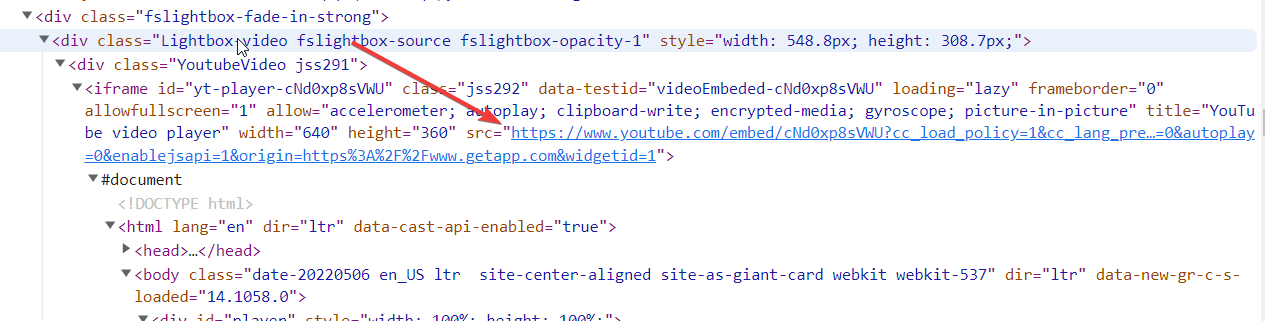
看起来视频就在预览部分的末尾,视频的链接是不可直接看到的。它们被点击时是可用的,因为它们是嵌入的。
为了实现我们的目标,我们可以采取这些步骤。
单击视频上的multiple)
- Extract
- ,
- 使其正确可见(一些产品具有来自iframe.
- Close视频预览面板的链接(因为有多个视频的产品需要在单击其他视频之前正确可见)。
这种方法的代码(用注释解释的步骤)
for ul in URL2:
    try:
        wait = WebDriverWait(
            driver, 5
        )  # time waiting for element to be found or accessable [Wait variable use below]
        driver.get(ul)  # going through each page
        elements = driver.find_elements_by_xpath("//img[contains(@src,'ytimg')]")
        for element in elements[0:1]: # use limit here for number of video links
            while True:  # making videos properly available for clicking the  right arrow
                try:
                    element.click()
                    break
                except Exception as e:
                    elemt = wait.until(
                        EC.element_to_be_clickable(
                            (By.XPATH, '//button[@data-evac="slide-to_right"]/div')
                        )
                    )
                    elemt.click()
                    time.sleep(0.7)

            driver.implicitly_wait(10)
            URL3.append(
                driver.find_element_by_xpath(
                    '//iframe[contains(@id,"yt-player")]'
                ).get_attribute("src")
            )  # collecting and adding it up

            elemt = wait.until(
                EC.element_to_be_clickable((By.XPATH, '//div[@title="Close"]'))
            )
            elemt.click()  # finally closing
    except Exception as e:
print("failed" ,e, ul)注意:对于iframe (在selenium中),我们需要切换到iframe,或者以不同的方式处理它。但是幸运的是,视频链接在iframe之外是可用的。
https://stackoverflow.com/questions/72124969
复制相似问题
腾讯云开发者

Copyright © 2013 - 2026 Tencent Cloud. All Rights Reserved. 腾讯云 版权所有
深圳市腾讯计算机系统有限公司 ICP备案/许可证号:粤B2-20090059  粤公网安备44030502008569号
腾讯云计算(北京)有限责任公司 京ICP证150476号 | 京ICP备11018762号