
在NSTextField中选择NSTableView对齐
在NSTextField中选择NSTableView对齐
提问于 2022-05-04 12:21:09
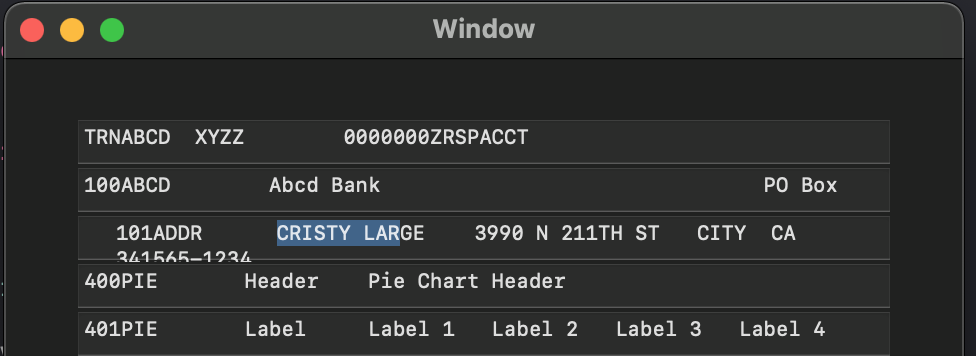
我有一个以编程方式创建的具有n行和1列的NSTableView。嵌入的文本字段是可选的,不可编辑。我能够在文本字段中观察到mouseDown事件,但是正如您在图像中看到的那样,所选的行被重新定位并包装了word。我怀疑这可能与实地编辑有关,但我的MacOS奥德赛已经无数次地证明了我的错误。
我的问题是:要保持所选行的布局与表中的其他行一致,需要做什么?
Update:向tableview委托添加一个textfield.cell.wraps = false,消除了单词have,但选中的文本字段仍然存在缩进问题。
代码片段:
表中的代表:
    func tableView (_ tableView: NSTableView, viewFor tableColumn: NSTableColumn?, row: Int) -> NSView?
    {
        let text = dataArray [row]
        var v = tableView.makeView(withIdentifier: NSUserInterfaceItemIdentifier.init(rawValue: "TableColumn"), owner: self) as? MyTextFieldExt
        if v == nil
        {
            v = MyTextFieldExt ()
            v?.identifier = NSUserInterfaceItemIdentifier(rawValue: "TableColumn")
            v?.maximumNumberOfLines = 1
            v?.autoresizingMask = [.width]
            v?.setContentHuggingPriority(NSLayoutConstraint.Priority(rawValue: 251), for: .horizontal)
            v?.translatesAutoresizingMaskIntoConstraints = false

            v?.isEditable = false
            v?.isSelectable = true

            v?.cell?.wraps = false
        }

        v!.stringValue = text
        v!.font = NSFont.monospacedSystemFont(ofSize: 10, weight: .regular)
        v!.frame = CGRect(x: 0, y: 0, width: 3000, height: 0)

        return v!
    }
来自捕获mouseDown的文本字段(自定义):
    override func mouseDown(with event: NSEvent)
    {
        super.mouseDown(with: event)

        let cEditor = self.currentEditor() as? NSTextView
        let localPos = convert (event.locationInWindow, to: nil)

        let location = cEditor?.selectedRange().location

        if let r = cEditor?.selectedRange()
        {
            self.select(withFrame: self.frame, editor: cEditor!, delegate: self, start: r.location, length: r.length+10)
        }

    }
在创建滚动视图、表视图和列的视图控制器中:
    func setupTableView ()
    {
        let tableView = MyTableViewExt ()
        tableView.selectionHighlightStyle = .none

        tableView.headerView = nil
        tableView.columnAutoresizingStyle = .lastColumnOnlyAutoresizingStyle
        tableView.autoresizesSubviews = true
        tableView.autoresizingMask = [.width, .height]

        let column = NSTableColumn ()
        column.identifier = NSUserInterfaceItemIdentifier(rawValue: "TableColumn")
        column.width = 426
        column.minWidth = 40
        column.maxWidth = 1000
        column.resizingMask = [.autoresizingMask, .userResizingMask] // verify in debugger

        tableView.addTableColumn(column)

        tableView.delegate = self
        tableView.dataSource = self

        let scrollView = NSScrollView (frame: self.view.bounds)
        scrollView.autoresizesSubviews = true
        scrollView.autoresizingMask = [.height, .width]
        scrollView.translatesAutoresizingMaskIntoConstraints = false
        scrollView.hasHorizontalScroller = true
        scrollView.hasVerticalScroller = true

        self.view.addSubview(scrollView)

        self.view.addConstraint(NSLayoutConstraint (item: self.view, attribute: .trailing, relatedBy: .equal, toItem: scrollView, attribute: .trailing, multiplier: 1.0, constant: 20))
        self.view.addConstraint(NSLayoutConstraint (item: scrollView, attribute: .leading, relatedBy: .equal, toItem: self.view, attribute: .leading, multiplier: 1.0, constant: 20))
        self.view.addConstraint(NSLayoutConstraint (item: self.view, attribute: .bottom, relatedBy: .equal, toItem: scrollView, attribute: .bottom, multiplier: 1.0, constant: 20))
        self.view.addConstraint(NSLayoutConstraint (item: scrollView, attribute: .top, relatedBy: .equal, toItem: self.view, attribute: .top, multiplier: 1.0, constant: 20))

        scrollView.documentView = tableView
}回答 1
Stack Overflow用户
发布于 2022-05-04 16:24:55
因此,通过修改文本字段mouseDown逻辑中的代码,解决了我的问题。更正后的代码如下所示,所选范围的设置发生了更改:
    override func mouseDown(with event: NSEvent)
    {
        super.mouseDown(with: event)

        let cEditor = self.currentEditor() as? NSTextView
        let localPos = convert (event.locationInWindow, to: nil)
        let insertionPoint = cEditor?.characterIndexForInsertion(at: localPos)
        let location = cEditor?.selectedRange().location

        if let r = cEditor?.selectedRange()
        {
//          self.select(withFrame: self.frame, editor: cEditor!, delegate: self, start: r.location, length: r.length+10) <-- Source of problem
            cEditor?.setSelectedRange(NSMakeRange(r.location, r.length+10)) <-- Solution to problem
        }
    }
而且要明确的是,不要求在评论中使用textfield.cell?.wraps = false的说法是不正确的。在我的表视图委托中需要这一行,以避免单词包装。
页面原文内容由Stack Overflow提供。腾讯云小微IT领域专用引擎提供翻译支持
原文链接:
https://stackoverflow.com/questions/72112905
复制相关文章
相似问题
腾讯云开发者

Copyright © 2013 - 2026 Tencent Cloud. All Rights Reserved. 腾讯云 版权所有
深圳市腾讯计算机系统有限公司 ICP备案/许可证号:粤B2-20090059  粤公网安备44030502008569号
腾讯云计算(北京)有限责任公司 京ICP证150476号 | 京ICP备11018762号