
Elsa Workflow -如何实现级联下拉列表
我在一次活动中有两次摔倒。其中一个是从OptionsProvider属性动态填充的。
我想填充第一个下拉列表中的第二个下拉列表。
怎么弄到?
你好,古斯塔沃
回答 1
Stack Overflow用户
发布于 2022-05-17 11:30:47
要实现这一点,您需要编写一个基本上完成以下工作的设计器插件:
- 当活动编辑器出现时,获取第一个下拉列表的选择值。
- 根据第一个下拉列表的值,获取第二个下拉列表。您没有指定从何处获取这些项,因此我假设您是从API端点获得这些项的。
- 处理第一个下拉列表的“更改”事件(并重复步骤2)。
- 当活动编辑器出现时,您将希望使用上次选择的值初始化第二个下拉列表。此信息存储在活动中。
例如,我更新了找到https://github.com/elsa-workflows/elsa-core/blob/master/src/samples/server/Elsa.Samples.Server.Host/Activities/VehicleActivity.cs的"vehicle“示例。
示例活动演示了如何通过让用户首先选择car ,然后从第二个下拉列表中选择Model来实现级联下拉行为。
下面是在行动中的样子:
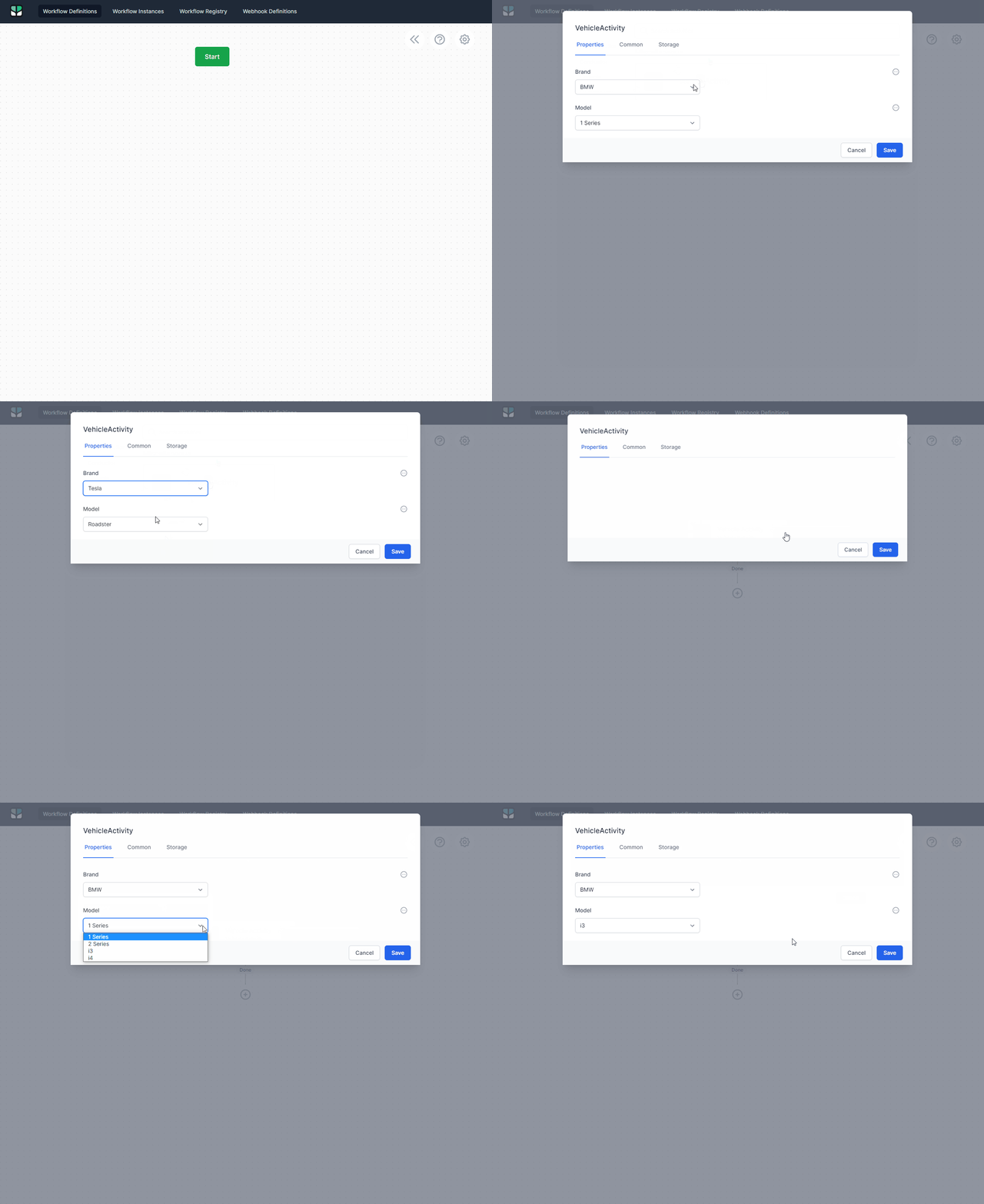
该活动的代码非常简单,因此我将只展示它感兴趣的两个属性:
[ActivityInput(
    UIHint = ActivityInputUIHints.Dropdown,
    OptionsProvider = typeof(VehicleActivity),
    DefaultSyntax = SyntaxNames.Literal,
    SupportedSyntaxes = new[] { SyntaxNames.Literal, SyntaxNames.JavaScript, SyntaxNames.Liquid }
)]
public string? Brand { get; set; }

[ActivityInput(
    UIHint = ActivityInputUIHints.Dropdown,
    DefaultSyntax = SyntaxNames.Literal,
    SupportedSyntaxes = new[] { SyntaxNames.Literal, SyntaxNames.JavaScript, SyntaxNames.Liquid }
)]
public string? Model { get; set; }最重要的方面是设置为UIHint的ActivityInputUIHints.Dropdown --它告诉设计器将输入编辑器呈现为下拉列表。
下一步是为设计器创建并安装一个插件。理想情况下,您已经有了一个封装设计器的StencilJS项目,但是我们也可以直接在HTML页面中使用JavaScript来完成它。下面的片段展示了一个插件的脚手架以及如何将它安装到设计器中:
// A plugin is just a function that receives access to `elsaStudio` services.
function VehicleActivityPlugin(elsaStudio) { }

// To install the plugin, get a reference to the <elsa-studio-root> element:
const elsaStudioRoot = document.querySelector('elsa-studio-root');

// Then install the plugin during the 'initializing' event:
elsaStudioRoot.addEventListener('initializing', e => {
   const elsa = e.detail;
   elsa.pluginManager.registerPlugin(VehicleActivityPlugin);
}
现在由您的插件在显示自定义活动的活动编辑器时找到适当的元素。
例如:
function VehicleActivityPlugin(elsaStudio) {
  // Get access to the eventBus to observe events and httpClientFactory to make API calls.
  const {eventBus, httpClientFactory} = elsaStudio;

  // When the activity editor is opened, setup an event handler on the Brands dropdown list.
  eventBus.on('activity-editor-appearing', async e => {
    // We are only interested in our custom activity being editor.
    if (e.activityDescriptor.type !== 'VehicleActivity')
      return;

    // Listen for change events on the Brand dropdown list.
    const brandsSelectList = await awaitElement('#Brand'); // awaitElement is a custom function that returns a promise that resolves after the element exists.

    const currentBrand = brandsSelectList.value;

    // Get the current value of the Model property.
    const currentModel = e.activityModel.properties.find(p => p.name === 'Model').expressions['Literal'];

    // Setup a change handler for when the user changes the selected brand.
    brandsSelectList.addEventListener('change', async e => {
      await updateModels(e.currentTarget.value);
    });

    // Update the second dropdown with available options based on the current brand (if any).
    // Also provide the currently selected model, if any.
    await updateModels(currentBrand, currentModel);
  });

  // When the activity editor is closing, dispose event handlers.
  eventBus.on('activity-editor-disappearing', e => {
    if (e.activityDescriptor.type !== 'VehicleActivity')
      return;

    document.querySelector('#Brand').removeEventListener('change', updateModels);
  });
}我省略了两个函数来尝试显示插件的结构,但是下面是缺少的awaitElement和updateModels函数:
// Awaits the existence of an element.
// Taken from this [SO answer][3].
const awaitElement = async selector => {
  while ( document.querySelector(selector) === null) {
    await new Promise( resolve =>  requestAnimationFrame(resolve) )
  }
  return document.querySelector(selector);
};updateModels函数应该位于插件内部,因为在本例中它需要访问httpClientFactory:
// A function that requests a list of models from the server based on the selected car brand.
const updateModels = async (brand, currentModel) => {
  let models = [];

  // Only attempt to fetch car models if a brand was given.
  if (!!brand) {
    const httpClient = await httpClientFactory();
    const response = await httpClient.get(`api/samples/brands/${brand}/models`);
    models = response.data;
  }

  // Get a reference to the models select list.
  const modelsSelectList = await awaitElement('#Model');
  modelsSelectList.innerHTML = "";

  // Build up the models dropdown list.
  for (const model of models) {
    const selected = model === currentModel;
    const option = new Option(model, model, selected, selected);
    modelsSelectList.options.add(option);
  }
}
完整的插件代码应该如下所示:
// A sample plugin for the VehicleActivity sample activity.
  function VehicleActivityPlugin(elsaStudio) {
    const {eventBus, httpClientFactory} = elsaStudio;

    // A function that requests a list of models from the server based on the selected car brand.
    const updateModels = async (brand, currentModel) => {
      let models = [];

      // Only attempt to fetch car models if a brand was given.
      if (!!brand) {
        const httpClient = await httpClientFactory();
        const response = await httpClient.get(`api/samples/brands/${brand}/models`);
        models = response.data;
      }

      // Get a reference to the models select list.
      const modelsSelectList = await awaitElement('#Model');
      modelsSelectList.innerHTML = "";

      // Build up the models dropdown list.
      for (const model of models) {
        const selected = model === currentModel;
        const option = new Option(model, model, selected, selected);
        modelsSelectList.options.add(option);
      }
    }

    // When the activity editor is opened, setup an event handler on the Brands dropdown list.
    eventBus.on('activity-editor-appearing', async e => {
      // We are only interested in our custom activity being editor.
      if (e.activityDescriptor.type !== 'VehicleActivity')
        return;

      // Listen for change events on the Brand dropdown list.
      const brandsSelectList = await awaitElement('#Brand');
      const currentBrand = brandsSelectList.value;
      const currentModel = e.activityModel.properties.find(p => p.name === 'Model').expressions['Literal'];

      brandsSelectList.addEventListener('change', async e => {
        await updateModels(e.currentTarget.value);
      });

      await updateModels(currentBrand, currentModel);
    });

    // When the activity editor is closing, dispose event handlers.
    eventBus.on('activity-editor-disappearing', e => {
      if (e.activityDescriptor.type !== 'VehicleActivity')
        return;

      document.querySelector('#Brand').removeEventListener('change', updateModels);
    });
}https://stackoverflow.com/questions/72102024
复制相似问题
腾讯云开发者

Copyright © 2013 - 2026 Tencent Cloud. All Rights Reserved. 腾讯云 版权所有
深圳市腾讯计算机系统有限公司 ICP备案/许可证号:粤B2-20090059  粤公网安备44030502008569号
腾讯云计算(北京)有限责任公司 京ICP证150476号 | 京ICP备11018762号