
改变GestureDetector尺寸
改变GestureDetector尺寸
提问于 2022-05-03 09:24:53
我有什么?:
现在,我可以将文本输入到蓝色部分,单击它后,键盘显示和每个小部件调整到另一个(由mainAxisAlignment: MainAxisAlignment.spaceAround调整)。
我想要什么?:
我想要和我一样的东西,但我希望能够点击红色部分来显示键盘。(同时不断调整小部件)
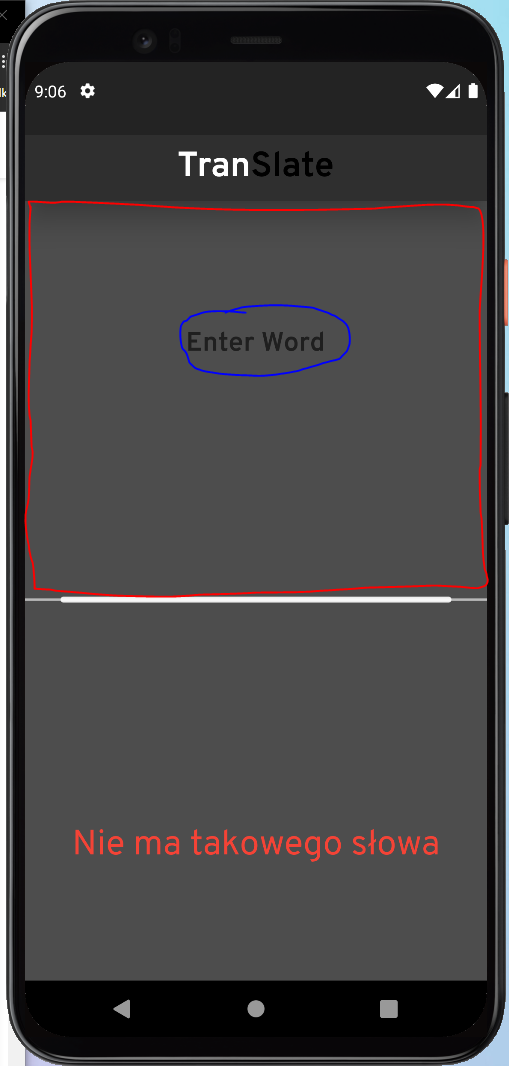
简写版
main.dart
import 'package:flutter/material.dart';

@override
Widget build(BuildContext context) {
  return Scaffold(
      body: SafeArea(
          child: Column(
              mainAxisAlignment: MainAxisAlignment.spaceAround,
              children: [
        GestureDetector(
          child: const TextField(
            textAlign: TextAlign.center,
            decoration: InputDecoration(
              border: InputBorder.none,
              hintText: "Enter Word",
            ),
          ),
        ),
        SizedBox(
          width: MediaQuery.of(context).size.width,
          child: const CustomPaint(
              //   foregroundPainter: LinePainter(),
              ),
        ),
        const Text(
          "Nie ma takowego słowa",
          textAlign: TextAlign.center,
        ),
      ])));
}回答 2
Stack Overflow用户
发布于 2022-05-03 10:07:32
为此,您可以将TextField封装在一个Expanded小部件中,该小部件将展开以填充其父部件,然后将TextField的expanded参数设置为true,将maxLines的参数设置为null。这将允许TextField展开以匹配其父部件( Expanded小部件)的高度:
Expanded(
  child: TextField(
    expands: true,
    maxLines: null,
    textAlign: TextAlign.center,
    textAlignVertical: TextAlignVertical.center,
  ),
)
如果不希望文本字段本身展开,则需要使用
Expanded(
  child: GestureDetector(
    child: Center(child: TextField(focusNode: _focusNode))
  ),
)并在点击focusNode时使用TextField的GestureDetector请求焦点。这里的例子:https://docs.flutter.dev/cookbook/forms/focus。这将需要使用StatefulWidget,因为focusNode是长寿命状态.
Stack Overflow用户
发布于 2022-05-03 11:47:45
最终代码(未缩短)
import 'package:flutter/material.dart';
import 'package:google_fonts/google_fonts.dart';
import 'package:xmltranslator/painter.dart';
import 'package:xmltranslator/xmlreader.dart';

void main() {
  runApp(const MyApp());

  WidgetsFlutterBinding.ensureInitialized();
}

class MyApp extends StatelessWidget {
  const MyApp({Key? key}) : super(key: key);

  @override
  Widget build(BuildContext context) {
    return MaterialApp(
      debugShowCheckedModeBanner: false,
      title: 'Flutter Demo',
      theme: ThemeData(
        primarySwatch: Colors.blue,
      ),
      home: const MyHomePage("text"),
    );
  }
}

class MyHomePage extends StatefulWidget {
  const MyHomePage(String text, {Key? key}) : super(key: key);

  @override
  State<MyHomePage> createState() => _MyHomePageState();
}

final _searchValue = TextEditingController();
String _typedText = "finding txt";
String _translatedText1 = "translation";

class _MyHomePageState extends State<MyHomePage> {
  @override
  void initState() {
    getXmlFile(context, _searchValue.text, context);
    super.initState();
    myFocusNode = FocusNode();
  }

  late FocusNode myFocusNode;

  @override
  Widget build(BuildContext context) {
    return Scaffold(
        backgroundColor: Color.fromARGB(255, 77, 77, 77),
        appBar: AppBar(
          centerTitle: true,
          backgroundColor: const Color.fromARGB(255, 47, 47, 47),
          title: Row(
            mainAxisAlignment: MainAxisAlignment.center,
            children: [
              RichText(
                text: TextSpan(children: [
                  TextSpan(
                      text: "T r a n ",
                      style: GoogleFonts.overpass(
                          fontWeight: FontWeight.bold, fontSize: 30)),
                  TextSpan(
                      text: " S l a t e",
                      style: GoogleFonts.overpass(
                          color: Colors.black,
                          fontWeight: FontWeight.bold,
                          fontSize: 30)),
                ]),
              ),
            ],
          ),
          elevation: 20,
        ),
        body: SafeArea(
            child: Column(children: [
          Expanded(
            child: TextField(
              textAlignVertical: TextAlignVertical.center,
              style: GoogleFonts.overpass(
                  color: Colors.white,
                  fontWeight: FontWeight.bold,
                  fontSize: 23),
              controller: _searchValue,
              textAlign: TextAlign.center,
              decoration: const InputDecoration(
                border: InputBorder.none,
                hintText: "Enter Word",
              ),
              onEditingComplete: () async {
                String xmlString = await DefaultAssetBundle.of(context)
                    .loadString("assets/test.xml");
                final _translatedText2 =
                    await getXmlFile(context, _searchValue.text, xmlString);

                setState(() {
                  _typedText = _searchValue.text;
                });

                if (xmlString.contains(_typedText)) {
                  setState(() {
                    _translatedText1 = _translatedText2.first.toString();
                  });
                } else {
                  setState(() {
                    _translatedText1 = "Nie ma takowego słowa";
                  });
                  print("wartosc po funkcji:$_translatedText2");
                }
              },
            ),
          ),
          SizedBox(
            width: MediaQuery.of(context).size.width,
            child: CustomPaint(
              foregroundPainter: LinePainter(),
            ),
          ),
          Expanded(
            child: Text(_translatedText1,
                textAlign: TextAlign.center,
                style: GoogleFonts.overpass(
                  color: Colors.red,
                  fontSize: 30,
                )),
          ),
        ])));
  }
}页面原文内容由Stack Overflow提供。腾讯云小微IT领域专用引擎提供翻译支持
原文链接:
https://stackoverflow.com/questions/72097320
复制相关文章
相似问题
腾讯云开发者

Copyright © 2013 - 2026 Tencent Cloud. All Rights Reserved. 腾讯云 版权所有
深圳市腾讯计算机系统有限公司 ICP备案/许可证号:粤B2-20090059  粤公网安备44030502008569号
腾讯云计算(北京)有限责任公司 京ICP证150476号 | 京ICP备11018762号