
如何使用Pyscript输入和输出文本?
我正在学习Python,您可以在HTML5文件中使用HTML5编写Python。作为python编码器,我想尝试一下web开发,同时仍然使用python,所以如果我们可以使用py脚本输出和输入信息,那将是很有帮助的。
例如,有人能解释一下如何使这个函数工作:
<html>
     <head>
          <link rel="stylesheet" href="https://pyscript.net/alpha/pyscript.css" />
          <script defer src="https://pyscript.net/alpha/pyscript.js"></script>
     </head>
     <body>
          <div>Type an sample input here</div>
          <input id = “test_input”></input>
          <-- How would you get this button to display the text you typed into the input into the div with the id, “test”--!>
          <button id = “submit-button” onClick = “py-script-function”>
          <div id = “test”></div>
          <div
<py-script>

<py-script>
     </body>
</html
我很感激它,我希望这也能帮助其他py脚本用户。
回答 2
Stack Overflow用户
发布于 2022-05-03 01:13:14
我使用文件todo.html和todo.py创建了这个index.html
(我使用本地服务器python -m http.server进行了测试)
我发现了一些元素,因为我对JavaScript和CSS有一定的经验,所以学习JavaScript和CSS使用JavaScript元素可能是件好事。
index.html
<!DOCTYPE html>

<html>

<head>
  <!--<link rel="stylesheet" href="https://pyscript.net/alpha/pyscript.css" />-->
  <script defer src="https://pyscript.net/alpha/pyscript.js"></script>
</head>

<body>
  <div>Type an sample input here</div>
  <input type="text" id="test-input"/>
  <button id="submit-button" type="submit" pys-onClick="my_function">OK</button>
  <div id="test-output"></div>

<py-script>
from js import console

def my_function(*args, **kwargs):

    #print('args:', args)
    #print('kwargs:', kwargs)

    console.log(f'args: {args}')
    console.log(f'kwargs: {kwargs}')

    text = Element('test-input').element.value

    #print('text:', text)
    console.log(f'text: {text}')

    Element('test-output').element.innerText = text
</py-script>

  </body>
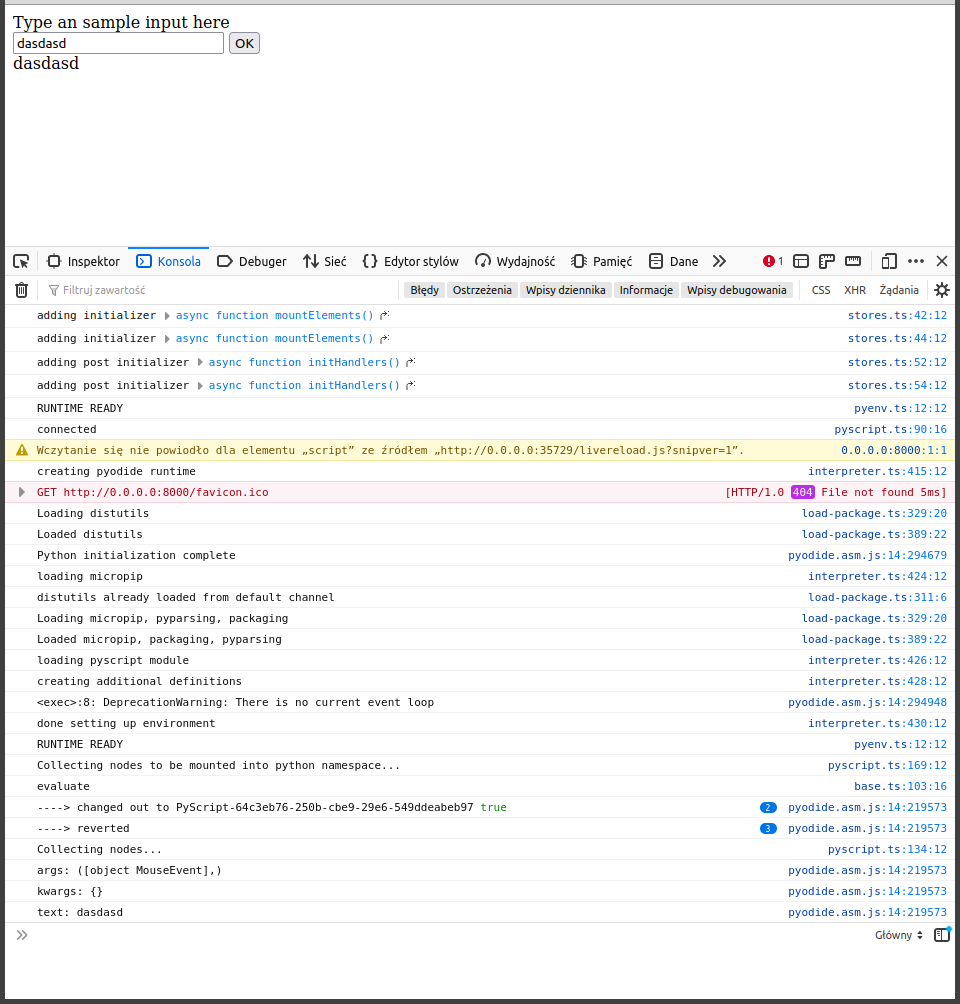
</html>这里用JavaScript控制台在火狐的DevTool中截图。
加载所有模块需要更长的时间。
(从Create pyodine runtime到Collecting nodes...)
接下来,您可以看到来自console.log()的输出。
您也可以使用print(),但它会显示带有额外错误writing to undefined ...的文本。
Stack Overflow用户
发布于 2022-05-06 21:24:42
显示输出的另一种方法是替换
Element('test-output').element.innerText = text通过
pyscript.write('test-output', text)https://stackoverflow.com/questions/72093397
复制相似问题
腾讯云开发者

Copyright © 2013 - 2026 Tencent Cloud. All Rights Reserved. 腾讯云 版权所有
深圳市腾讯计算机系统有限公司 ICP备案/许可证号:粤B2-20090059  粤公网安备44030502008569号
腾讯云计算(北京)有限责任公司 京ICP证150476号 | 京ICP备11018762号