
启用DPI缩放时,QPushButton的图标模糊不清
启用DPI缩放时,QPushButton的图标模糊不清
提问于 2022-05-01 09:04:16
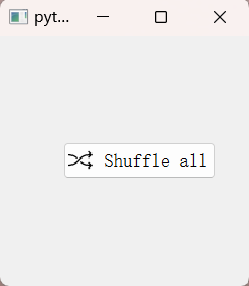
我发现,QPushButon的图标是模糊的,当新闻部缩放是启用。即使被SVG取代,图标仍然模糊不清。有什么办法让图标更清晰吗?
以下是代码:
# coding:utf-8
import os
import sys

from PyQt5.QtGui import QIcon
from PyQt5.QtWidgets import QApplication, QPushButton, QWidget


class Demo(QWidget):

    def __init__(self):
        super().__init__(parent=None)
        self.button = QPushButton(' Shuffle all', self)
        imagePath = "app/resource/images/random_play_all/Shuffle_normal.png"
        self.button.setIcon(QIcon(imagePath))
        self.button.move(self.width()//2-self.button.width() //
                         2, self.height()//2-self.button.height()//2)


if __name__ == '__main__':
    os.environ["QT_ENABLE_HIGHDPI_SCALING"] = "0"
    os.environ["QT_SCALE_FACTOR"] = '1.25'
    app = QApplication(sys.argv)
    demo = Demo()
    demo.show()
    app.exec_()
运行结果如下图所示
回答 1
Stack Overflow用户
回答已采纳
发布于 2022-05-11 11:12:44
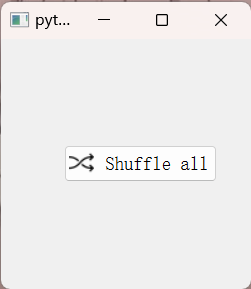
我通过重写QIconEngine和设置Qt.AA_UseHighDpiPixmaps标志解决了这个问题。
# coding:utf-8
import os
import sys

from PyQt5.QtCore import QPoint, QRect, QSize, Qt
from PyQt5.QtGui import QIcon, QIconEngine, QImage, QPainter, QPixmap
from PyQt5.QtWidgets import QApplication, QPushButton, QWidget


class PixmapIconEngine(QIconEngine):
    """ Pixmap icon engine """

    def __init__(self, iconPath: str):
        self.iconPath = iconPath
        super().__init__()

    def paint(self, painter: QPainter, rect: QRect, mode: QIcon.Mode, state: QIcon.State):
        painter.setRenderHints(QPainter.Antialiasing |
                               QPainter.SmoothPixmapTransform)
        painter.drawImage(rect, QImage(self.iconPath))

    def pixmap(self, size: QSize, mode: QIcon.Mode, state: QIcon.State) -> QPixmap:
        pixmap = QPixmap(size)
        pixmap.fill(Qt.transparent)
        self.paint(QPainter(pixmap), QRect(QPoint(0, 0), size), mode, state)
        return pixmap


class Icon(QIcon):

    def __init__(self, iconPath: str):
        self.iconPath = iconPath
        super().__init__(PixmapIconEngine(iconPath))


class Demo(QWidget):

    def __init__(self):
        super().__init__(parent=None)
        self.button = QPushButton(' Shuffle all', self)
        imagePath = "resource/images/random_play_all/Shuffle_normal.png"
        self.button.setIcon(Icon(imagePath))
        self.button.move(self.width()//2-self.button.width() //
                         2, self.height()//2-self.button.height()//2)


if __name__ == '__main__':
    os.environ["QT_ENABLE_HIGHDPI_SCALING"] = "0"
    os.environ["QT_SCALE_FACTOR"] = '1.25'
    QApplication.setAttribute(Qt.AA_UseHighDpiPixmaps)
    app = QApplication(sys.argv)
    demo = Demo()
    demo.show()
    app.exec_()
这是结果
页面原文内容由Stack Overflow提供。腾讯云小微IT领域专用引擎提供翻译支持
原文链接:
https://stackoverflow.com/questions/72075366
复制相关文章
相似问题
腾讯云开发者

Copyright © 2013 - 2026 Tencent Cloud. All Rights Reserved. 腾讯云 版权所有
深圳市腾讯计算机系统有限公司 ICP备案/许可证号:粤B2-20090059  粤公网安备44030502008569号
腾讯云计算(北京)有限责任公司 京ICP证150476号 | 京ICP备11018762号