
将XAML呈现为图像/pdf/word
将XAML呈现为图像/pdf/word
提问于 2022-04-27 20:03:46
假设我有这个XAML文件:
<Activity mc:Ignorable="sap sap2010" x:Class="Main" mva:VisualBasic.Settings="{x:Null}" sap:VirtualizedContainerService.HintSize="896,428" sap2010:WorkflowViewState.IdRef="ActivityBuilder_1" xmlns="http://schemas.microsoft.com/netfx/2009/xaml/activities" xmlns:mc="http://schemas.openxmlformats.org/markup-compatibility/2006" xmlns:mva="clr-namespace:Microsoft.VisualBasic.Activities;assembly=System.Activities" xmlns:sap="http://schemas.microsoft.com/netfx/2009/xaml/activities/presentation" xmlns:sap2010="http://schemas.microsoft.com/netfx/2010/xaml/activities/presentation" xmlns:scg="clr-namespace:System.Collections.Generic;assembly=mscorlib" xmlns:x="http://schemas.microsoft.com/winfx/2006/xaml">
  <TextExpression.NamespacesForImplementation>
    <scg:List x:TypeArguments="x:String" Capacity="23">
      <x:String>System.Activities</x:String>
      <x:String>System.Activities.Statements</x:String>
      <x:String>System.Activities.Expressions</x:String>
      <x:String>System.Activities.Validation</x:String>
      <x:String>System.Activities.XamlIntegration</x:String>
      <x:String>Microsoft.VisualBasic</x:String>
      <x:String>Microsoft.VisualBasic.Activities</x:String>
      <x:String>System</x:String>
      <x:String>System.Collections</x:String>
      <x:String>System.Collections.Generic</x:String>
      <x:String>System.Data</x:String>
      <x:String>System.Diagnostics</x:String>
      <x:String>System.Drawing</x:String>
      <x:String>System.IO</x:String>
      <x:String>System.Linq</x:String>
      <x:String>System.Net.Mail</x:String>
      <x:String>System.Xml</x:String>
      <x:String>System.Xml.Linq</x:String>
      <x:String>UiPath.Core</x:String>
      <x:String>UiPath.Core.Activities</x:String>
      <x:String>System.Windows.Markup</x:String>
      <x:String>System.Collections.ObjectModel</x:String>
      <x:String>System.Activities.DynamicUpdate</x:String>
    </scg:List>
  </TextExpression.NamespacesForImplementation>
  <TextExpression.ReferencesForImplementation>
    <scg:List x:TypeArguments="AssemblyReference" Capacity="16">
      <AssemblyReference>System.Activities</AssemblyReference>
      <AssemblyReference>Microsoft.VisualBasic</AssemblyReference>
      <AssemblyReference>mscorlib</AssemblyReference>
      <AssemblyReference>System.Data</AssemblyReference>
      <AssemblyReference>System</AssemblyReference>
      <AssemblyReference>System.Drawing</AssemblyReference>
      <AssemblyReference>System.Core</AssemblyReference>
      <AssemblyReference>System.Xml</AssemblyReference>
      <AssemblyReference>System.Xml.Linq</AssemblyReference>
      <AssemblyReference>PresentationFramework</AssemblyReference>
      <AssemblyReference>WindowsBase</AssemblyReference>
      <AssemblyReference>PresentationCore</AssemblyReference>
      <AssemblyReference>System.Xaml</AssemblyReference>
      <AssemblyReference>UiPath.System.Activities</AssemblyReference>
      <AssemblyReference>UiPath.UiAutomation.Activities</AssemblyReference>
      <AssemblyReference>System.Data.DataSetExtensions</AssemblyReference>
    </scg:List>
  </TextExpression.ReferencesForImplementation>
  <Sequence sap:VirtualizedContainerService.HintSize="304,152.8" sap2010:WorkflowViewState.IdRef="Sequence_1">
    <Sequence.Variables>
      <Variable x:TypeArguments="x:String" Name="stringTest" />
    </Sequence.Variables>
    <sap:WorkflowViewStateService.ViewState>
      <scg:Dictionary x:TypeArguments="x:String, x:Object">
        <x:Boolean x:Key="IsExpanded">True</x:Boolean>
      </scg:Dictionary>
    </sap:WorkflowViewStateService.ViewState>
    <Assign sap:VirtualizedContainerService.HintSize="262.4,60" sap2010:WorkflowViewState.IdRef="Assign_1">
      <Assign.To>
        <OutArgument x:TypeArguments="x:String">[stringTest]</OutArgument>
      </Assign.To>
      <Assign.Value>
        <InArgument x:TypeArguments="x:String">3</InArgument>
      </Assign.Value>
    </Assign>
  </Sequence>
</Activity>
有人能告诉我,我应该怎么做才能从中得到图像/pdf/word?我希望有一个类似的结果,你可以在图片中看到。
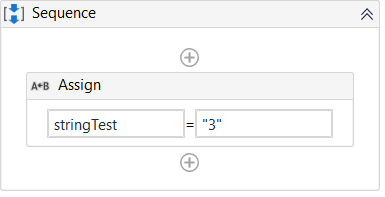
我发誓我查看了之前的文章,但他们谈论的是WPF、xaml,而不是活动的XAML。
谢谢Lior
回答 1
Stack Overflow用户
发布于 2022-04-28 18:50:06
您需要使用UiPath Studio打开XAML文件,该文件将按照图像的格式呈现。
您还没有说明使用哪个应用程序打开文件,但我怀疑您可能将XAML的文件关联设置为其他程序(例如Visual )。
页面原文内容由Stack Overflow提供。腾讯云小微IT领域专用引擎提供翻译支持
原文链接:
https://stackoverflow.com/questions/72034662
复制相关文章
相似问题
腾讯云开发者

Copyright © 2013 - 2026 Tencent Cloud. All Rights Reserved. 腾讯云 版权所有
深圳市腾讯计算机系统有限公司 ICP备案/许可证号:粤B2-20090059  粤公网安备44030502008569号
腾讯云计算(北京)有限责任公司 京ICP证150476号 | 京ICP备11018762号