
如果在html下面发邮件,邮件正文的内容就会变得混乱起来。
如果在html下面发邮件,邮件正文的内容就会变得混乱起来。
提问于 2022-04-26 18:57:16
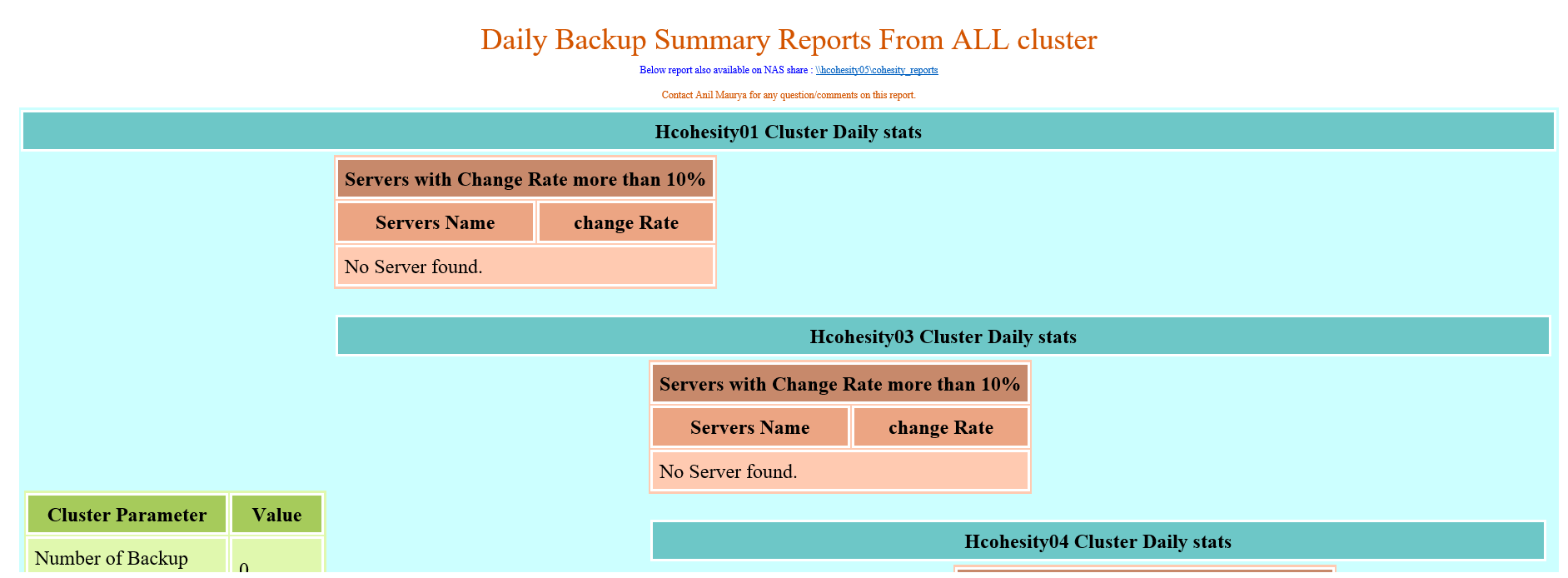
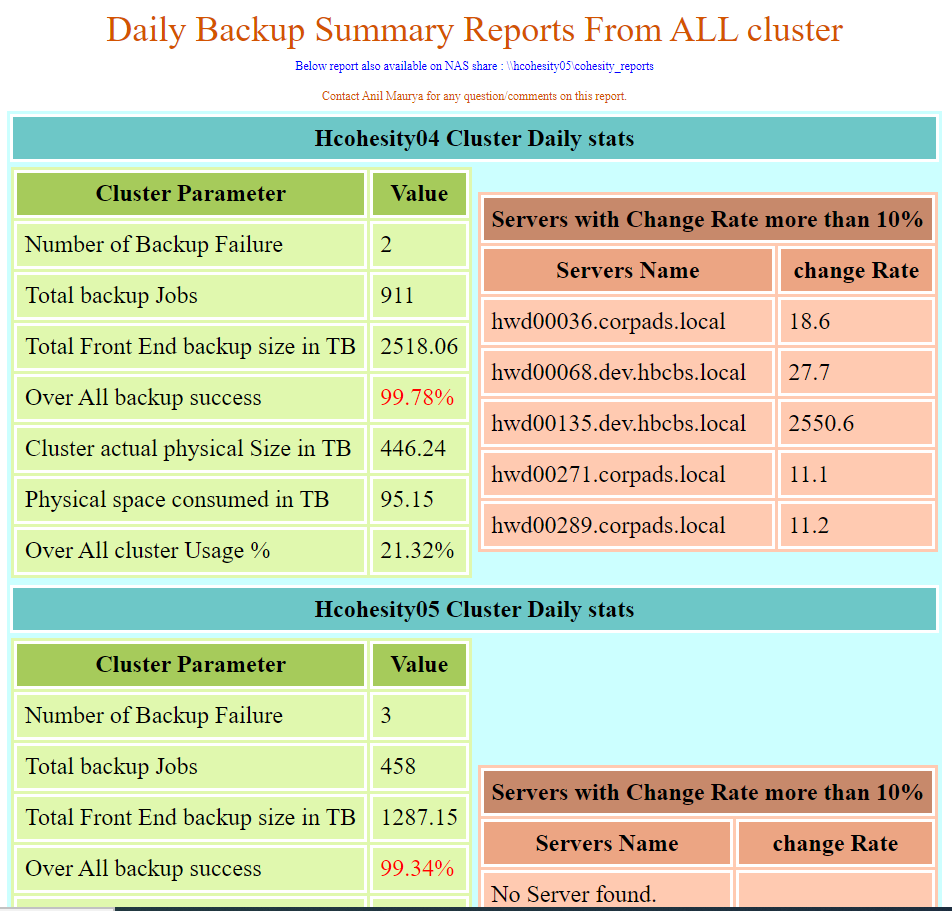
我正在使用powershell处理原始数据,然后填充哈希表。然后我将从哈希表中生成报告。我正在生成HTML文件作为报告。如果我使用任何浏览器,这个HTML文件看起来都很好,但是如果我使用选项发送电子邮件,因为-BodyasHtml $HTML内容被混淆了,.Below代码就有嵌套的表。我能做什么,即使电子邮件看我看到的浏览器??下面的代码是在电子邮件中,如果我发送电子邮件作为-Body $HTML。
   <html>
    <head>
    <style type="text/css">
    caption {  font-size: 1.5em;  font-weight: 400;  margin: 0;  padding: 6px 0 8px;  text-align: left;}
    .table1 {border: 4px ;background:#cff;align:"center";cellpadding="0"; cellspacing="0";}
    .table2 {border: 3px ; background:#E0F8AE;align:"left" ;cellpadding="20";cellspacing="0";}
    .table3 {border: 4px ; background:#FFCAB1 ;align:"right";cellpadding="20" ;cellspacing="0";}

    tr, td { font-size:16px; }
    .content {width: 640px !important;}
    td.fw {padding:25px 25px 25px 25px}
    .th1 { border: solid 2px #ffffff; padding: 5px; background:#A6cb5b}
    .th4 { border: solid 2px #ffffff; padding: 5px; background:#6DC7C7}
    .th2 { border: solid 2px #ffffff; padding: 5px; background:#c7896b}
    .th3 { border: solid 2px #ffffff; padding: 5px; background:#ECA583}
    .td1 { border: solid 2px #ffffff; padding: 5px; }
    .td2 { text-align: center; font-size: 1.5em; face:Tahoma; color:#D35400 ;}
    .td3 { text-align: center; font-size: .5em; padding: 5px;color:#0000FF }
    .td4 { text-align: center; font-size: .5em; padding: 5px;color:#D35400 }

    </style>
    <meta charset="utf-8">
    <title> NestedTables </title>
    </head>
    <body >
    <table width="100%" style="font-size: 15px;border-collapse: collapse;">
        <tr>
        <td class="td2">Daily Backup Summary Reports From ALL cluster</td>
        </tr>
        <tr>
        <td class="td3" >Below report also available on NAS share : \\hcohesity05\cohesity_reports </td></tr>
        <tr>
        <td class="td4" >Contact Anil Maurya for any question/comments on this report. </td></tr>
        </tr>
    </table>
    <table class="table1" style="margin-left:auto; margin-right:auto;width:"100%"; border: "4px solid green"; border-collapse: collapse;" >
    <tr> <th  colspan="2" class="th4"> Hcohesity01 Cluster Daily stats </th> </tr>
    <tr>                                                          <! start of first row in main table  >
    <td >                                                         <! start of first cell in first row in main table  >
    <table class="table2">                                                       <! start of top left table  >
    <tr> <th class="th1"> Cluster Parameter</th> <th class="th1"> Value </th> </tr>

    <tr> <td class="td1"> Number of Backup Failure </td> <td class="td1"> 0 </td> </tr>

    <tr> <td class="td1"> Total backup Jobs </td> <td class="td1"> 597 </td> </tr>

    <tr> <td class="td1"> Total Front End backup size in TB </td> <td class="td1"> 15553.39 </td> </tr>

    <tr> <td class="td1"> Over All backup success </td>

                                      <td class="td1"><span style="color: #0000FF"> 100.00 % </td> </tr>

    <tr> <td class="td1"> Cluster actual physical Size in TB</td> <td class="td1"> 384.81 </td> </tr>

    <tr> <td class="td1"> Physical space consumed in TB </td> <td class="td1"> 179.07 </td> </tr>

    <tr> <td class="td1"> Over All cluster Usage % </td> <td class="td1"> 46.53 %</td> </tr>

                            <tr> <td class="td1"> IBMCOS Usage in TB </td>
                            <td class="td1"> 141 </td> </tr>
                            <tr> <td class="td1"> IBMCOS Usage % </td>
                            <td class="td1"> 40.75 % </td> </tr>
                            </table>
                            </td>
                            <td>
               <table class="table3">
                                    <tr> <th class="th2" colspan="2"> Servers with Change Rate more than 10% </th> </tr>                                                       <! start of right top table >
                                    <tr> <th class="th3"> Servers Name </th>
                                    <th class="th3"> change Rate</th></tr>


                                                                            <tr> <td class="td1" colspan="2"> No Server found. </td> </tr>


                                    </table> </td> </tr>


    <table class="table1" style="margin-left:auto; margin-right:auto;width:"100%"; border: "4px solid green"; border-collapse: collapse;" >
    <tr> <th  colspan="2" class="th4"> Hcohesity03 Cluster Daily stats </th> </tr>
    <tr>                                                          <! start of first row in main table  >
    <td >                                                         <! start of first cell in first row in main table  >
    <table class="table2">                                                       <! start of top left table  >
    <tr> <th class="th1"> Cluster Parameter</th> <th class="th1"> Value </th> </tr>

    <tr> <td class="td1"> Number of Backup Failure </td> <td class="td1"> 0 </td> </tr>

    <tr> <td class="td1"> Total backup Jobs </td> <td class="td1"> 325 </td> </tr>

    <tr> <td class="td1"> Total Front End backup size in TB </td> <td class="td1"> 15494.36 </td> </tr>

    <tr> <td class="td1"> Over All backup success </td>

                                      <td class="td1"><span style="color: #0000FF"> 100.00 % </td> </tr>

    <tr> <td class="td1"> Cluster actual physical Size in TB</td> <td class="td1"> 385.1 </td> </tr>

    <tr> <td class="td1"> Physical space consumed in TB </td> <td class="td1"> 179.01 </td> </tr>

    <tr> <td class="td1"> Over All cluster Usage % </td> <td class="td1"> 46.48 %</td> </tr>

                            <tr> <td class="td1"> IBMCOS Usage in TB </td>
                            <td class="td1"> 72 </td> </tr>
                            <tr> <td class="td1"> IBMCOS Usage % </td>
                            <td class="td1"> 45.57 % </td> </tr>
                            </table>
                            </td>
                            <td>
               <table class="table3">
                                    <tr> <th class="th2" colspan="2"> Servers with Change Rate more than 10% </th> </tr>                                                       <! start of right top table >
                                    <tr> <th class="th3"> Servers Name </th>
                                    <th class="th3"> change Rate</th></tr>


                                                                            <tr> <td class="td1" colspan="2"> No Server found. </td> </tr>


                                    </table> </td> </tr>


    <table class="table1" style="margin-left:auto; margin-right:auto;width:"100%"; border: "4px solid green"; border-collapse: collapse;" >
    <tr> <th  colspan="2" class="th4"> Hcohesity04 Cluster Daily stats </th> </tr>
    <tr>                                                          <! start of first row in main table  >
    <td >                                                         <! start of first cell in first row in main table  >
    <table class="table2">                                                       <! start of top left table  >
    <tr> <th class="th1"> Cluster Parameter</th> <th class="th1"> Value </th> </tr>

    <tr> <td class="td1"> Number of Backup Failure </td> <td class="td1"> 2 </td> </tr>

    <tr> <td class="td1"> Total backup Jobs </td> <td class="td1"> 911 </td> </tr>

    <tr> <td class="td1"> Total Front End backup size in TB </td> <td class="td1"> 2518.08 </td> </tr>

    <tr> <td class="td1"> Over All backup success </td>

    <td class="td1"><span style="color: #FF0000">99.78 % </td> </tr>

    <tr> <td class="td1"> Cluster actual physical Size in TB</td> <td class="td1"> 446.23 </td> </tr>

    <tr> <td class="td1"> Physical space consumed in TB </td> <td class="td1"> 95.26 </td> </tr>

    <tr> <td class="td1"> Over All cluster Usage % </td> <td class="td1"> 21.35 %</td> </tr>

                                    </table>
                                    </td>
                                    <td>
               <table class="table3">
                                    <tr> <th class="th2" colspan="2"> Servers with Change Rate more than 10% </th> </tr>                                                       <! start of right top table >
                                    <tr> <th class="th3"> Servers Name </th>
                                    <th class="th3"> change Rate</th></tr>


                                    <tr> <td class="td1"> hwd00135.dev.hbcbs.local </td>
                                    <td class="td1"> 23662 </td> </tr>


                                    <tr> <td class="td1"> hwd00270.corpads.local </td>
                                    <td class="td1"> 19 </td> </tr>


                                    <tr> <td class="td1"> hwd00271.corpads.local </td>
                                    <td class="td1"> 21.1 </td> </tr>


                                    <tr> <td class="td1"> hwd00276.corpads.local </td>
                                    <td class="td1"> 14.3 </td> </tr>


                                    </table> </td> </tr>


    <table class="table1" style="margin-left:auto; margin-right:auto;width:"100%"; border: "4px solid green"; border-collapse: collapse;" >
    <tr> <th  colspan="2" class="th4"> Hcohesity05 Cluster Daily stats </th> </tr>
    <tr>                                                          <! start of first row in main table  >
    <td >                                                         <! start of first cell in first row in main table  >
    <table class="table2">                                                       <! start of top left table  >
    <tr> <th class="th1"> Cluster Parameter</th> <th class="th1"> Value </th> </tr>

    <tr> <td class="td1"> Number of Backup Failure </td> <td class="td1"> 0 </td> </tr>

    <tr> <td class="td1"> Total backup Jobs </td> <td class="td1"> 442 </td> </tr>

    <tr> <td class="td1"> Total Front End backup size in TB </td> <td class="td1"> 1289.94 </td> </tr>

    <tr> <td class="td1"> Over All backup success </td>

                                      <td class="td1"><span style="color: #0000FF"> 100.00 % </td> </tr>

    <tr> <td class="td1"> Cluster actual physical Size in TB</td> <td class="td1"> 311.14 </td> </tr>

    <tr> <td class="td1"> Physical space consumed in TB </td> <td class="td1"> 69.68 </td> </tr>

    <tr> <td class="td1"> Over All cluster Usage % </td> <td class="td1"> 22.40 %</td> </tr>

                                    </table>
                                    </td>
                                    <td>
               <table class="table3">
                                    <tr> <th class="th2" colspan="2"> Servers with Change Rate more than 10% </th> </tr>                                                       <! start of right top table >
                                    <tr> <th class="th3"> Servers Name </th>
                                    <th class="th3"> change Rate</th></tr>


                                                                            <tr> <td class="td1" colspan="2"> No Server found. </td> </tr>


                                    </table> </td> </tr>


    </table>
    </body>
    </html>
=============================
回答 1
Stack Overflow用户
回答已采纳
发布于 2022-04-26 22:28:22
我还没用过powershell。但是,如果我没记错的话,您需要遵循的一般规则是,您需要在HTML元素中提供内联css。
看起来你有一个合适的HTML。但是您需要提供内联css,而不是内部css。因此,移除类并将样式添加到HTML元素中。例如:
<td class="td1"> Total backup Jobs </td>更改为
<td style="border: solid 2px #ffffff; padding: 5px;"> Total backup Jobs </td>还要确保每个元素都有正确的打开和结束标记。如果不为元素提供结束标记。浏览器将处理它,但电子邮件可能不会。
我希望这个helps.Thanks
如果你提供电子邮件的截图,那也会很有帮助。
我想在我的电子邮件里看到下面的样子
页面原文内容由Stack Overflow提供。腾讯云小微IT领域专用引擎提供翻译支持
原文链接:
https://stackoverflow.com/questions/72019168
复制相关文章
相似问题
腾讯云开发者

Copyright © 2013 - 2026 Tencent Cloud. All Rights Reserved. 腾讯云 版权所有
深圳市腾讯计算机系统有限公司 ICP备案/许可证号:粤B2-20090059  粤公网安备44030502008569号
腾讯云计算(北京)有限责任公司 京ICP证150476号 | 京ICP备11018762号