
化合物内命名子组分(?)组件
基本上,我要创建的是一个继承自TScrollBox的组件。该组件有一个TGroupBox,内部有一个TFlowPanel。我需要的是,当我双击这个组件时,会出现一个TCollection-like编辑器,在那里我可以添加组件(TFiltros),这些组件将是该TFlowPanel的子组件。问题是,我希望这些组件被命名,这样我就可以通过代码直接访问它们,就像TClientDataSet一样,在这里添加字段,它们出现在代码中。
通过重写GetChildren并使其返回TFlowPanel的子级,我设法使它几乎工作起来。这也要求我使TFiltros的所有者成为他们所处的表单。它在结构面板中显示为子表(即使不是直接子表),并将其保存在DFM中,但当我关闭表单并再次打开它时,它无法从DFM加载数据,从而引发访问冲突。我不知道如何重写加载以正确设置子表。
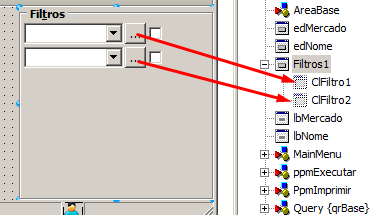
对我如何解决这个问题有任何帮助,甚至不同的想法都会很好。我刚开始创建Delphi组件。
我的当前代码是在这个问题中受到很大启发的
unit uFiltros;

interface

uses
  System.SysUtils, System.Classes, Vcl.Controls, Vcl.ExtCtrls, Forms, StdCtrls,
  ClRelatorio, Math, DesignEditors, DesignIntf, System.Generics.Collections;

type
  TFiltrosEditor = class(TComponentEditor)
    procedure ExecuteVerb(Index: Integer); override;
    function GetVerb(Index: Integer): String; override;
    function GetVerbCount: Integer; override;
  end;

  TFiltros = class(TScrollingWinControl)
  private
    FChilds: TList<TComponent>;
    FGroupBox: TGroupBox;
    FFlowPanel: TFlowPanel;
    FWidth: Integer;
    procedure OnFlowPanelResize(Sender: TObject);
    procedure SetWidth(AWidth: Integer);
  public
    procedure GetChildren(Proc: TGetChildProc; Root: TComponent); override;
    function GetChildOwner: TComponent; override;
    constructor Create(AOwner: TComponent); override;
    property Childs: TList<TComponent> read FChilds;
  published
    property Width: Integer read FWidth write SetWidth;
  end;

  TClFiltro = class(TFiltro)
  private
    FFiltros: TFiltros;
  protected
    procedure SetParent(AParent: TWinControl); override;
  public
    constructor Create(AOwner: TComponent; AFiltros: TFiltros); reintroduce;
    function GetParentComponent: TComponent; override;
    function HasParent: Boolean; override;
    property Parent: TWinControl write SetParent;
  end;

  TFiltroItem = class(TCollectionItem)
  private
    FFiltro: TClFiltro;
  protected
    function GetDisplayName: String; override;
  public
    constructor Create(Collection: TCollection); override;
    destructor Destroy; override;
  published
    property Filtro: TClFiltro read FFiltro write FFiltro;
  end;

  TFiltrosCollection = class(TOwnedCollection)
  private
    FDesigner: IDesigner;
  public
    property Designer: IDesigner read FDesigner write FDesigner;
  end;

procedure Register;

implementation

uses Dialogs, ClFuncoesBase, Vcl.Graphics, ColnEdit;

procedure Register;
begin
  RegisterClass(TClFiltro);
  RegisterNoIcon([TClFiltro]);
  RegisterComponents('Cl', [TFiltros]);
  RegisterComponentEditor(TFiltros, TFiltrosEditor);
end;

{ TFiltroItem }

constructor TFiltroItem.Create(Collection: TCollection);
begin
   inherited;
   if Assigned(Collection) then
   begin
      FFiltro        := TClFiltro.Create(TFiltros(Collection.Owner).Owner, TFiltros(Collection.Owner));
      FFiltro.Name   := TFiltrosCollection(Collection).Designer.UniqueName(TClFiltro.ClassName);
      FFiltro.Parent := TFiltros(Collection.Owner).FFlowPanel;
      FFiltro.Margins.Top      := 1;
      FFiltro.Margins.Bottom   := 1;
      FFiltro.AlignWithMargins := True;
      //FFiltro.SetSubComponent(True);
   end;
end;

destructor TFiltroItem.Destroy;
begin
   FFiltro.Free;
   inherited;
end;

function TFiltroItem.GetDisplayName: String;
begin
   Result := FFiltro.Name;
end;

{ TFiltros }

constructor TFiltros.Create(AOwner: TComponent);
begin
   inherited;
   FChilds := TList<TComponent>.Create;
   // Configurações ScrollBox
   Align      := TAlign.alRight;
   AutoScroll := False;
   AutoSize   := True;

   //Configurações GroupBox
   FGroupBox := TGroupBox.Create(Self);
   FGroupBox.Parent     := Self;
   FGroupBox.Caption    := ' Fil&tros ';
   FGroupBox.Font.Style := [fsBold];

   //Configurações FlowPanel
   FFlowPanel := TFlowPanel.Create(FGroupBox);
   FFlowPanel.Parent     := FGroupBox;
   FFlowPanel.Top        := 15;
   FFlowPanel.Left       := 2;
   FFlowPanel.AutoSize   := True;
   FFlowPanel.FlowStyle  := TFlowStyle.fsRightLeftTopBottom;
   FFlowPanel.Caption    := '';
   FFlowPanel.OnResize   := OnFlowPanelResize;
   FFlowPanel.BevelOuter := TBevelCut.bvNone;
end;

function TFiltros.GetChildOwner: TComponent;
begin
   Result := FFlowPanel;
end;

procedure TFiltros.GetChildren(Proc: TGetChildProc; Root: TComponent);
var I: Integer;
begin
//  inherited;
  for I := 0 to FChilds.Count - 1 do
    Proc(TComponent(FChilds[I]));
end;

procedure TFiltros.OnFlowPanelResize(Sender: TObject);
begin
   FGroupBox.Width     := FFlowPanel.Width + 4;
   FGroupBox.Height    := Max(FFlowPanel.Height + 17, Height);
   VertScrollBar.Range := FGroupBox.Height;
   FWidth := FFlowPanel.Width;
end;

procedure TFiltros.SetWidth(AWidth: Integer);
begin
   FFlowPanel.Width := AWidth;
   FWidth := FFlowPanel.Width;
   OnFlowPanelResize(Self);
end;

{ TFiltrosEditor }

procedure TFiltrosEditor.ExecuteVerb(Index: Integer);
var LCollection: TFiltrosCollection;
    I: Integer;
begin
  LCollection := TFiltrosCollection.Create(Component, TFiltroItem);
  LCollection.Designer := Designer;
  for I := 0 to TFiltros(Component).Childs.Count - 1 do
    with TFiltroItem.Create(nil) do
    begin
      FFiltro    := TClFiltro(TFiltros(Component).Childs[I]);
      Collection := LCollection;
    end;
  ShowCollectionEditorClass(Designer, TCollectionEditor, Component, LCollection, 'Filtros');
end;

function TFiltrosEditor.GetVerb(Index: Integer): String;
begin
   Result := 'Editar filtros...';
end;

function TFiltrosEditor.GetVerbCount: Integer;
begin
   Result := 1;
end;

{ TClFiltro }

constructor TClFiltro.Create(AOwner: TComponent; AFiltros: TFiltros);
begin
   inherited Create(AOwner);
   FFiltros := AFiltros;
end;

function TClFiltro.GetParentComponent: TComponent;
begin
   Result := FFiltros;
end;

function TClFiltro.HasParent: Boolean;
begin
   Result := Assigned(FFiltros);
end;

procedure TClFiltro.SetParent(AParent: TWinControl);
begin
   if Assigned(AParent) then
      FFiltros.FChilds.Add(Self)
   else
      FFiltros.FChilds.Remove(Self);
   inherited;
end;

end.回答 1
Stack Overflow用户
发布于 2022-04-27 18:37:52
我终于成功了。它需要TOwnedCollection和重写GetChildren和GetParentComponent的组合。
基本上,我学到了以下内容(如果我错了,你可以纠正我):
如果要在结构选项卡中显示组件,则该组件的Owner必须是表单。因此,第一件事是与那个所有者一起创建TFiltro。
GetParentComponent定义了组件将驻留在结构树中的位置,它不一定是实际的父级。因此,第二件事是使GetParentComponent的TFiltro返回TScrollBox,但将实际的父级设置为TFlowPanel。
现在,由于TFiltro的父级不再是表单,所以它不会将其保存到DFM中,因为TFlowPanel是实际的父级,但没有定义为子组件。在GetChildren中重写TScrollBox并使其返回每个TFiltro解决了这个问题,现在它作为子级保存在DFM中。
但是现在,要正确地从DFM中读取TFiltro并相应地再次设置它,它必须是TOwnedCollection内的一个项中的published值,而该项本身就是TScrollBox中的一个已发布的值。然后,让TCollectionItem发布值的set函数将TFiltro的父函数定义为TFlowPanel。
在实现这一目标方面帮助我最大的一篇文章可以在WayBack机中找到。
https://stackoverflow.com/questions/72018084
复制相似问题
腾讯云开发者

Copyright © 2013 - 2026 Tencent Cloud. All Rights Reserved. 腾讯云 版权所有
深圳市腾讯计算机系统有限公司 ICP备案/许可证号:粤B2-20090059  粤公网安备44030502008569号
腾讯云计算(北京)有限责任公司 京ICP证150476号 | 京ICP备11018762号