
如何为Pinterest类型的砖石布局制作卡片类型布局?
如何为Pinterest类型的砖石布局制作卡片类型布局?
提问于 2022-04-26 01:21:39
我正在工作一个颤振/达特拯救猫收养应用程序,我有一个Pintrest风格的砖石格栅布局的猫可用。我有一张卡片的草稿,其中显示了猫的照片和以下的基本信息,如名称和品种,特征和位置。
我想有一个卡片布局,看起来像以下,但不确定如何舍入卡的顶部和底部,并有一个可变的高度图像。对于图像,我希望它有一个设置的宽度,但一个可变的高度,这将是足够高,不切断任何一方,或顶部或底部的图像。这些图像有各种各样的宽度和高度。白色文本部分应固定在高度和宽度。卡片应该是这样的:
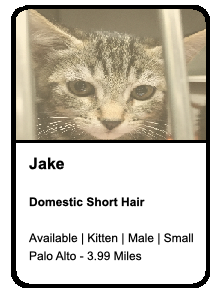
我对颤音很陌生。怎样才能完成这个卡片的布局?
回答 1
Stack Overflow用户
回答已采纳
发布于 2022-04-26 05:01:48
试试下面的代码。
Card(
  elevation: 5,
  shadowColor: Colors.grey,
  shape: RoundedRectangleBorder(
    borderRadius: BorderRadius.circular(
      20,
    ),
  ),
  margin: EdgeInsets.all(5),
  child: Container(
    height: 300,
    width: 200,
    child: Column(
      crossAxisAlignment: CrossAxisAlignment.stretch,
      children: [
        Expanded(
          child: Container(
            decoration: BoxDecoration(
              borderRadius: BorderRadius.only(
                topLeft: Radius.circular(
                  10,
                ),
                topRight: Radius.circular(
                  10,
                ),
              ),
              image: DecorationImage(
                fit: BoxFit.fill,
                image: NetworkImage(
                  'https://cdn.pixabay.com/photo/2022/03/27/11/23/cat-7094808__340.jpg',
                ),
              ),
            ),
          ),
        ),
        Container(
          height: 2,
          color: Colors.black,
        ),
        Container(
          height: 130,
          padding: const EdgeInsets.all(8.0),
          decoration: BoxDecoration(
            color: Colors.white,
            borderRadius: BorderRadius.only(
              bottomLeft: Radius.circular(20.0),
              bottomRight: Radius.circular(20.0),
            ),
          ),
          child: Column(
            crossAxisAlignment: CrossAxisAlignment.start,
            children: [
              Text(
                'Jake',
                style: TextStyle(
                  color: Colors.black,
                  fontWeight: FontWeight.bold,
                  fontSize: 15,
                ),
              ),
              SizedBox(
                height: 5,
              ),
              Text(
                'Domestic Short Hair',
                style: TextStyle(
                  color: Colors.black,
                  fontWeight: FontWeight.w500,
                  fontSize: 12,
                ),
              ),
              SizedBox(
                height: 5,
              ),
              Text(
                'Available | Kitchen | Male | Small Pale - 3.99 Mile',
                style: TextStyle(
                  color: Colors.black,
                  fontSize: 12,
                ),
              ),
            ],
          ),
        ),
      ],
    ),
  ),
),
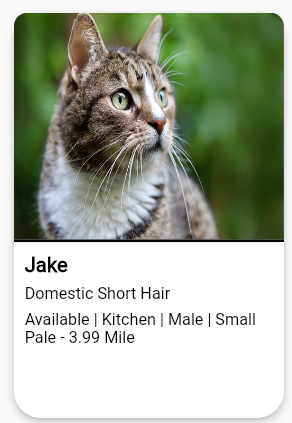
结果图像->
页面原文内容由Stack Overflow提供。腾讯云小微IT领域专用引擎提供翻译支持
原文链接:
https://stackoverflow.com/questions/72007332
复制相关文章
相似问题
腾讯云开发者

Copyright © 2013 - 2026 Tencent Cloud. All Rights Reserved. 腾讯云 版权所有
深圳市腾讯计算机系统有限公司 ICP备案/许可证号:粤B2-20090059  粤公网安备44030502008569号
腾讯云计算(北京)有限责任公司 京ICP证150476号 | 京ICP备11018762号