
设置动态DataGridTextColumn HeaderStyle
设置动态DataGridTextColumn HeaderStyle
提问于 2022-04-25 18:25:57
我正试图为我的DataGrid设置一个动态标题样式。
我可以为整个数据集设置ColumnHeader样式,但是为单个列设置样式不起作用。样式不应用于列。
MainWindow.xaml
<Window x:Class="StyleTest.MainWindow"
        xmlns="http://schemas.microsoft.com/winfx/2006/xaml/presentation"
        xmlns:x="http://schemas.microsoft.com/winfx/2006/xaml"
        xmlns:d="http://schemas.microsoft.com/expression/blend/2008"
        xmlns:mc="http://schemas.openxmlformats.org/markup-compatibility/2006"
        mc:Ignorable="d"
        Title="MainWindow" Height="450" Width="800">
    <Grid>
        <CheckBox Content="Themes" IsChecked="False" Unchecked="CheckBox_Unchecked" Checked="CheckBox_Checked" HorizontalAlignment="Left" VerticalAlignment="Top" Margin="60,92,0,0"/>
        <DataGrid d:ItemsSource="{d:SampleData ItemCount=5}" HorizontalAlignment="Left" VerticalAlignment="Top" Margin="0,150,0,0" AutoGenerateColumns="False"
            ColumnHeaderStyle="{DynamicResource ColumnHeaderTest}">
            <DataGrid.Columns>
                <DataGridTextColumn Header="SampleInt" Binding="{Binding SampleInt}"/>
                <DataGridTextColumn Header="SampleStringA" Binding="{Binding SampleStringA}"/>
                <DataGridTextColumn Header="SampleStringB" Binding="{Binding SampleStringB}" HeaderStyle="{DynamicResource ColumnHeaderTest}"/>
                <DataGridCheckBoxColumn Header="SampleBool" Binding="{Binding SampleBool, Mode=OneWay}"/>
            </DataGrid.Columns>
        </DataGrid>
    </Grid>
</Window>
MainWindow.xaml.cs
using System;
using System.Linq;
using System.Windows;

namespace StyleTest
{
    public partial class MainWindow : Window
    {
        public MainWindow()
        {
            InitializeComponent();
        }

        private void CheckBox_Unchecked(object sender, RoutedEventArgs e)
        {
            foreach (var dictionary in App.Current.Resources.MergedDictionaries.ToList())
            {
                App.Current.Resources.MergedDictionaries.Remove(dictionary);
            }
        }

        private void CheckBox_Checked(object sender, RoutedEventArgs e)
        {
            foreach (var dictionary in App.Current.Resources.MergedDictionaries.ToList())
            {
                App.Current.Resources.MergedDictionaries.Remove(dictionary);
            }
            App.Current.Resources.MergedDictionaries.Add(new ResourceDictionary() { Source = new Uri("pack://application:,,,/Themes/Theme1.xaml") });
        }
    }
}
/主题/Them1.xaml
<ResourceDictionary xmlns="http://schemas.microsoft.com/winfx/2006/xaml/presentation"
                    xmlns:x="http://schemas.microsoft.com/winfx/2006/xaml">
    <Style TargetType="{x:Type DataGridColumnHeader}" x:Key="ColumnHeaderTest">
        <Setter Property="Background" Value="Green"/>
    </Style>
</ResourceDictionary>
App.xaml和App.xaml.cs都是默认的,不添加任何代码。
结果
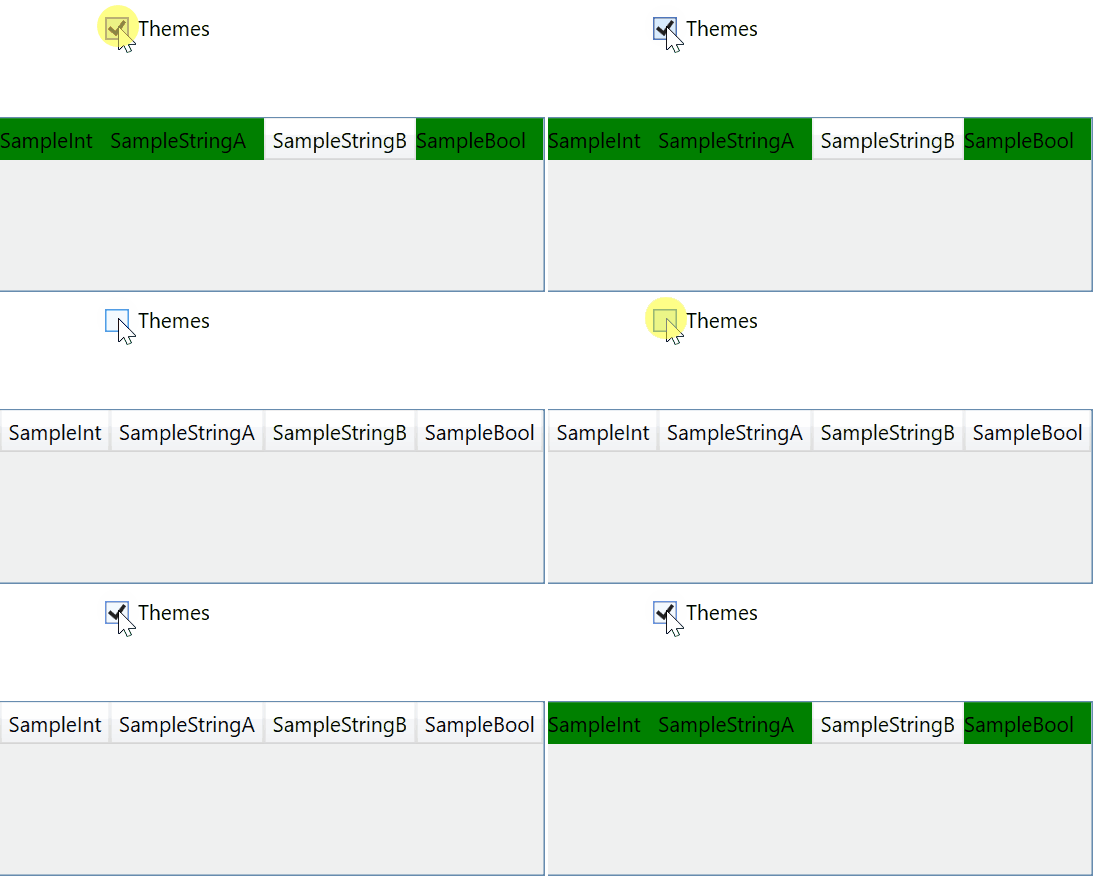
下面是一个演示问题的完整示例项目。
https://www.dropbox.com/s/1t2n43gi1umkim7/StyleTest.zip?raw=1
回答 1
Stack Overflow用户
回答已采纳
发布于 2022-04-29 23:11:55
我能想出的唯一解决方案是,每当主题发生变化时,手动更改代码中的标头样式。
private void ThemeChanged()
{
    //a dirty hack to workaround dynamic headerstyle not working
    var CustomHeaderStyle = Application.Current.TryFindResource("CustomHeaderStyle") as Style;
    MyDataGridColumn1.HeaderStyle = CustomHeaderStyle;
}页面原文内容由Stack Overflow提供。腾讯云小微IT领域专用引擎提供翻译支持
原文链接:
https://stackoverflow.com/questions/72004100
复制相关文章
相似问题
腾讯云开发者

Copyright © 2013 - 2026 Tencent Cloud. All Rights Reserved. 腾讯云 版权所有
深圳市腾讯计算机系统有限公司 ICP备案/许可证号:粤B2-20090059  粤公网安备44030502008569号
腾讯云计算(北京)有限责任公司 京ICP证150476号 | 京ICP备11018762号