
GraphiQL突变不接受输入类型
GraphiQL突变不接受输入类型
提问于 2022-04-25 11:48:30
嗨,我正在按照教程系列https://www.youtube.com/watch?v=MRrcUQhZwBc&list=PL55RiY5tL51rG1x02Yyj93iypUuHYXcB_&index=8制作一个预订系统,我正在跟踪它们(同时更改字段的名称以更适合我的数据库)这里是我的User.js:(定义用户)。
const mongoose = require('mongoose');

const Schema = mongoose.Schema;

const userSchema = new Schema({
    username: {
        type: String,
        required: true
    },
    studentnumber: {
        type: String,
        required: true
    },
    createdEvents: [
        {
        type: Schema.Types.ObjectId,
        ref: 'Event'
        }
    ]
});

module.exports = mongoose.model('User', userSchema);
下面是我的App.js(我在localhost上为GraphiQL运行的主文件:3002/graphql)
const express = require('express');
const bodyParser = require('body-parser');
const { graphqlHTTP } = require('express-graphql');
const { buildSchema } = require('graphql');
const mongoose = require('mongoose');
const bcrypt = require('bcryptjs');

const User = require('./models/user')

const Event = require('./models/events');

const app = express();

app.use(bodyParser.json());

app.use(
    '/graphql',
    graphqlHTTP({
        schema: buildSchema(`
        type Event {
          _id: ID!
          title: String!
          description: String!
          price: Float!
          date: String!
        }
        type User {
            _id: ID!
            username: String!
            studentnumber: String
        }
        input EventInput {
          title: String!
          description: String!
          price: Float!
          date: String!
        }
        type UserInput {
            username: String!
            studentnumber: String!
        }
        type RootQuery {
            events: [Event!]!
        }
        type RootMutation {
            createEvent(eventInput: EventInput): Event
            createUser(userInput: UserInput): User
        }
        schema {
            query: RootQuery
            mutation: RootMutation
        }
    `),
        rootValue: {
            events: () => {
                return Event.find()
                    .then(events => {
                        return events.map(event => {
                            return { ...event._doc, _id: event.id };
                        });
                    })
                    .catch(err => {
                        throw err;
                    });
            },
            createEvent: args => {
                const event = new Event({
                    title: args.eventInput.title,
                    description: args.eventInput.description,
                    price: +args.eventInput.price,
                    date: new Date(args.eventInput.date)
                });
                return event
                    .save()
                    .then(result => {
                        console.log(result);
                        return { ...result._doc, _id: result._doc._id.toString() };
                    })
                    .catch(err => {
                        console.log(err);
                        throw err;
                    });
            },
            createUser: args => {
                return bcrypt
                    .hash(args.userInput.studentnumber, 12)
                    .then(hashedNum => {
                        const user = new User({
                            username: args.userInput.username,
                            studentnumber: hashedNum,
                        });
                        return user.save();
                    })
                    .then(result => {
                        return {...result._doc, _id: result.id};
                    })
                    .catch(err => {
                        throw err;
                    });
            }
        },
        graphiql: true
    })
);

mongoose
    .connect(
        `mongodb+srv://${process.env.MONGO_USER}:${process.env.MONGO_PASSWORD}@cluster0.scgam.mongodb.net/${process.env.MONGO_DB}?retryWrites=true&w=majority`
    )
    .then(() => {
        app.listen(3002);
    })
    .catch(err => {
        console.log(err);
    });
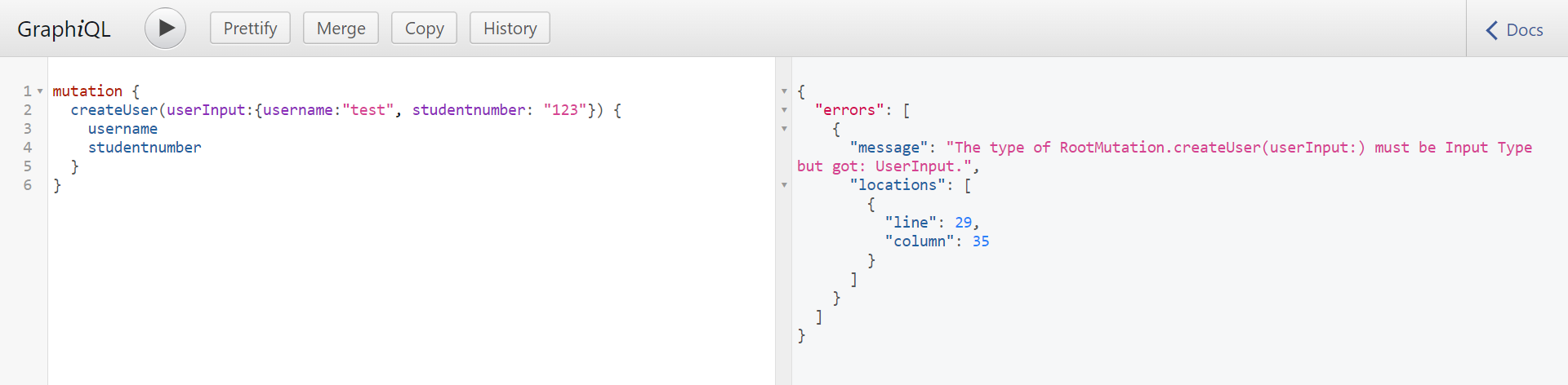
在尝试在createUser中使用GraphiQl时,运行它们会给出以下错误消息
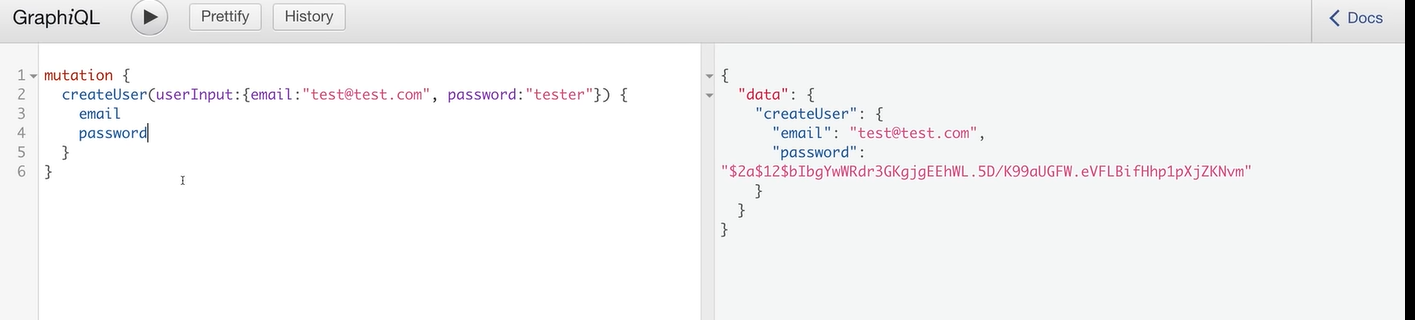
我应该得到这个(但是有不同的字段名)
有人知道怎么解决这个问题吗?谢谢
回答 1
Stack Overflow用户
发布于 2022-04-25 11:55:47
我想出来是因为我把type而不是input放在了UserInput{}前面,所以用错了类型
页面原文内容由Stack Overflow提供。腾讯云小微IT领域专用引擎提供翻译支持
原文链接:
https://stackoverflow.com/questions/71999052
复制相关文章
相似问题
腾讯云开发者

Copyright © 2013 - 2026 Tencent Cloud. All Rights Reserved. 腾讯云 版权所有
深圳市腾讯计算机系统有限公司 ICP备案/许可证号:粤B2-20090059  粤公网安备44030502008569号
腾讯云计算(北京)有限责任公司 京ICP证150476号 | 京ICP备11018762号