
反应主机和NextJS远程应用程序示例/配置模块联合会
反应主机和NextJS远程应用程序示例/配置模块联合会
提问于 2022-04-24 11:44:20
我没有找到一个react主机和nextjs远程应用程序的例子,我的主机正在使用一个react远程应用程序,现在我正在尝试添加一个nextjs远程应用程序,它不起作用:
- 港口:
- Host `3000`
- React remote `3001`
- NextJS Remote `3002`- 在我的主机react应用程序中,我有以下内容,在
webpack.config.js文件中
plugins: [
    new ModuleFederationPlugin({
      name: 'react_container',
      filename: 'remoteEntry.js',
      remotes: {
        remote_react: 'remote_react@http://localhost:3001/remoteEntry.js', // <- This is working
        remote_nextjs: 'remote_nextjs@http://localhost:3002/_next/static/chunks/remoteEntry.js', // <- Not working :-(
      },
      exposes: {
        './react': 'react',
        './react-dom': 'react-dom',
      },
      shared: {
      },
}),和远程nextjs应用程序中的next.config.js文件
const { withFederatedSidecar } = require("@module-federation/nextjs-mf");

module.exports = withFederatedSidecar({
  name: "remote_nextjs",
  filename: "static/chunks/remoteEntry.js",
  exposes: {
    "./ExposedComponent": "./components/ExposedComponent",
  },
  shared: {
  },
})({
  // your original next.config.js export
});- 最后,在主机的
App.jsx中,我试图使用以下远程组件
import RemoteNav from 'remote_react/Nav'; // <- Working
import ExposedComponent from 'remote_nextjs/ExposedComponent'; // <- Not working- 我有回购这里
我从js.js得到它的404错误
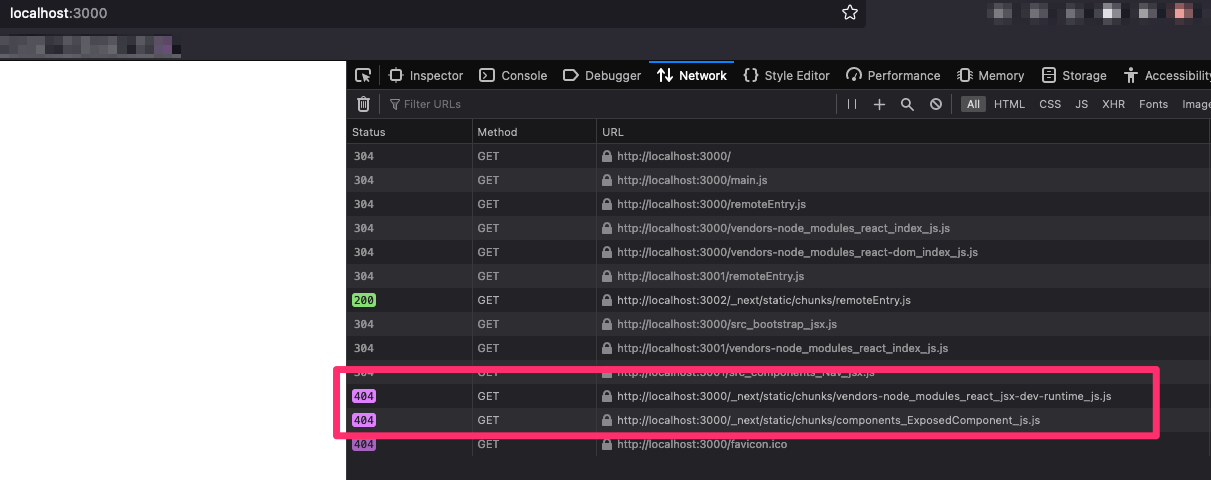
谢谢
回答 1
Stack Overflow用户
发布于 2022-11-01 09:35:05
参考https://webpack.js.org/guides/public-path/,在远程应用程序的webpack配置中,设置publicPath将修复路径问题。
  export default {
    output: {
      publicPath: 'auto',
    },
    plugins: [...],
    ...
}页面原文内容由Stack Overflow提供。腾讯云小微IT领域专用引擎提供翻译支持
原文链接:
https://stackoverflow.com/questions/71988055
复制相关文章
相似问题
腾讯云开发者

Copyright © 2013 - 2026 Tencent Cloud. All Rights Reserved. 腾讯云 版权所有
深圳市腾讯计算机系统有限公司 ICP备案/许可证号:粤B2-20090059  粤公网安备44030502008569号
腾讯云计算(北京)有限责任公司 京ICP证150476号 | 京ICP备11018762号