
其他依赖项的依赖项(非开发)尚未自动添加到node_modules中。
有人告诉我
ESLint couldn't find the plugin "@typescript-eslint/eslint-plugin".

(The package "@typescript-eslint/eslint-plugin" was not found when loaded as a Node module from the directory "D:\XXX\NNN".)

It's likely that the plugin isn't installed correctly. Try reinstalling by running the following:

npm install @typescript-eslint/eslint-plugin@latest --save-dev由ESLint.奇怪的是,带有@typescript-eslint/eslint-plugin预设的包在依赖项中有ESLint:
{
  "name": "@yamato_daiwa/style_guides",
  "dependencies": {
    "@typescript-eslint/eslint-plugin": "5.19.0",
    "@typescript-eslint/parser": "5.19.0",
    "eslint": "8.13.0",
    "eslint-plugin-node": "11.1.0"
  },
  "peerDependencies": {
    "@typescript-eslint/eslint-plugin": "^5.18.0",
    "@typescript-eslint/parser": "^5.18.0",
    "eslint": "^8.13.0",
    "eslint-plugin-node": "^11.1.0",
    "typescript": ">=4.0.0 <4.7.0"
  }
}
(我不确定是否需要peerDependencies,但我必须把这个问题集中在一个问题上)
我预计所有依赖项都会自动添加到node_modules中,但它还没有(作用域目录中没有@typescript-eslint ):
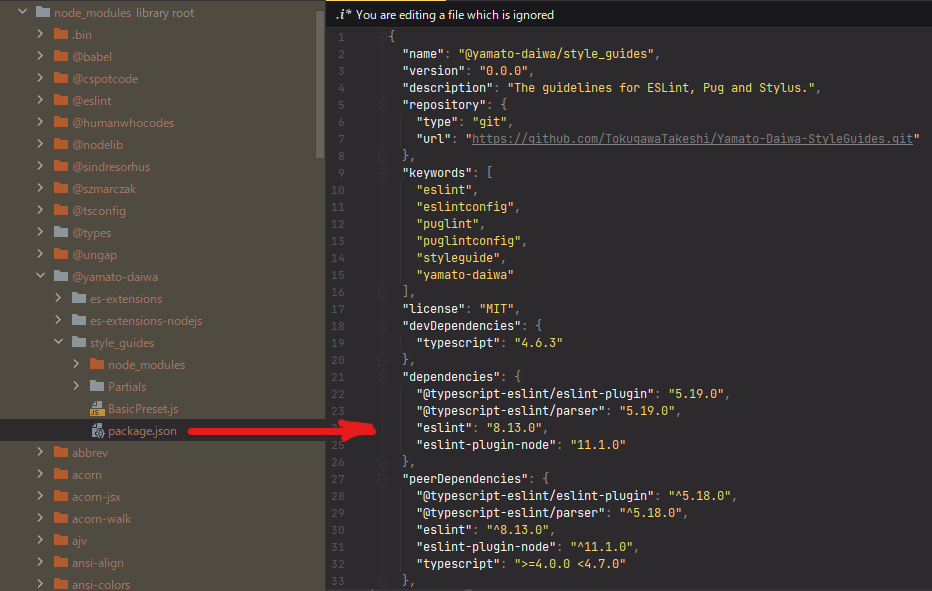
我的节点版本是16.3。
更新
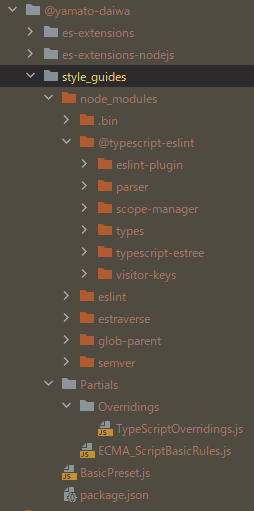
看起来,@typescript-eslint/eslint-plugin已经添加到node_modules下面的库中,并预先设置了ESLint。我预期它将被添加到项目的node_modules下面的目录中,而不是在project/node_modules/@yamato-daiwa/style_guides/node_modules下面。
回答 1
Stack Overflow用户
发布于 2022-04-25 12:03:13
在您的项目中,您真的需要将peerDependency作为一个eslint吗?如果是这样的话,请检查您是否试图安装与所需的库相同的eslint版本。如果没有,就把它移开。
根据文档:“当一个依赖项作为一个peerDependency列在包中时,它不会自动安装。相反,包含该包的代码必须将它作为它的依赖项。npm将警告您,如果您运行npm,它不会找到该依赖项。”
https://flaviocopes.com/npm-peer-dependencies/
如果所有这些都失败了,尝试运行"npm“(清洁安装),而不是npm安装。
https://stackoverflow.com/questions/71976323
复制相似问题
腾讯云开发者

Copyright © 2013 - 2026 Tencent Cloud. All Rights Reserved. 腾讯云 版权所有
深圳市腾讯计算机系统有限公司 ICP备案/许可证号:粤B2-20090059  粤公网安备44030502008569号
腾讯云计算(北京)有限责任公司 京ICP证150476号 | 京ICP备11018762号