
如何以编程方式使用PHPicker中的新iOS从照片中加载图像?
如何以编程方式使用PHPicker中的新iOS从照片中加载图像?
提问于 2022-04-21 12:42:07
我想使用新的PHPickerViewController从照片中选择一个图像,当我的控制器加载时,我想直接打开PHPicker。
像这样
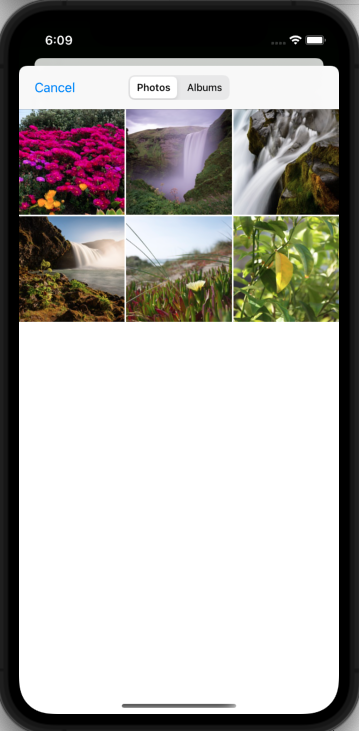
import UIKit
class ViewController: UIViewController {
    override func viewDidLoad() {
        super.viewDidLoad()
         // Do any additional setup after loading the view.
         // TODO: - Here I want PhotoPicker
       }
}回答 1
Stack Overflow用户
发布于 2022-04-21 12:44:31
当您想要放置您的openPHPicker()时,可以调用此方法PHPicker。
- 您也可以使用此代码。来打开新的PHPicker。
- 有关PHPicker在WWDC21 PHPicker WWDC20视频和PHPicker WWDC21视频中的更多知识
- PHPicker Notes PHPicker备注
import Photos
import PhotosUI


// MARK: - PHPicker Configurations (PHPickerViewControllerDelegate)
extension ViewController: PHPickerViewControllerDelegate {
    func picker(_ picker: PHPickerViewController, didFinishPicking results: [PHPickerResult]) {
         picker.dismiss(animated: true, completion: .none)
         results.forEach { result in
               result.itemProvider.loadObject(ofClass: UIImage.self) { reading, error in
               guard let image = reading as? UIImage, error == nil else { return }
               DispatchQueue.main.async {
                   self.profilePictureOutlet.image = image
                   // TODO: - Here you get UIImage
               }
               result.itemProvider.loadFileRepresentation(forTypeIdentifier: "public.image") { [weak self] url, _ in
                // TODO: - Here You Get The URL
               }
          }
       }
  }

   /// call this method for `PHPicker`
   func openPHPicker() {
       var phPickerConfig = PHPickerConfiguration(photoLibrary: .shared())
       phPickerConfig.selectionLimit = 1
       phPickerConfig.filter = PHPickerFilter.any(of: [.images, .livePhotos])
       let phPickerVC = PHPickerViewController(configuration: phPickerConfig)
       phPickerVC.delegate = self
       present(phPickerVC, animated: true)
   }
}页面原文内容由Stack Overflow提供。腾讯云小微IT领域专用引擎提供翻译支持
原文链接:
https://stackoverflow.com/questions/71954672
复制相关文章
相似问题
腾讯云开发者

Copyright © 2013 - 2026 Tencent Cloud. All Rights Reserved. 腾讯云 版权所有
深圳市腾讯计算机系统有限公司 ICP备案/许可证号:粤B2-20090059  粤公网安备44030502008569号
腾讯云计算(北京)有限责任公司 京ICP证150476号 | 京ICP备11018762号