
IIS如何通过命令行检查父路径选项是否已启用/禁用?
IIS如何通过命令行检查父路径选项是否已启用/禁用?
提问于 2022-04-20 15:52:40
在IIS上,按照以下步骤允许禁用/启用父路径选项:
Log into the IIS Administration Console.
Open the Directory Browsing section.
Select On or Off to enable or disable the Parent Paths option.
Click Set Parent Paths to save your setting.
我正在尝试获取此设置的状态,以查看是否通过cmd/PowerShell启用或禁用该设置,然而,在此在线上似乎没有多少信息,这可能通过命令行吗?
回答 1
Stack Overflow用户
回答已采纳
发布于 2022-04-21 03:35:41
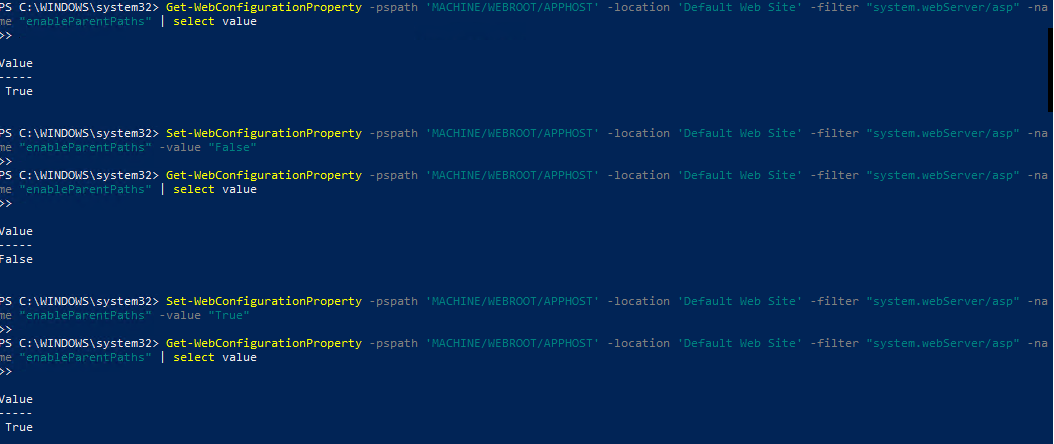
可以使用此powershell命令启用或禁用父路径。只需将值更改为true或false即可。
Set-WebConfigurationProperty -pspath 'MACHINE/WEBROOT/APPHOST' -location 'Default Web Site' -filter "system.webServer/asp" -name "enableParentPaths" -value "False"是。如果您想获得它的配置值,可以使用这个值。
Get-WebConfigurationProperty -pspath 'MACHINE/WEBROOT/APPHOST' -location 'Default Web Site' -filter "system.webServer/asp" -name "enableParentPaths" | select value
页面原文内容由Stack Overflow提供。腾讯云小微IT领域专用引擎提供翻译支持
原文链接:
https://stackoverflow.com/questions/71942696
复制相关文章
相似问题
腾讯云开发者

Copyright © 2013 - 2026 Tencent Cloud. All Rights Reserved. 腾讯云 版权所有
深圳市腾讯计算机系统有限公司 ICP备案/许可证号:粤B2-20090059  粤公网安备44030502008569号
腾讯云计算(北京)有限责任公司 京ICP证150476号 | 京ICP备11018762号