
用于运行时的WorkerConfig :dotnet-孤立的未找到
在VisualStudio2022中创建了一个.NET 6.0隔离函数(带有HTTP触发器)。但是,在本地运行/调试此函数时,请获得以下错误:
Microsoft.Azure.WebJobs.Script: WorkerConfig for runtime: dotnet-isolated not found. Value cannot be null. (Parameter 'provider')
控制台中的错误详细信息:

Local.settings.json:
{
    "IsEncrypted": false,
  "Values": {
    "AzureWebJobsStorage": "UseDevelopmentStorage=true",
    "FUNCTIONS_WORKER_RUNTIME": "dotnet-isolated"
  }
}
host.json:
{
  "version": "2.0",
  "logging": {
    "applicationInsights": {
      "samplingSettings": {
        "isEnabled": true,
        "excludedTypes": "Request"
      }
    }
  }
}
.csproj文件:
<Project Sdk="Microsoft.NET.Sdk">
  <PropertyGroup>
    <TargetFramework>net6.0</TargetFramework>
    <AzureFunctionsVersion>v4</AzureFunctionsVersion>
    <OutputType>Exe</OutputType>
    <ImplicitUsings>enable</ImplicitUsings>
    <Nullable>enable</Nullable>
  </PropertyGroup>
  <ItemGroup>
    <PackageReference Include="Microsoft.Azure.Functions.Extensions" Version="1.1.0" />
    <PackageReference Include="Microsoft.Azure.Functions.Worker.Extensions.Http" Version="3.0.13" />
    <PackageReference Include="Microsoft.Azure.Functions.Worker.Sdk" Version="1.3.0" OutputItemType="Analyzer" />
    <PackageReference Include="Microsoft.Azure.Functions.Worker" Version="1.6.0" />
  </ItemGroup>
  <ItemGroup>
    <None Update="host.json">
      <CopyToOutputDirectory>PreserveNewest</CopyToOutputDirectory>
    </None>
    <None Update="local.settings.json">
      <CopyToOutputDirectory>PreserveNewest</CopyToOutputDirectory>
      <CopyToPublishDirectory>Never</CopyToPublishDirectory>
    </None>
  </ItemGroup>
  <ItemGroup>
    <Using Include="System.Threading.ExecutionContext" Alias="ExecutionContext" />
  </ItemGroup>
</Project>
Program.cs
using Microsoft.Extensions.Hosting;

var host = new HostBuilder()
    .ConfigureFunctionsWorkerDefaults()
    .Build();

host.Run();
项目可在此GitHub Repo:FunctionAppTest中找到。
回答 4
Stack Overflow用户
发布于 2022-04-20 13:05:44
解决方法之一是在应用程序中添加program.cs,并在.csproj中添加以下引用。
<PackageReference Include="Microsoft.Azure.Functions.Worker.Extensions.Http" Version="3.0.13" />
<PackageReference Include="Microsoft.Azure.Functions.Worker.Sdk" Version="1.3.0" OutputItemType="Analyzer" />
<PackageReference Include="Microsoft.Azure.Functions.Worker" Version="1.6.0" />
<PackageReference Include="Microsoft.Azure.WebJobs.Script.ExtensionsMetadataGenerator" Version="4.0.1" />
在运行应用程序之前,请确保尝试删除bin的内容,清除并构建解决方案。
试着检查一下这个相似螺纹。
Stack Overflow用户
发布于 2022-07-25 17:04:05
我也经历过同样的错误信息:
Microsoft.Azure.WebJobs.Script: WorkerConfig用于运行时:dotnet-孤立未找到。
当部署到Azure (在消费计划中,但这似乎是Azure托管的一个一般问题)时也会发生这种情况。
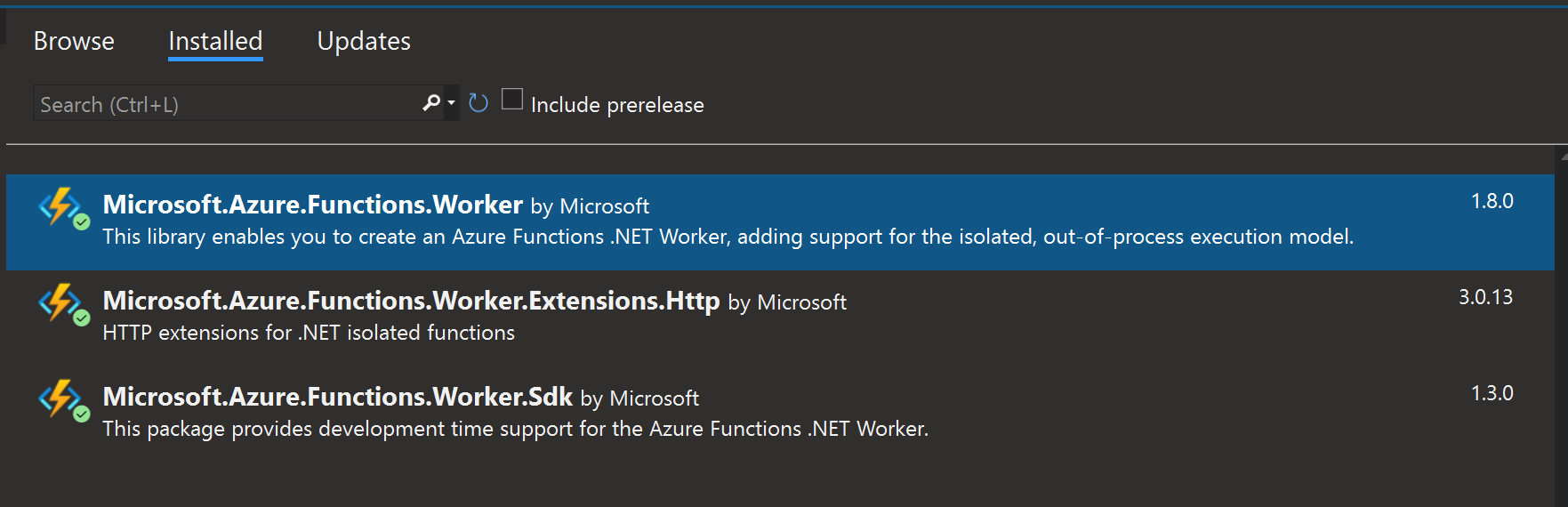
我的解决方案是更新与工作流程相关的nuget包,特别是Microsoft.Azure.Functions.Worker。从函数模板创建的项目最初引用了1.6.0版本,这显示了上述错误;升级到最新版本(在发布时版本为1.8.0 )解决了所有问题。
本地调试和发布到Azure都是成功的,并且该函数的行为与预期相同。
Stack Overflow用户
发布于 2022-10-06 12:51:15
当我在本地运行时,我遇到了这个问题,它实际上是由分支的变化引起的,清洁解决方案为我解决了这个问题。我知道这不是每个人的答案,但希望其他人在抓他们的头时会发现这是有用的:-)。
https://stackoverflow.com/questions/71939139
复制相似问题
腾讯云开发者

Copyright © 2013 - 2026 Tencent Cloud. All Rights Reserved. 腾讯云 版权所有
深圳市腾讯计算机系统有限公司 ICP备案/许可证号:粤B2-20090059  粤公网安备44030502008569号
腾讯云计算(北京)有限责任公司 京ICP证150476号 | 京ICP备11018762号