
/opt/gitlab/embedded/bin/ruby:加载共享库时出错: libstdc++.so.6:无法打开共享对象文件:没有这样的文件或目录
/opt/gitlab/embedded/bin/ruby:加载共享库时出错: libstdc++.so.6:无法打开共享对象文件:没有这样的文件或目录
提问于 2022-04-15 07:25:19
我正试图在我的raspberry pi 4B,4GB型号上安装gitlab-ce。我的操作系统是Raspberry Pi操作系统Lite 64位。从这里获取的安装程序
There was an error running gitlab-ctl reconfigure:

Multiple failures occurred:
* Mixlib::ShellOut::ShellCommandFailed occurred in Chef Infra Client run: runit_service[gitlab-kas] (gitlab-kas::enable line 121) had an error: Mixlib::ShellOut::ShellCommandFailed: ruby_block[restart_log_service] (/opt/gitlab/embedded/cookbooks/cache/cookbooks/runit/libraries/provider_runit_service.rb line 65) had an error: Mixlib::ShellOut::ShellCommandFailed: Expected process to exit with [0], but received '1'
---- Begin output of /opt/gitlab/embedded/bin/sv restart /opt/gitlab/service/gitlab-kas/log ----
STDOUT: timeout: run: /opt/gitlab/service/gitlab-kas/log: (pid 21560) 34s, got TERM
STDERR:
---- End output of /opt/gitlab/embedded/bin/sv restart /opt/gitlab/service/gitlab-kas/log ----
Ran /opt/gitlab/embedded/bin/sv restart /opt/gitlab/service/gitlab-kas/log returned 1
* Mixlib::ShellOut::ShellCommandFailed occurred in delayed notification: execute[clear the gitlab-rails cache] (gitlab::gitlab-rails line 477) had an error: Mixlib::ShellOut::ShellCommandFailed: Expected process to exit with [0], but received '127'
---- Begin output of /opt/gitlab/bin/gitlab-rake cache:clear ----
STDOUT:
STDERR: /opt/gitlab/embedded/bin/ruby: error while loading shared libraries: libstdc++.so.6: cannot open shared object file: No such file or directory
---- End output of /opt/gitlab/bin/gitlab-rake cache:clear ----
Ran /opt/gitlab/bin/gitlab-rake cache:clear returned 127
* Mixlib::ShellOut::ShellCommandFailed occurred in delayed notification: runit_service[gitlab-kas] (gitlab-kas::enable line 121) had an error: Mixlib::ShellOut::ShellCommandFailed: Expected process to exit with [0], but received '1'
---- Begin output of /opt/gitlab/embedded/bin/sv restart /opt/gitlab/service/gitlab-kas ----
STDOUT: timeout: run: /opt/gitlab/service/gitlab-kas: (pid 21561) 65s, got TERM
STDERR:
---- End output of /opt/gitlab/embedded/bin/sv restart /opt/gitlab/service/gitlab-kas ----
Ran /opt/gitlab/embedded/bin/sv restart /opt/gitlab/service/gitlab-kas returned 1
*更新:发布信息:
PRETTY_NAME="Debian GNU/Linux 11 (bullseye)"
NAME="Debian GNU/Linux"
VERSION_ID="11"
VERSION="11 (bullseye)"
VERSION_CODENAME=bullseye
ID=debian
HOME_URL="https://www.debian.org/"
SUPPORT_URL="https://www.debian.org/support"
BUG_REPORT_URL="https://bugs.debian.org/"回答 1
Stack Overflow用户
回答已采纳
发布于 2022-04-19 20:15:01
Raspberry Pi的安装脚本只适用于debian buster。注意,为包指定的发行版/版本是raspbian/buster
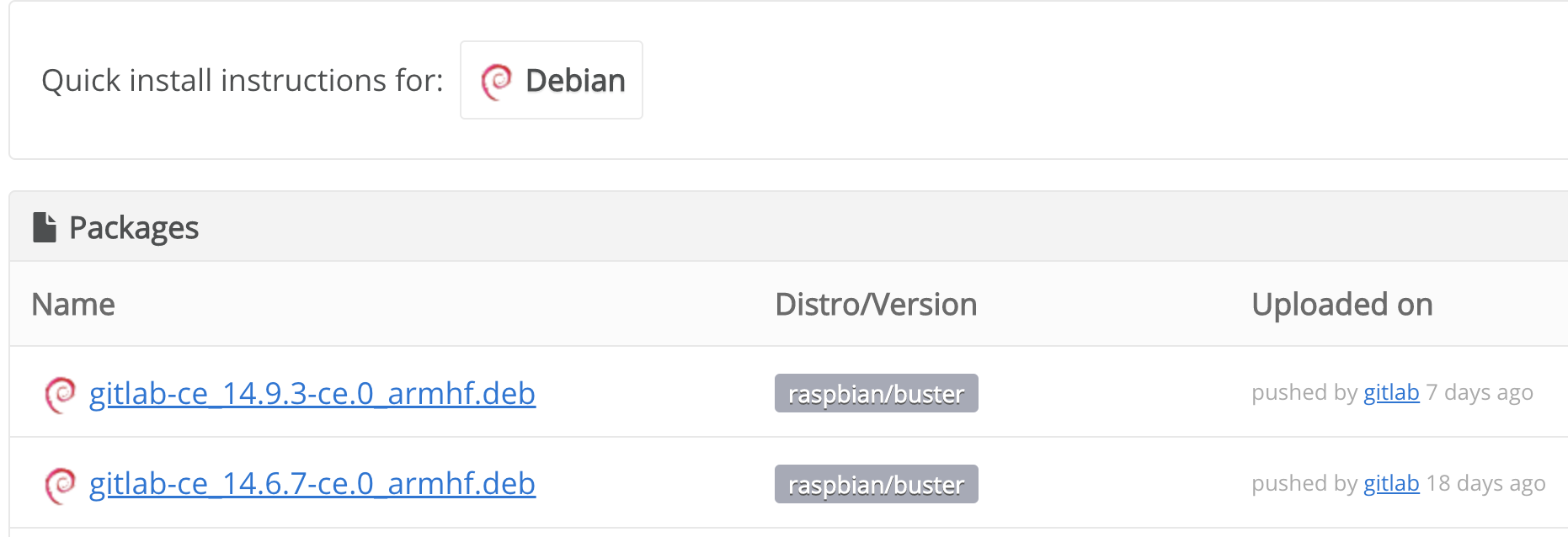
但是,您已经安装了较新版本的raspbian:
PRETTY_NAME="Debian /Linux11(斗牛眼)“
为了使用这个安装脚本,您需要为Raspberry操作系统使用遗留debian破坏程序发行版。
页面原文内容由Stack Overflow提供。腾讯云小微IT领域专用引擎提供翻译支持
原文链接:
https://stackoverflow.com/questions/71881216
复制相关文章
相似问题
腾讯云开发者

Copyright © 2013 - 2026 Tencent Cloud. All Rights Reserved. 腾讯云 版权所有
深圳市腾讯计算机系统有限公司 ICP备案/许可证号:粤B2-20090059  粤公网安备44030502008569号
腾讯云计算(北京)有限责任公司 京ICP证150476号 | 京ICP备11018762号