
在wwwroot中编辑图像
我是mvc的一名程序员,我的目标是使用数据库中的图像,并将其编辑成另一个图像,它不一定存在于我的www.root中,而是存在于我的计算机中。图片:

图像说明:我在数据库中有一个图像,我想编辑它,点击编辑按钮编辑图像:
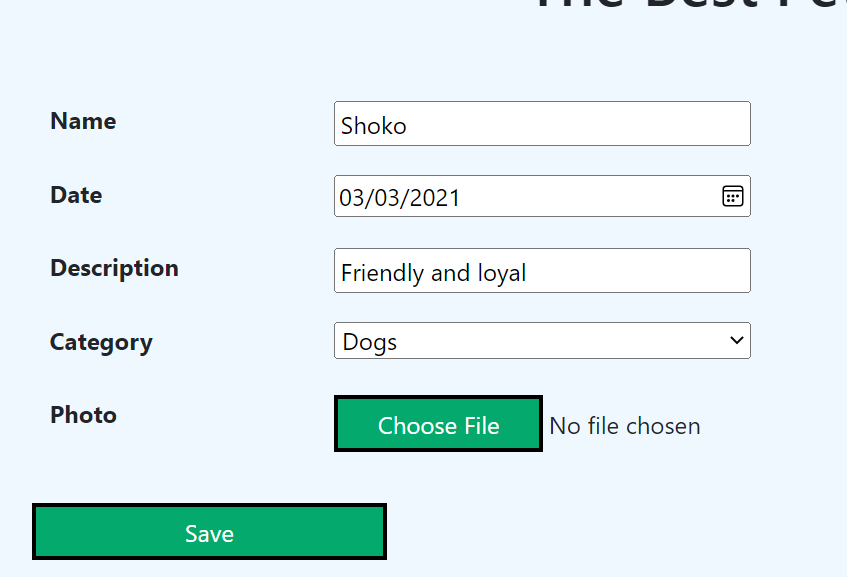
但是,当我按下“保存”按钮时,会得到一个错误: NullReferenceException:Object reference not set to an instance of an object. PetShop.Client.Services.FileService.File(CreateAnimalViewModel model) in FileService.cs var path = Path.Combine(wwwPath, "Images", model.Photo!.FileName); PetShop.Client.Controllers.AdminController.EditAnimal(CreateAnimalViewModel model) in AdminController.cs await _file.File(model);
必须注意,当我尝试向wwwroot添加一个新图像时,服务的代码确实工作,但在编辑时不起作用。
我的服务:
public class FileService : IFileService
{
    private readonly IWebHostEnvironment _environment;
    public FileService(IWebHostEnvironment environment)
    {
        _environment = environment;
    }
    public async Task<string> File([FromForm] CreateAnimalViewModel model)
    {
        string wwwPath = _environment.WebRootPath;
        var path = Path.Combine(wwwPath, "Images", model.Photo!.FileName);
        if (model.Photo.Length > 0)
        {
            using var stream = new FileStream(path, FileMode.Create);
            await model.Photo.CopyToAsync(stream);
        }
          return model.Animal!.PhotoUrl = model.Photo.FileName;
    }
}
public interface IFileService
{
    Task<string> File([FromForm] CreateAnimalViewModel model);
}
我的ViewModel:
public class CreateAnimalViewModel
{
    public Animal? Animal { get; set; }
    public IFormFile Photo { get; set; }
}
我的财务主任:
public async Task<IActionResult> EditAnimal(int id)
    {
        var animal = await _repo.FindAnimalById(id);
        ViewBag.Category = new SelectList(_repository.GetCategoriesTable(), "CategoryId", "Name");
        return View(new CreateAnimalViewModel() { Animal = animal});
    }

    [HttpPost]
    [ValidateAntiForgeryToken]
    public async Task<IActionResult> EditAnimal([FromForm] CreateAnimalViewModel model)
    {
        ModelState.Clear();
        TryValidateModel(model);

        await _file.File(model);

        if (!ModelState.IsValid)
        {
            await _repo.EditAnimal(model.Animal!);
            return RedirectToAction(nameof(Manager));
        }
        return View();
    }
我的观点:
@model PetShop.Client.Models.CreateAnimalViewModel

<div >
<form asp-action="EditAnimal" method="post" >
    <div asp-validation-summary="ModelOnly"></div><input type="hidden" asp-for="Animal!.AnimalId" id="Space"/>
<dl class="row" >
    <dt class = "col-sm-2"><label asp-for="Animal!.Name" id="Space"></label></dt>
    <dd class = "col-sm-10"><input asp-for="Animal!.Name"/><span asp-validation-for="Animal!.Name" ></span></dd>
    <dt class = "col-sm-2"><label asp-for="Animal!.BirthDate" id="Space"></label></dt>
    <dd class = "col-sm-10"><input asp-for="Animal!.BirthDate"/><span asp-validation-for="Animal!.BirthDate"></span></dd>
    <dt class = "col-sm-2"><label asp-for="Animal!.Description" id="Space"></label></dt>
    <dd class = "col-sm-10"><input asp-for="Animal!.Description"/><span asp-validation-for="Animal!.Description"></span></dd>
    <dt class = "col-sm-2"><label asp-for="Animal!.CategoryId" id="Space"></label></dt>
    <dd class = "col-sm-10"><select asp-for="Animal!.CategoryId" asp-items="ViewBag.Category"></select><span asp-validation-for="Animal!.CategoryId"></span></dd>
    <dt class = "col-sm-2"><label asp-for="Photo"></label></dt>
    <dd class = "col-sm-10"><input type="file" asp-for="Photo" accept="image/*"/>
    <span asp-validation-for="Photo"></span></dd>
    <br/> <br/> <br/>
    <input type="submit" value="Save" id="ButtonDesign"/>
</dl>
</form>
<a asp-action="Commands"><input type="submit" value="Back to Admin Page" id="BackPageButton"/></a>考虑到,我只显示文件的一部分,所有其他事情都与问题无关,
编辑发布仓库:
 public async Task<int> AddAnimal(Animal animal)
    {
        _context.Add(animal!);
        return await _context.SaveChangesAsync();
    }

    public async Task<int> EditAnimal(Animal animal)
    {
        _context.Update(animal);
        return await _context.SaveChangesAsync();
    }

public DbSet<Category> GetCategories()
    {
        var category = _context.Categories;
        return category;
}回答 1
Stack Overflow用户
发布于 2022-04-15 18:34:47
让我们从下面的错误代码开始,
FromForm In EditAnimal Post方法:
您正在提交[FormBody],但在这里您正在接收[FromForm],这是空引用异常的原因之一。在您的情况下,您不需要使用它,而是可以直接使用class。
照片在控制器中没有处理程序
您正在从视图中发送图像文件。但是你的控制器没有任何处理程序。它应该有IFormFile类型来接收图像。
大错特错:
    [HttpPost]
    [ValidateAntiForgeryToken]
    public async Task<IActionResult> EditAnimal([FromForm] CreateAnimalViewModel model)
    {

    }
基于您正确的设计和架构,这是不正确的方法。
正确方式:
    [HttpPost]
    [ValidateAntiForgeryToken]
    public async Task<IActionResult> EditAnimal(CreateAnimalViewModel model, IFormFile photo)
    {
        if (photo == null || photo.Length == 0)
        {
            return Content("File not selected");
        }
        var path = Path.Combine(_environment.WebRootPath, "images", photo.FileName);
        using (FileStream stream = new FileStream(path, FileMode.Create))
        {
            await photo.CopyToAsync(stream);
            stream.Close();
        }

        model.Animal!.PhotoUrl = model.Photo!.FileName;


        // Find the existing data
        var objAnimal = _context.Animals.Where(aId => aId.AnimalId == model.Animal.AnimalId).FirstOrDefault();


       if(model != null)
        {
            //Update the date with new value
            objAnimal!.AnimalId = model.Animal.AnimalId;
            objAnimal.Name = model.Animal.Name;
            objAnimal.Category = model.Animal.Category;
            objAnimal.Description = model.Animal.Description;
            objAnimal.PhotoUrl = model.Animal.PhotoUrl;
            _context.SaveChanges();
        }


        return RedirectToAction("Edit", new { id = model!.Animal.AnimalId });

}加载时的编辑方法:
public async Task<IActionResult> Edit(int id)
        {
            var animal = await _context.Animals.FindAsync(id);
            ViewBag.Category = new SelectList(_repository.GetCategoriesTable(), "CategoryId", "Name");
            return View(new CreateAnimalViewModel() { Animal = animal, DisplayPhoto = animal!.PhotoUrl });

}这里您犯了另一个错误,您没有必要使用CreateAnimalViewModel,而是可以直接返回Animal Model,因为在这种情况下,您决定使用CreateAnimalViewModel,即您将Animal domain class绑定到CreateAnimalViewModel中的方式--您将失去PhotoUrl --所以在这里,我在视图模型中引入了另一个属性,以避免额外的修改,我将使用它在view上加载图像。
因此,更新的CreateAnimalViewModel将是:
public class CreateAnimalViewModel
    {
        public Animal? Animal { get; set; }
        public string? DisplayPhoto { get; set; }
        public IFormFile? Photo { get; set; }
}如果可以对此ViewModel使用单个view --在这种情况下,也不需要IFormFile? Photo property --则可以直接绑定视图中的image。但我没有修改你现有的任何东西。
用于加载编辑动物的视图:
@model DotNet6MVCWebApp.Models.CreateAnimalViewModel
<div>
    <form asp-action="EditAnimal" method="post" enctype="multipart/form-data">
        <div asp-validation-summary="ModelOnly"></div><input type="hidden" asp-for="Animal!.AnimalId" id="Space" />
        <div>
            <h4><strong>Animal Details</strong> </h4>

            <table class="table table-sm table-bordered table-striped">

                <tr>
                    <th> <label asp-for="Animal!.Name"></label></th>
                    <td> <input asp-for="Animal!.Name" class="form-control" placeholder="Enter animal name" /><span asp-validation-for="Animal!.Name"></span></td>
                </tr>
                <tr>
                    <th> <label asp-for="Animal!.Description"></label></th>
                    <td> <input asp-for="Animal!.Description" class="form-control" placeholder="Enter animal description" /><span asp-validation-for="Animal!.Description"></span></td>
                </tr>
                <tr>
                    <th> <label asp-for="Animal!.Category"></label></th>
                    <td> <input asp-for="Animal!.Category" class="form-control" placeholder="Enter animal category" /><span asp-validation-for="Animal!.Category"></span></td>
                </tr>
                <tr>
                    <th> <label asp-for="Photo"></label></th>
                    <td>
                        <img src="~/images/@Model.Animal!.PhotoUrl"
                             class="rounded-square"
                             height="50" width="75"
                             style="border:1px"
                             asp-append-version="true" accept="image/*" />
                        <input type="file" name="photo" accept="image/*" />

                    </td>
                </tr>
                <tr>
                    <th>  <button type="submit" class="btn btn-primary" style="width:107px" >Update</button></th>
                    <td> </td>
                </tr>
                <tr>
                    <th>@Html.ActionLink("Back To List", "Index", new { /* id=item.PrimaryKey */ }, new { @class = "btn btn-success" })</th>
                    <td> </td>
                </tr>
            </table>
        </div>
    </form>

</div>
最终输出:
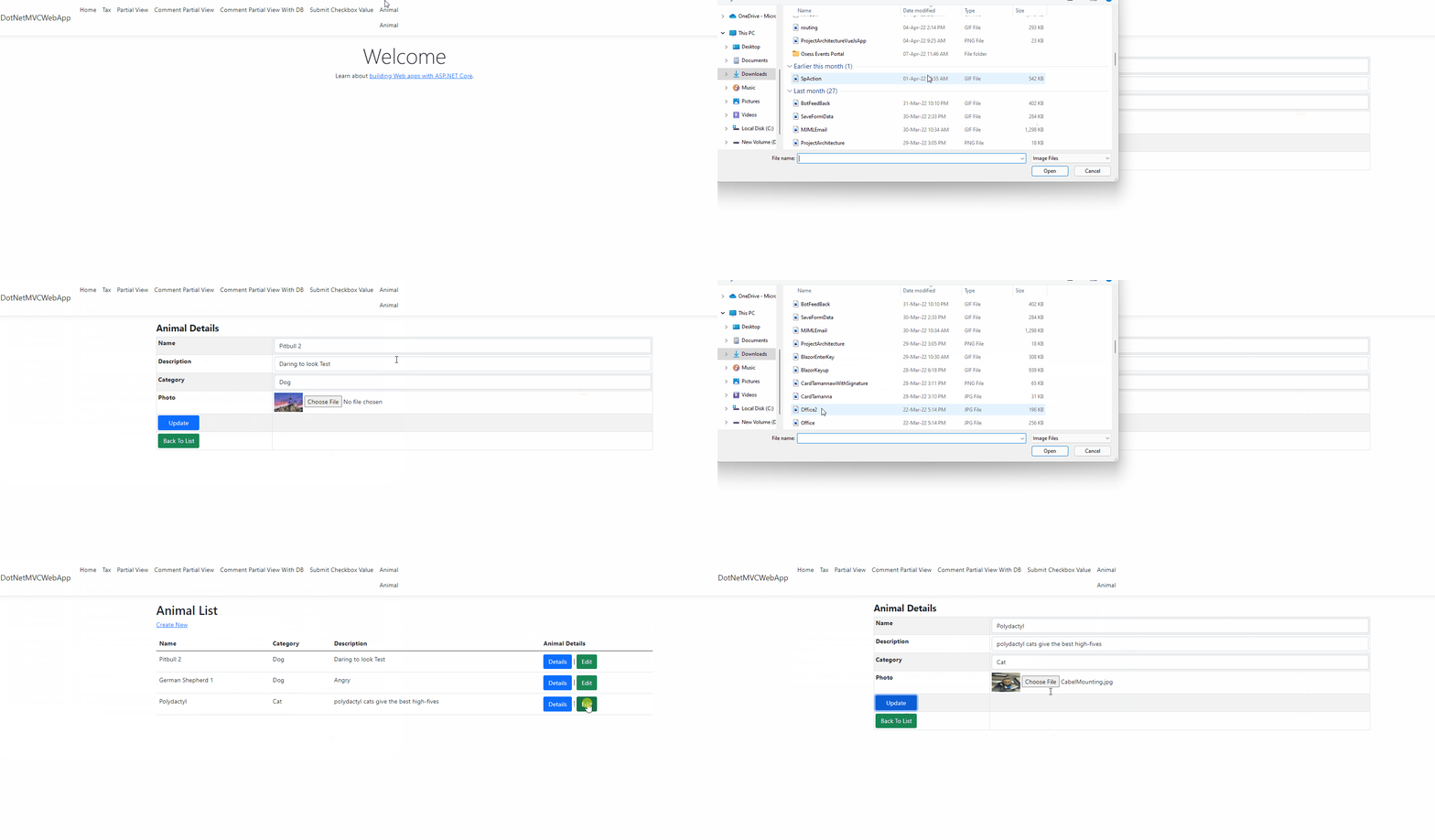
这应该可以修复您的异常。
https://stackoverflow.com/questions/71881214
复制相似问题
腾讯云开发者

Copyright © 2013 - 2026 Tencent Cloud. All Rights Reserved. 腾讯云 版权所有
深圳市腾讯计算机系统有限公司 ICP备案/许可证号:粤B2-20090059  粤公网安备44030502008569号
腾讯云计算(北京)有限责任公司 京ICP证150476号 | 京ICP备11018762号