
移动和桌面中的倒置背景色
因此,我是一个新手,对三个,基本上已经开始学习和发展的三个。我理解,由于移动浏览器的局限性,桌面上可能存在一些不存在于移动浏览器上的特性。然而,我遇到了一个问题,我似乎没有谷歌,也找不到为什么会发生这种情况。我创造了一个非常基本的场景,背景颜色为‘0x000000’,在这个场景中,我有一个以线框为材质的球体,它的颜色被设置为白色。在桌面上,这呈现完美,并显示准确的黑色背景场景与白色球体几何。然而,一旦我在一个域上部署测试并通过移动访问它,场景和球体颜色就会完全颠倒。我仍不清楚是什么原因造成的,任何答案都将不胜感激。提前感谢!
下面的代码是我如何创建一个画布、一个场景和一个球体。
import "../css/style.css";
import * as THREE from "three";
import { OrbitControls } from "three/examples/jsm/controls/OrbitControls.js";
import * as dat from "dat.gui";

// Debug
// const gui = new dat.GUI();

// Canvas
const canvas = document.querySelector("canvas.main-bg");

// Scene
const scene = new THREE.Scene();

scene.background = new THREE.Color(0x000000);

// Objects
const geometry = new THREE.SphereBufferGeometry(0.5, 15, 8);

// Materials
const material = new THREE.MeshBasicMaterial({
  color: 0xffffff,
  wireframe: true,
});

// Mesh
const sphere = new THREE.Mesh(geometry, material);

// Lights

// Point light
const pointLight = new THREE.PointLight(0x252525, 0.1);
pointLight.position.x = 2;
pointLight.position.y = 3;
pointLight.position.z = 4;
scene.add(pointLight);

// Sizes
const sizes = {
  width: window.innerWidth,
  height: window.innerHeight,
};

window.addEventListener("resize", () => {
  // Update sizes
  sizes.width = window.innerWidth;
  sizes.height = window.innerHeight;

  // Update camera
  camera.aspect = sizes.width / sizes.height;
  camera.updateProjectionMatrix();

  // Update renderer
  renderer.setSize(sizes.width, sizes.height);
  renderer.setPixelRatio(Math.min(window.devicePixelRatio, 2));
});

// Base camera
const camera = new THREE.PerspectiveCamera(
  75,
  sizes.width / sizes.height,
  0.1,
  100
);
camera.position.x = 0;
camera.position.y = 0;
camera.position.z = 2;
scene.add(camera);

// Controls
// const controls = new OrbitControls(camera, canvas)
// controls.enableDamping = true

// Renderer
const renderer = new THREE.WebGLRenderer({
  canvas: canvas,
});
renderer.setSize(sizes.width, sizes.height);
renderer.setPixelRatio(Math.min(window.devicePixelRatio, 2));

const clock = new THREE.Clock();

const animate = () =>
  const elapsedTime = clock.getElapsedTime();

  // Update objects
  sphere.rotation.y = -0.2 * elapsedTime;
  sphere2.rotation.y = 0.1 * elapsedTime;
  sphere3.rotation.x = 0.7 * elapsedTime;
  sphere.rotation.x += 0.5 * (targetY - sphere.rotation.x);
  sphere.rotation.y += 0.5 * (targetX - sphere.rotation.y);
  sphere.position.z += -0.5 * (targetY - sphere.rotation.x);

  // Render
  renderer.render(scene, camera);

  // Call animate again on the next frame
  window.requestAnimationFrame(animate);
};

animate();除此之外,没有什么能改变scene.background的颜色。这就是它在桌面上的样子。桌面图像
这就是它在手机上的样子。莫比尔县。
没有任何其他设置的画布颜色,但颜色是倒置在移动,任何帮助都是非常感谢的!谢谢
回答 1
Stack Overflow用户
发布于 2022-04-14 18:03:34
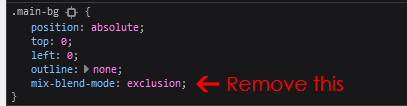
您已经将CSS规则mix-blend-mode: exclusion添加到<canvas>中。出于某种原因,Safari是唯一尊重这一规则的浏览器,这也是它在手机上显示倒置颜色的原因。
如果你想要一个带有白色线框的黑色背景,只要去掉CSS中的混合模式,你就可以得到你定义的颜色。
https://stackoverflow.com/questions/71870623
复制相似问题
腾讯云开发者

Copyright © 2013 - 2026 Tencent Cloud. All Rights Reserved. 腾讯云 版权所有
深圳市腾讯计算机系统有限公司 ICP备案/许可证号:粤B2-20090059  粤公网安备44030502008569号
腾讯云计算(北京)有限责任公司 京ICP证150476号 | 京ICP备11018762号