
Laravel扩展功能:扩展未在div中显示
Laravel扩展功能:扩展未在div中显示
提问于 2022-04-14 07:32:46
我正在使用Laravel8,并希望在我的主视图中扩展另一个视图。我创建了一个新的div,当我在浏览器中运行它时,扩展没有正确显示。我测试添加标题1,标题1在顶部,然后延伸在底部。
<!DOCTYPE html>
<html lang="en">

<head>
<meta charset="UTF-8">
<meta name="viewport" content="width=device-width, initial-scale=1.0">
<meta http-equiv="X-UA-Compatible" content="ie=edge">
<title>Document</title>
<style>
    .header {
        background-color: aquamarine;
        height: 100px;
    }

    h5 {
        height: 50px;
    }

    .main {
        background-color: beige;
        height: 600px;
        display: flex;
        flex-direction: row;
    }


    .footer {
        background-color: #bdf7f1;
        height: 80px;
    }


    .slideleft {
        /* position: fixed; */
        width: 200px;
        top: 100;
        left: 0;
        bottom: 80;
        height: 600px;
        background-color: #f5bdf7;
        padding-top: 20px;
        padding-bottom: 5px;
    }

    .slideleft tbody {
        flex-direction: column-reverse;

    }

    .header h5 {
        float: right;
        height: 20px;
    }

    .center {
        display: flex;
        flex-direction: row;
        width: 50px;
    }

</style>


@livewireStyles
</head>

<body>
<div class="header">
    <div class="logo">
        <img width="100" src="shorturl.at/irNPS"
            alt="">
    </div>
    <div>

        <h5>Addres Book</h5>
    </div>

</div>
<div class="main">


    <div class="slideleft">
        <div class="upper">
            <a href="{{ route('addstudents') }}" class="btn btn-sm btn-primary" style="text-align: center;">
                <button>Add New Contact</button>
            </a>
        </div>

        <tbody>
            @if ($students->count() > 0)
                @foreach ($students as $student)
                    <tr>
                        {{-- <a href=" "></a> --}}
                        <a href="{{ route ('editstudents', ['id' => $student->id]) }}" wire:click="$emit('showedit')" class="btn btn-sm btn-secondary"
                            style="padding: 1px 8px;">
                            <td>{{ $student->name }}</td>
                        </a>
                    </tr>
                @endforeach
            @else
                <tr>
                    <td colspan="5" style="text-align: center;">No students found!</td>
                </tr>
            @endif
        </tbody>

    </div>

    <div class="center">
        <h1>check</h1>
        @extends('livewire.crud.add-student-component')
        {{-- @section('check')

            @endsection --}}
    </div>
</div>
<div class="footer">

</div>

@livewireScripts
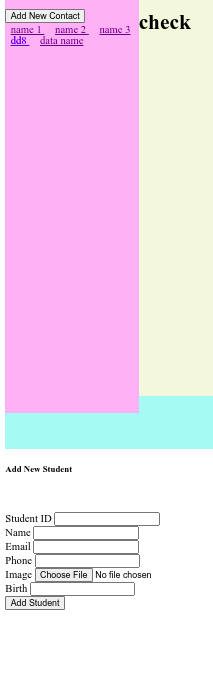
我是一个编辑来配置样式,但仍然不起作用。另一个视图的宽度太大,导致视图在底部显示。如何正确地写出所有div显示良好的内容?
回答 1
Stack Overflow用户
发布于 2022-04-14 07:38:29
看起来您需要一个“包含”,而不是“扩展”。
页面原文内容由Stack Overflow提供。腾讯云小微IT领域专用引擎提供翻译支持
原文链接:
https://stackoverflow.com/questions/71867978
复制相关文章
相似问题
腾讯云开发者

Copyright © 2013 - 2026 Tencent Cloud. All Rights Reserved. 腾讯云 版权所有
深圳市腾讯计算机系统有限公司 ICP备案/许可证号:粤B2-20090059  粤公网安备44030502008569号
腾讯云计算(北京)有限责任公司 京ICP证150476号 | 京ICP备11018762号