
使用LazyVStack/ForEach的SectionedFetchRequest无法正确更新
(修改后的标题和添加了联系人列表示例,其中包含列表和LazyVStack/ForEach之间的代码和行为差异。)
在导航视图/LazyVStack中,来自@FetchRequest的互斥ForEach循环组查询结果。当实体修改使其“切换”组时,核心数据将被更新,该实体将显示在适当的组中,但该实体具有先前的数据。
代码示例创建两个组: 1)以A到M内的字母开头的单词,2)以N到Z内的字母开头的单词。把"A“改成"Z”。该实体现在出现在另一个适当的组中,但与前面的单词一起出现。
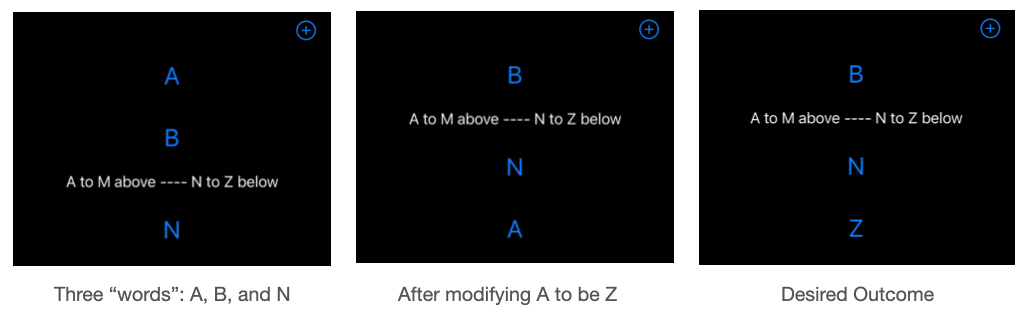
其他主要意见:
- 选择刚换的词.从"A“到"Z”的例子.打开ModifyView (通过NavigationLink)显示以前的数据.一个"A“而不是”Z“。
- 将LazyVStack转换为VStack会产生想要的行为:更改将正确显示,在适当的LazyVStack中,应用程序(在iOS中滑动)并重新打开会产生所需的行为:更改将正确显示,并在正确的部分中显示。
- 都会更新不会导致组更改的单词。例如,从B更改为C或从N更改为O。
struct List: View {
   @FetchRequest(
      sortDescriptors: [SortDescriptor(\Entity.name_, order: .forward)]
   ) var allEntities: FetchedResults<Entity>
   @State var showAddView = false

   var body: some View {
      NavigationView {
         ScrollView {
            LazyVStack {   // Works as expected if VStack
               // First ForEach: first half of alphabet
               ForEach(allEntities.filter { fh in fh.firstHalfOfAlphabet() })
               { entity in
                  NavigationLink(destination: Modify(entity: entity)) {
                     Text(entity.name).font(.title).padding()
                  }
               }
               Text("A to M above ---- N to Z below")
               // Second ForEach: second half of alphabet
               ForEach(allEntities.filter { sh in !sh.firstHalfOfAlphabet() })
               { entity in
                  NavigationLink(destination: Modify(entity: entity)) {
                     Text(entity.name).font(.title).padding()
                  }
               }
            }
         }
         .navigationBarTitleDisplayMode(.inline)
         .sheet(isPresented: $showAddView) { New() }
         .toolbar {
            ToolbarItem() {
               Button(action: { showAddView = true },
                      label: { Image(systemName: "plus.circle") }
               )
            }
         }
      }
   }
}
修改实体的代码:
struct Modify: View {
   @ObservedObject var entity: Entity
   @Environment(\.managedObjectContext) var moc
   @State var theName: String // Local working value
   @Environment(\.dismiss) var dismiss

   init(entity: Entity) {
      self.entity = entity
      _theName = State<String>(initialValue: entity.name)
   }

   var body: some View {
      VStack {
         TextField("Name", text: $theName).padding()
         HStack {
            Button("Save") {
               entity.name = theName   // Update @ObservedObject
               try? moc.save()         // Save to database
               dismiss()
            }
         }
      }.font(.title)
   }
}核心数据数据库将单个条目name_作为字符串。助手代码:
extension Entity {
   var name: String {
      get { return name_ ?? "Unknown" }
      set { name_ = newValue }
   }
}

extension Entity: Comparable {
   // Compares first letters of the names to determine "smallest" name
   public static func < (lhs: Entity, rhs: Entity) -> Bool {
      return lhs.name < rhs.name
   }

   func firstHalfOfAlphabet() -> Bool {
      if self.name.first!.uppercased() < "N" { return true }
      else { return false }
   }
}
新内容。实现@SectionedFetchRequest,如下面的代码所示。然而,上述“其他关键意见”仍然适用。例如,使用LazyVStack (而不是VStack)是有问题的,因为如果修改会导致从前半部分切换到字母表的下半部分,则不会反映更新。就好像使用LazyVStack提供了“没有更新的理由”这样的更改。
struct List: View {
   @SectionedFetchRequest<Bool, Entity>(
      sectionIdentifier: \.firstHalfOfAlphabet,
      sortDescriptors: [SortDescriptor(\.name_, order: .forward)]
   ) private var sectionedEntities

   @State var showAddView = false

   var body: some View {
      NavigationView {
         ScrollView {
            LazyVStack {   // Works as expected if VStack
               ForEach(sectionedEntities) { section in
                  Section(header: HeaderView(sectionId: section.id)) {
                     ForEach(section) { entity in
                        NavigationLink(destination: Modify(entity: entity)) {
                           Text(entity.name).font(.title).padding()
                        }
                     }
                  }
               }
            }
            .navigationBarTitleDisplayMode(.inline)
            .sheet(isPresented: $showAddView) { New() }
            .toolbar {
               ToolbarItem() {
                  Button(action: { showAddView = true },
                         label: { Image(systemName: "plus.circle") }
                  )
               }
            }
         }
      }
   }
}
联系人名单更新。为了显示问题的相关性而增加的。使用SectionedFetchRequest完成联系人列表有两种方法: 1.使用列表(有效);2.使用LazyVStack和ForEach (某些更新失败)。
使用列表的
- 联系人列表
struct ContentView: View {
    @SectionedFetchRequest<String, Contact>(
        sectionIdentifier: \.lastNameInitial,
        sortDescriptors: [
            NSSortDescriptor(keyPath: \Contact.lastName, ascending: true),
            NSSortDescriptor(keyPath: \Contact.firstName, ascending: true),
        ]
    ) var sectionedContacts

    var body: some View {
        NavigationView {
            List(sectionedContacts) { section in
                Section(header: Text("Lastnames with '\(section.id)'")) {
                    ForEach(section) { contact in
                        NavigationLink(destination: ModifyContact(contact: contact)) {
                            ContactView(contact: contact)
                        }
                    }
                }
            }
        }
    }
}
Lastname修改行为:
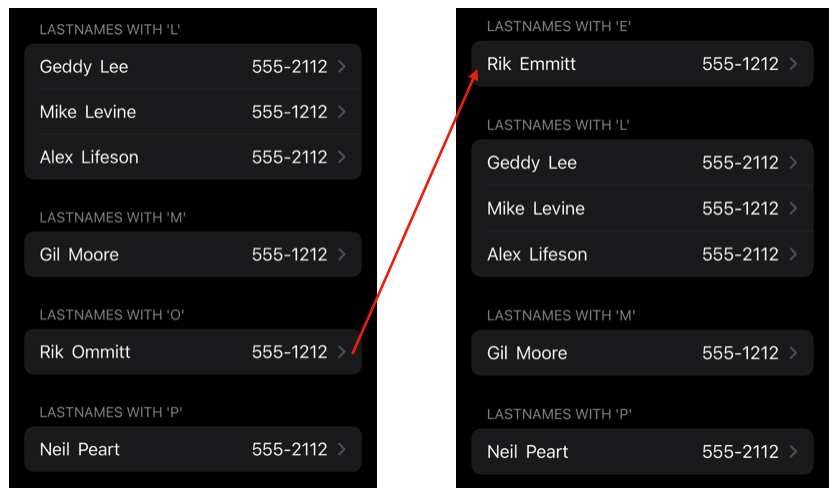
结果:将Ommitt修改为Emmitt,更新名称,并正确地转到“E”部分。
使用
- 联系人列表LazyVStack和ForEach
struct ContentView: View {
   @SectionedFetchRequest<String, Contact>(
      sectionIdentifier: \.lastNameInitial,
      sortDescriptors: [
         NSSortDescriptor(keyPath: \Contact.lastName, ascending: true),
         NSSortDescriptor(keyPath: \Contact.firstName, ascending: true),
      ]
   ) var sectionedContacts

   var body: some View {
      NavigationView {
         LazyVStack {
            ForEach(sectionedContacts) { section in
               Section(header: Text("Lastnames '\(section.id)'")) {
                  ForEach(section) { contact in
                     NavigationLink(destination: ModifyContact(contact: contact)) { ContactView(contact: contact)
                     }
                  }
               }
            }
         }
      }
   }
}
Lastname修改行为:
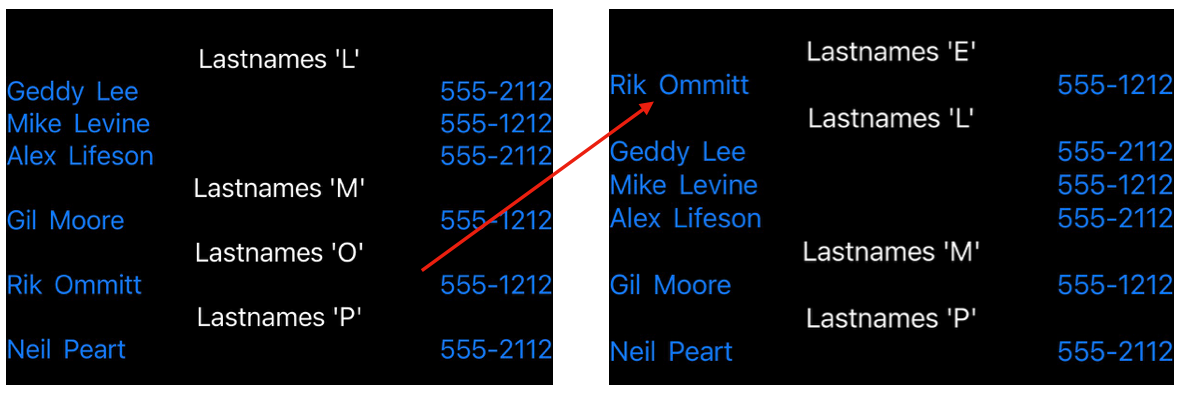
结果:将Ommitt修改为Emmitt并不显示名称更新,而是正确地转到“E”部分。
注意:当更改姓氏的第一个字母时,即使联系人被正确分割(如上面所示),也不会出现姓氏、姓名或电话号码的可视更新。不更改姓氏的第一个字母,所有字段都将正确显示。
回答 1
Stack Overflow用户
发布于 2022-04-18 20:00:10
当对导致项节中的更改的基础数据进行更改时,将SectionedFetchRequest与LazyVStack配对无法正确更新。
上述替代工作实例可视为解决办法:
- 使用VStack而不是LazyVStack。一个缺点是VStack没有提供令人浮躁的抓取。
- 使用列表而不是LazyVStack。在这里,您会懒洋洋地抓取,但可能不是所需的“外观”。
另一个解决方法是:对于给定项的更新,如果该更新将导致部分中的切换,而不是更新,请执行“删除”,然后为该更改的实体创建。这种方法适用于上面的SectionedFetchRequest/LazyVStack示例,并适用于我正在开发的应用程序的代码。
https://stackoverflow.com/questions/71850248
复制相似问题
腾讯云开发者

Copyright © 2013 - 2026 Tencent Cloud. All Rights Reserved. 腾讯云 版权所有
深圳市腾讯计算机系统有限公司 ICP备案/许可证号:粤B2-20090059  粤公网安备44030502008569号
腾讯云计算(北京)有限责任公司 京ICP证150476号 | 京ICP备11018762号