
将borderRadius添加到AnnotationLabel
将borderRadius添加到AnnotationLabel
提问于 2022-04-12 07:32:09
我用的是react简单的地图和react注释。
现在,我的annotationsLabel看起来是下面的第一个图像:
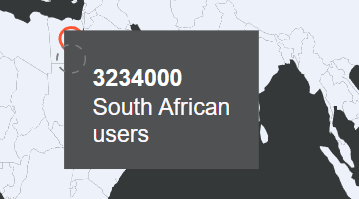
我想要做的是添加borderRadius,使标签看起来像下面的图像:
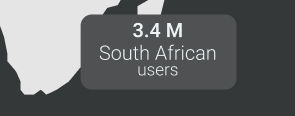
我已经阅读了react注释文档中的相关上下文,但是,我没有发现将borderRadius添加到注释标签中。
下面是我需要插入的相关代码:
import {
    Marker, Annotation, AnnotationProps
  } from "react-simple-maps";
import AnnotationBadge from 'react-annotation/lib/Types/AnnotationBadge';
import {EditableAnnotation,ConnectorEndArrow, ConnectorCurve, Note, AnnotationLabel} from 'react-annotation'
const useStyles = makeStyles((theme) => ({
    root: {
        "&.MuiCard-root": {
          padding: theme.spacing(5),
          background: "#353839",
          borderRadius: theme.spacing(1),
          textAlign: "center",
          width: '80%',
          height: 600,
          marginLeft: 80,
          marginTop: 100
        },
        '& .annotation-note-bg': {
            fillOpacity: 1,
            fill: '#4F5152',
            borderRadius: 8

          },
      },
    }))
const geoUrl =
  "https://raw.githubusercontent.com/zcreativelabs/react-simple-maps/master/topojson-maps/world-110m.json";
const Map = () => {
    const classes = useStyles();
    const theme = useTheme();
    const multiLine2 = `1️⃣first
2️⃣second`;
    // const user = 'users';
    return(
    <Card className={classes.root}>
    <ComposableMap>
      <Geographies geography={geoUrl}>
        {({ geographies }) =>
          geographies.map(geo =>
          <Geography
          fill={theme.palette.primary.main}
          key={geo.rsmKey}
          geography={geo} />)
        }
      </Geographies>
      {markers.map((item) => (
        <Marker key={item.id} coordinates={item.coordinates}>
          <AnnotationLabel
  color={"#fcf9fd"}
  className="show-bg"
  editMode={true}

  note={{
      "title": item.users.toString(),
    "label": `${item.name}
    ${'users'}`,
    "align":"dynamic",
    "textAlign": "center",
    "orientation":"leftRight" ,
    "bgPadding":20,
    "padding":15,
    "titleColor":"#ffffff",
}}

/>


        </Marker>
      ))}
    </ComposableMap>
  </Card>
    );
  };
export default Map;
请看下面的沙箱链接,我已经创建了。这将向你展示我所做的一切,我希望它能让你更好地了解正在发生的事情。
https://codesandbox.io/s/nice-austin-sco6gb?file=/src/App.js
回答 1
Stack Overflow用户
回答已采纳
发布于 2022-04-12 11:54:59
它是一个rect元素。您需要给它一个rx属性来给它圆角。
页面原文内容由Stack Overflow提供。腾讯云小微IT领域专用引擎提供翻译支持
原文链接:
https://stackoverflow.com/questions/71838732
复制相关文章
相似问题
腾讯云开发者

Copyright © 2013 - 2026 Tencent Cloud. All Rights Reserved. 腾讯云 版权所有
深圳市腾讯计算机系统有限公司 ICP备案/许可证号:粤B2-20090059  粤公网安备44030502008569号
腾讯云计算(北京)有限责任公司 京ICP证150476号 | 京ICP备11018762号