
在为Linux构建我的.deb应用程序时,如何设置创建的Electron.NET文件的文件名?
在为Linux构建我的.deb应用程序时,如何设置创建的Electron.NET文件的文件名?
提问于 2022-04-11 20:20:17
这是我的electron.manifest.json
{
    "executable": "MyApplication.UI",
    "splashscreen": {
        "imageFile": "/wwwroot/assets/Animation.svg"
    },
    "author": "MyCompany",
    "environment": "Production",
    "singleInstance": false,
    "build": {
        "appId": "com.mycompany.myapplication",
        "productName": "MyApplication",
        "copyright": "Copyright @ 2022",
        "buildVersion": "2022.1.0",
        "compression": "maximum",
        "fileAssociations": [
            {
                "ext": "sdg",
                "name": "MyApplication File",
                "role": "Editor"
            }
        ],
        "publish": {
            "provider": "generic",
            "url": "https://mydomain.io/Installer/MyApplication/",
            "channel": "latest"
        },
        "nsis": {
            "allowToChangeInstallationDirectory": true,
            "oneClick": false,
            "perMachine": true,
            "installerIcon": "bin/Assets/icon.ico",
            "uninstallerIcon": "bin/Assets/icon.ico",
            "installerHeaderIcon": "bin/Assets/icon.ico",
            "menuCategory": true
        },
        "win": {
            "target": [
                "nsis"
            ],
            "icon": "Assets/icon.ico"
        },
        "linux": {
            "target": "deb",
            "maintainer": "MyCompany",
            "vendor": "MyCompany",
            "synopsis": "MyApplication",
            "executableName": "MyApplication",
            "description": "Doing some magic.",
            "category": "Development",
            "icon": "./../../Assets/Icons/32x32.png"
        },
        "directories": {
            "output": "../../../bin/Installer",
            "buildResources": "Assets"
        },
        "extraResources": [
            {
                "from": "./bin",
                "to": "bin",
                "filter": [
                    "**/*"
                ]
            }
        ],
        "files": [
            {
                "from": "./ElectronHostHook/node_modules",
                "to": "ElectronHostHook/node_modules",
                "filter": [
                    "**/*"
                ]
            },
            "**/*"
        ]
    }
}在为linux构建时创建的.deb文件称为electron-net_{version}.deb。这不是问题,但在执行时,会显示应用程序名electron-net。
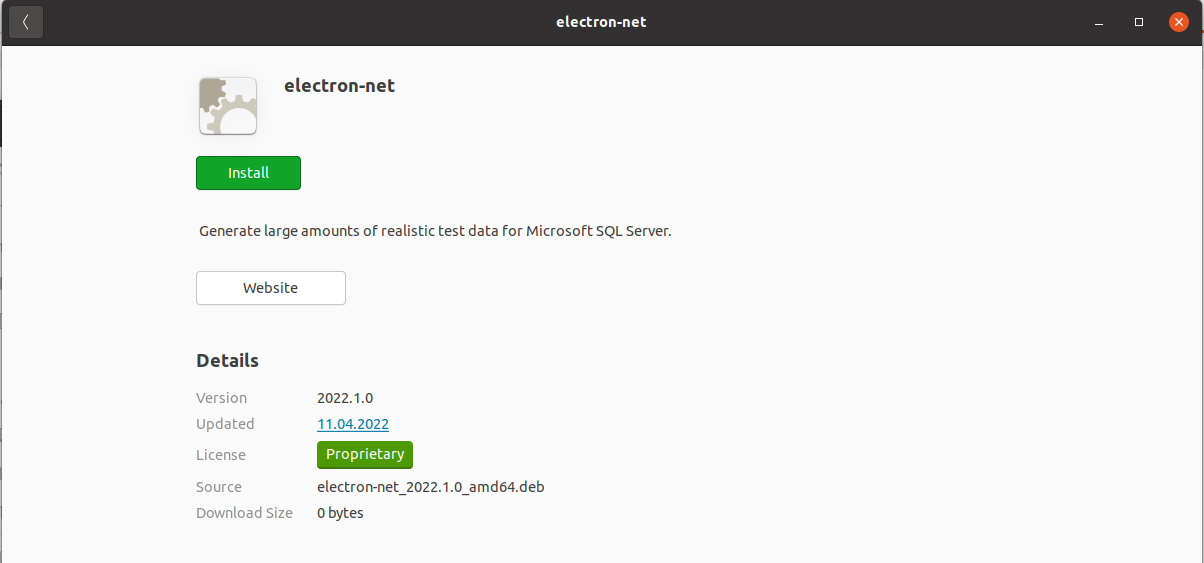
我怎么才能改变呢?我已经检查了文档(这里是https://www.electron.build/configuration/linux),但是在我的配置中看不到更多的选项?
我在Ubuntu20.04.4上使用ElectronNET.CLI版本15.5.1,在.NET版本5.0.406上使用
回答 1
Stack Overflow用户
回答已采纳
发布于 2022-04-14 16:22:00
我认为您正在为您的文件名查找“构建”下的artifactName属性,在“根”下查找显示的名称的name属性
{
  "name" : "MyApplication",
  "executable" : "MyApplication",
  "build": {
    "artifactName": "my-application.${ext}",
  }
}页面原文内容由Stack Overflow提供。腾讯云小微IT领域专用引擎提供翻译支持
原文链接:
https://stackoverflow.com/questions/71833827
复制相关文章
相似问题
腾讯云开发者

Copyright © 2013 - 2026 Tencent Cloud. All Rights Reserved. 腾讯云 版权所有
深圳市腾讯计算机系统有限公司 ICP备案/许可证号:粤B2-20090059  粤公网安备44030502008569号
腾讯云计算(北京)有限责任公司 京ICP证150476号 | 京ICP备11018762号