
Firebase删除与apple correclty签名的用户
我已经用Sign-In-With-Apple实现了Firebase。我也有删除用户的功能。我就是这样做的:
  static Future<bool> deleteUser(BuildContext context) async {
    try {
      await BackendService().deleteUser(
        context,
      );

      await currentUser!.delete(); // <-- this actually deleting the user from Auth

      Provider.of<DataProvider>(context, listen: false).reset();

      return true;
    } on FirebaseException catch (error) {
      print(error.message);
      AlertService.showSnackBar(
        title: 'Fehler',
        description: error.message ?? 'Unbekannter Fehler',
        isSuccess: false,
      );
      return false;
    }
}如您所见,我从auth中删除了所有用户数据,最后删除了用户本人。
但苹果公司仍然认为我在使用这个应用程序。我可以在设置中看到它:
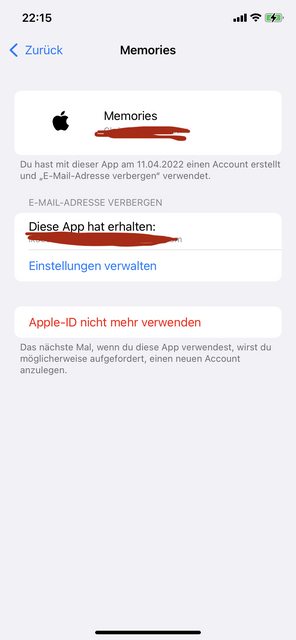
另外,当我再次尝试与苹果签约时,它表现得好像我已经有了一个账户。但是我刚刚删除了它,在Firebase里面没有任何东西说我还有那个帐户?如何从Firebase中完全删除Apple用户?我在这里错过了什么?
回答 4
Stack Overflow用户
发布于 2022-04-22 21:28:06
所以..。苹果不提供这项服务。但我找到了解决办法。
我的签名正在进行中:
1.检查用户是否在之前登录
  // Create an `OAuthCredential` from the credential returned by Apple.
  final oauthCredential = OAuthProvider("apple.com").credential(
    idToken: appleCredential.identityToken,
    rawNonce: rawNonce,
  );

  // If you can not access the email property in credential,
  // means that user already signed in with his appleId in the application once before
  bool isAlreadyRegistered = appleCredential.email == null;
现在讲到关键的部分:
登录用户并检查该uid 是否已存在于Firebase中。
  final UserCredential result =
      await FirebaseAuth.instance.signInWithCredential(
    oauthCredential,
  );

  isAlreadyRegistered = await BackendService.checkIfUserIdExists(
    result.user?.uid ?? '',
);checkIfUserIdExists也非常简单:
  static Future<bool> checkIfUserIdExists(String userId) async {
    try {
      var collectionRef = FirebaseFirestore.instance.collection(
        BackendKeys.users,
      );

      var doc = await collectionRef.doc(userId).get();
      return doc.exists;
    } on FirebaseException catch (e) {
      return false;
    }
}Stack Overflow用户
发布于 2022-04-21 11:19:14
苹果和其他一些第三方身份提供者通常不提供API。
对这些数据的访问可能导致隐私问题,例如,恶意应用程序可以在访问用户配置文件之后删除授权信息。
但是,如果您想要进行“优雅”的注销,您可以要求您的用户从iOS设置中注销,并侦听服务器对服务器通知的撤销。
Stack Overflow用户
发布于 2022-10-25 21:38:29
虽然用户帐户已经被删除,但它并没有从苹果的系统中删除。在为苹果编写firebase时,git枢纽问题 (计划用于Q4 2022或Q1 2023)仍在开发此功能,因为本机的颤振和反应可能依赖于base,在此之前需要定制实现。
根据苹果公司的说法,要完全删除用户的苹果帐户,你应该使用令牌API获得苹果的刷新令牌,然后使用令牌API撤销它。
高级别说明:
- 客户端(app):获取Apple授权代码。
- 向服务器发送授权代码。
- 服务器端:使用Apples p8密钥创建jwt令牌。Jwt令牌将用于对苹果API的请求进行身份验证
- 服务器端: refresh_token的交易授权代码(见上面的第一个链接)
- 服务器端:撤消refresh_token (请参阅上面的第二个链接)
详细描述:https://stackoverflow.com/a/72656672/6357154
服务器端进程的.NET植入。假设:
- _client是一种在DI中注册的HttpClient,上面贴出了苹果文档的基本网址。
- AppleClientOptions包含相同的值,用于在firebase上安装苹果。
/// <summary>
/// Gets apple refresh token
/// SEE MORE: https://developer.apple.com/documentation/sign_in_with_apple/generate_and_validate_tokens
/// </summary>
/// <param name="jwtToken"></param>
/// <param name="authorizationCode"></param>
/// <returns></returns>
public async Task<string> GetTokenFromApple(string jwtToken, string authorizationCode)
{
    IEnumerable<KeyValuePair<string, string>> content = new[]
    {
        new KeyValuePair<string, string>("client_id", _appleClientOptions.ClientId),
        new KeyValuePair<string, string>("client_secret", jwtToken),
        new KeyValuePair<string, string>("code", authorizationCode),
        new KeyValuePair<string, string>("grant_type", "authorization_code"),
    };
    var encodedContent = new FormUrlEncodedContent(content);
    var response = await _client.PostAsync("auth/token", encodedContent);
    var responseAsString = await response.Content.ReadAsStringAsync();
    if (response.IsSuccessStatusCode)
    {
        var appleTokenResponse = JsonConvert.DeserializeObject<AppleTokenResponse>(responseAsString);
        return appleTokenResponse.refresh_token;
    }
    _logger.LogError($"GetTokenFromApple failed: {responseAsString}");
    return null;
}

/// <summary>
/// Revokes apple refresh token
/// SEE MORE: https://developer.apple.com/documentation/sign_in_with_apple/generate_and_validate_tokens
/// </summary>
/// <param name="jwtToken"></param>
/// <param name="refreshToken"></param>
/// <returns></returns>
public async Task<bool> RevokeToken(string jwtToken, string refreshToken)
{
    IEnumerable<KeyValuePair<string, string>> content = new[]
    {
        new KeyValuePair<string, string>("client_id", _appleClientOptions.ClientId),
        new KeyValuePair<string, string>("client_secret", jwtToken),
        new KeyValuePair<string, string>("token", refreshToken),
        new KeyValuePair<string, string>("token_type_hint", "refresh_token"),
    };
    var response = await _client.PostAsync("auth/revoke", new FormUrlEncodedContent(content));
    return response.IsSuccessStatusCode;
}

private string GenerateAppleJwtTokenLinux()
{
    var epochNow = (int) DateTime.UtcNow.Subtract(new DateTime(1970, 1, 1)).TotalSeconds;
    var (payload, extraHeaders) = CreateJwtPayload(
        epochNow,
        _appleClientOptions.TeamId,
        _appleClientOptions.ClientId,
        _appleClientOptions.KeyId);

    var privateKeyCleaned = Base64Decode(_appleClientOptions.PrivateKey)
        .Replace("-----BEGIN PRIVATE KEY-----", string.Empty)
        .Replace("-----END PRIVATE KEY-----", string.Empty)
        .Replace("\r\n", string.Empty)
        .Replace("\r\n", string.Empty);
    var bytes = Convert.FromBase64String(privateKeyCleaned);

    using var ecDsaKey = ECDsa.Create();
    ecDsaKey!.ImportPkcs8PrivateKey(bytes, out _);

    return Jose.JWT.Encode(payload, ecDsaKey, JwsAlgorithm.ES256, extraHeaders);
}

private static (Dictionary<string, object> payload, Dictionary<string, object> extraHeaders) CreateJwtPayload(
    int epochNow,
    string teamId,
    string clientId,
    string keyId)
{
    var payload = new Dictionary<string, object>
    {
        {"iss", teamId},
        {"iat", epochNow},
        {"exp", epochNow + 12000},
        {"aud", "https://appleid.apple.com"},
        {"sub", clientId}
    };
    var extraHeaders = new Dictionary<string, object>
    {
        {"kid", keyId},
        {"alg", "ES256"}
    };
    return (payload, extraHeaders);
}


/// <summary>
/// https://developer.apple.com/documentation/sign_in_with_apple/tokenresponse
/// </summary>
public class AppleTokenResponse
{
    public string access_token { get; set; }

    public string expires_in { get; set; }

    public string id_token { get; set; }

    public string refresh_token { get; set; }

    public string token_type { get; set; }
}

public class AppleClientOptions
{
    public string TeamId { get; set; }

    public string ClientId { get; set; }

    public string KeyId { get; set; }

    public string PrivateKey { get; set; }
}public async Task<bool> DeleteUsersAccountAsync(string appleAuthorizationCode)
{
// Get jwt token:
var jwtToken = _appleClient.GenerateAppleJwtTokenLinux(); // Apple client is code form above, registered in DI.
// Get refresh token from authorization code:
var refreshToken = await _appleClient.GetTokenFromApple(jwtToken, appleAuthorizationCode);
if (string.IsNullOrEmpty(refreshToken)) return false;
// Delete token:
var isRevoked = await _appleClient.RevokeToken(jwtToken, refreshToken);
_logger.LogInformation("Deleted apple tokens for {UserId}", userId);
if (!isRevoked) return false;
return true;
}其他实施实例:
https://stackoverflow.com/questions/71833807
复制相似问题
腾讯云开发者

Copyright © 2013 - 2026 Tencent Cloud. All Rights Reserved. 腾讯云 版权所有
深圳市腾讯计算机系统有限公司 ICP备案/许可证号:粤B2-20090059  粤公网安备44030502008569号
腾讯云计算(北京)有限责任公司 京ICP证150476号 | 京ICP备11018762号