
禁用附加的node.js调试器
禁用附加的node.js调试器
提问于 2022-04-10 14:20:49
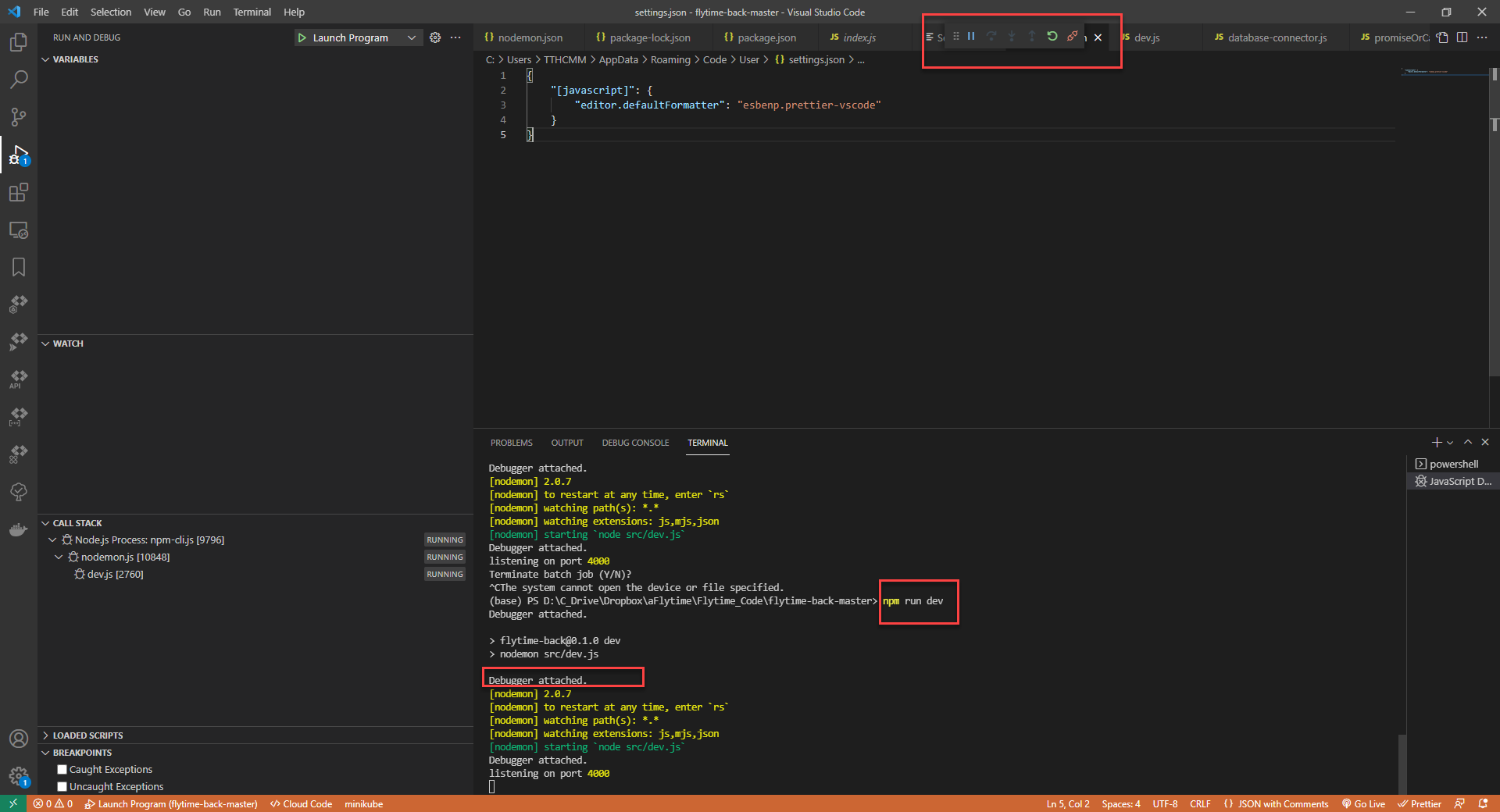
从图像中可以看到,在运行node.js时,我总是会在vscode中附加npm run dev调试器,有什么方法可以禁用吗?
我附上了package.json的内容
{
    "name": "ff-front",
    "version": "0.1.0",
    "private": true,
    "scripts": {
        "lint": "eslint src server --ext .js,.jsx",
        "lint:fix": "eslint src server --ext .js,.jsx --fix",
        "dev": "next dev",
        "build": "next build",
        "start": "next start -p 80",
        "start:pm2:next": "pm2 start server/babel.js --name ff-front",
        "stop:pm2:next": "pm2 delete ff-front",
        "deploy": "npm run stop:pm2:next; npm run build && npm run start:pm2:next"
    },
    "engines": {
        "node": ">=14.16.0"
    },
    "dependencies": {
        "@ckeditor/ckeditor5-react": "^3.0.3",
        "@material-ui/core": "^4.11.3",
        "@material-ui/icons": "^4.11.2",
        "@sosedisverhu/ckeditor5-build-classic": "^23.0.0",
        "babel-plugin-inline-react-svg": "^2.0.1",
        "body-parser": "^1.19.1",
        "body-scroll-lock": "^4.0.0-beta.0",
        "classnames": "^2.3.1",
        "compression": "^1.7.4",
        "cookie-parser": "^1.4.6",
        "cors": "^2.8.5",
        "cross-env": "^7.0.3",
        "date-fns": "^2.28.0",
        "eventemitter3": "^4.0.7",
        "express": "^4.17.2",
        "express-http-proxy": "^1.6.3",
        "formik": "^2.2.9",
        "helmet": "^4.6.0",
        "jsonwebtoken": "^8.5.1",
        "md5": "^2.3.0",
        "moment-timezone": "^0.5.34",
        "mongo-seeding": "^3.7.1",
        "mongodb-backup": "1.4.8",
        "mongodb-restore": "^1.6.2",
        "mongoose": "^6.1.3",
        "multer": "^1.4.4",
        "next": "12",
        "node-schedule": "^2.1.0",
        "nodemailer": "^6.7.2",
        "nodemon": "^2.0.15",
        "pm2": "^5.1.2",
        "prop-types": "^15.7.2",
        "ramda": "^0.27.1",
        "rctx-contextmenu": "^1.3.5",
        "react": "^17.0.2",
        "react-datepicker": "^4.6.0",
        "react-dom": "^17.0.2",
        "react-facebook-login": "^4.1.1",
        "react-google-authorize": "^1.0.4",
        "react-intl": "^5.13.2",
        "react-lazyload": "^3.2.0",
        "react-number-format": "^4.9.1",
        "react-redux": "^7.2.2",
        "react-rnd": "^10.3.5",
        "react-scroll": "^1.8.6",
        "react-select": "^5.2.2",
        "react-sortable-hoc": "^2.0.0",
        "react-sortablejs": "^6.0.0",
        "redux": "^4.0.5",
        "redux-thunk": "^2.3.0",
        "rimraf": "^3.0.2",
        "sass": "^1.49.7",
        "socket.io-client": "^4.4.1",
        "sortablejs": "^1.14.0",
        "superagent": "^6.1.0",
        "superagent-prefix": "^0.0.2",
        "tar": "^6.1.11",
        "timezones-list": "^3.0.1",
        "uniqid": "^5.4.0",
        "webp-converter": "^2.3.3",
        "yup": "^0.32.11"
    },
    "devDependencies": {
        "babel-eslint": "^10.1.0",
        "babel-preset-env": "^1.7.0",
        "babel-preset-stage-3": "^6.24.1",
        "babel-register": "^6.26.0",
        "eslint": "^7.21.0",
        "eslint-config-standard": "^16.0.2",
        "eslint-plugin-import": "^2.22.1",
        "eslint-plugin-node": "^11.1.0",
        "eslint-plugin-promise": "^4.2.1",
        "eslint-plugin-react": "^7.22.0",
        "next-fonts": "^1.5.1",
        "next-images": "^1.7.0"
    }
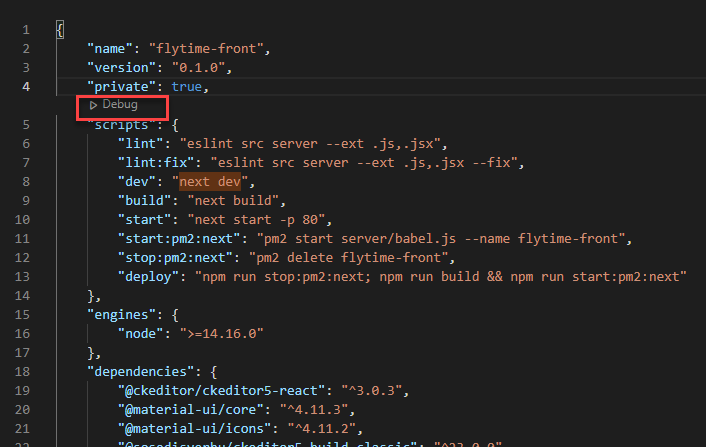
}在package.json中有一个调试选项
回答 3
Stack Overflow用户
发布于 2022-04-10 16:48:18
Visual代码是附加调试器的代码。在settings.json (ctrl+,)中,搜索以下设置并将它们添加到您自己的用户设置中。
若要禁用vscode终端中的附件:
// Configures which processes to automatically attach and debug when
// `debug.node.autoAttach` is on. A Node process launched with the `--inspect`
// flag will always be attached to, regardless of this setting.
//  - always: Auto attach to every Node.js process launched in the terminal.
//  - smart: Auto attach when running scripts that aren't in a node_modules folder.
//  - onlyWithFlag: Only auto attach when the `--inspect` is given.
//  - disabled: Auto attach is disabled and not shown in status bar.
"debug.javascript.autoAttachFilter": "disabled",在package.json中隐藏代码透镜
// Where a "Run" and "Debug" code lens should be shown in your npm scripts.
// It may be on "all", scripts, on "top" of the script section, or "never".
"debug.javascript.codelens.npmScripts": "never",
保存设置后,可能需要关闭终端和/或重新启动vscode。
Stack Overflow用户
发布于 2022-09-25 04:24:51


Stack Overflow用户
发布于 2022-09-29 12:11:31
我这样做的方式是按下ctrl+shit+p对话框将打开。搜索按钮自动附加并选择禁用。
当您想要调试时,选择始终是。
页面原文内容由Stack Overflow提供。腾讯云小微IT领域专用引擎提供翻译支持
原文链接:
https://stackoverflow.com/questions/71817462
复制相关文章
相似问题
腾讯云开发者

Copyright © 2013 - 2026 Tencent Cloud. All Rights Reserved. 腾讯云 版权所有
深圳市腾讯计算机系统有限公司 ICP备案/许可证号:粤B2-20090059  粤公网安备44030502008569号
腾讯云计算(北京)有限责任公司 京ICP证150476号 | 京ICP备11018762号