
节点异步的实际效益?
我是节点异步/同步概念的新手。这些天,我对异步函数执行的顺序感到困惑。我很难从单进程节点的异步调用中获益:
下面是一个示例:
1.异步/等待顺序
假设有一个异步函数:
async readPathInFile(filePath) {
     //open filePath, read the content and return
     return file path in filePath
}
我们有几个电话,比如:
var a = 'a.txt';
var b = await readPathInFile(a); // call_a
var c = await readPathInFile(b); // call_b
var d = await readPathInFile(c); // call_c众所周知,readPathInFile被定义为异步,但是调用call_a、call_b、call_c依赖于前面的调用。
对于这些调用,调用与同步调用没有区别。
那么,异步定义的好处是什么?
- 回调概念也有同样的关切:
例如:
readPathInFile(filePath, callback) {
     //open filePath, read the content and return
     callback(file path in filePath)
}var a = 'a.txt';
readPathInFile(a, (b)=>{
//call_a
readPathInFile(b, (c)=>{
//call_b
readPathInFile(c, (d)=>{
//
});
});
}); // call_a
call_z(); //只有当call_z不依赖于 a 、 b 、 c 、z而不关心a、b、c,这是唯一的好处。
如果我的假设是错误的,请纠正我。
回答 3
Stack Overflow用户
发布于 2022-04-10 12:10:44
顾名思义,异步意味着函数的无序运行。在这方面,你的理解是正确的。然而,这意味着什么却一点也不明显。
要回答你的问题需要几个词,async/await关键字是语法糖,这意味着它们并不是语言的固有特性,而是表达其他东西的捷径。具体来说,await关键字将表达式转换为等效的语法。
function someFunction(): Promise<string> {
  return new Promise(function(resolve) {
    resolve('Hello World');
  });
}

console.log('Step 1');
console.log(await someFunction());
console.log('Step 3');
就像说
...
console.log('Step 1');
someFunction().then(function (res) {
  console.log(res);
  console.log('Step 3');
});注意,第三个console.log是回调中的。
当您使用someFunction语法重新定义async时,您将得到以下内容:
async function someFunction() {
  return 'Hello World';
}
两者是等同的。
回答你的问题
我想重申,async/await是语法糖。它们的效果可以通过现有的功能来复制。
因此,它们的目的是将异步代码和同步代码结合起来。如果您见过一个更老、更大的JS文件,您将很快注意到在整个脚本中使用了多少个回调。await是一种在避免回调地狱的同时使用asynchronous函数的机制,但从根本上说,标记为async的函数始终是async,不管您在它前面放置了多少await。
如果您很难理解await调用是如何工作的,请记住,您传递给.then(...)的回调可以在任何时候调用。这是异步性的本质。await只是添加了一种简洁的方式来使用它。
一个直观的例子
我喜欢类比。这是我最喜欢的;
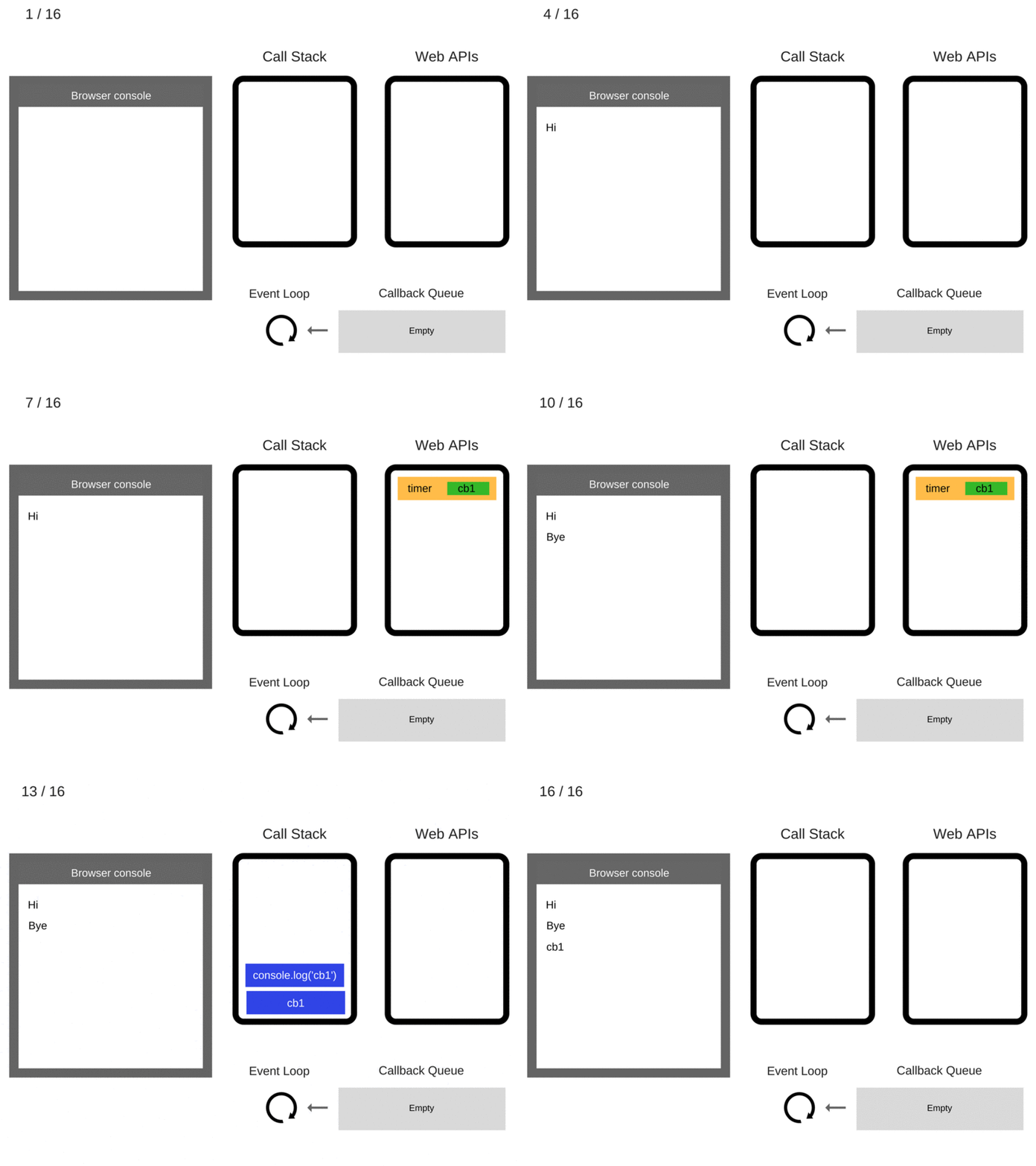
想象一下你自己在咖啡馆里。有3个人在排队。咖啡师接受您的点菜,并通知您您的咖啡将在5分钟内准备好。因此,这意味着你可以坐在桌子旁,阅读一本杂志或其他任何东西,而不是排队等待咖啡师为你煮咖啡和接受付款等。
这样做的好处是,排在你后面的人可以把自己的事情做好,而不是排队等着咖啡准备好。
从根本上讲,这就是异步代码的工作方式。咖啡师一次只能做一件事,但是他们的时间可以被优化,让排队的每个人在等待的时候做其他的事情。
希望这有帮助
这篇文章 (在评论中链接)有一个很棒的例子:这里是
Stack Overflow用户
发布于 2022-04-10 12:30:49
异步定义的好处是什么?
启用标准逻辑流代码异步运行。对比你的例子:
var a = 'a.txt';
var b = await readPathInFile(a); // call_a
var c = await readPathInFile(b); // call_b
var d = await readPathInFile(c); // call_c
与
var a = 'a.txt';
readPathInFile(a, (b)=>{
    //call_a
    readPathInFile(b, (c)=>{
        //call_b
        readPathInFile(c, (d)=>{
        //
        });
    });
}); // call_a后者常被称为“回调地狱”。即使在这种情况下,推理也要困难得多,但是一旦添加分支之类的内容,就很难对进行推理了。相反,使用async函数和await进行分支就像在同步代码中分支一样。
现在,您可以编写readPathInFileSync (readPathInFile的同步版本),它将不是一个async函数,并允许您这样做:
var a = 'a.txt';
var b = readPathInFileSync(a); // call_a
var c = readPathInFileSync(b); // call_b
var d = readPathInFileSync(c); // call_c那么,这与答案开头的async版本有什么区别呢?async版本允许在一个主JavaScript线程上发生其他事情,同时等待那些I/O调用的完成。同步版本没有,它阻塞主线程,等待I/O完成,防止任何其他事情被处理。
下面是一个示例,使用setTimeout来支持I/O:
const logElement = document.getElementById("log");
function log(msg) {
    const entry = document.createElement("pre");
    entry.textContent = Date.now() + ": " + msg;
    logElement.appendChild(entry);
    entry.scrollIntoView();
}

// Set up "other things" to happen
const things = [
    "this", "that", "the other", "something else", "yet another thing", "yada yada"
];
let starting = false; // We need this flag so we can show
                      // the "Doing X work" messsage before
                      // we actually start doing it, without
                      // giving the false impression in
                      // rare cases that other things happened
                      // during sync work
otherThing();
function otherThing() {
    if (!starting) {
        log(things[Math.floor(Math.random() * things.length)]);
    }
    setTimeout(otherThing, 250);
}

// Stand-in for a synchronous task that takes n milliseconds
function doSomethingSync(n) {
    const done = Date.now() + n;
    while (Date.now() < done) {
        // Busy-wait. NEVER DO THIS IN REAL CODE,
        // THIS IS SIMULATING BLOCKING I/O.
    }
}

// Stand-in for an asynchronous task that takes n milliseconds
function doSomething(n) {
    return new Promise(resolve => {
        setTimeout(resolve, n);
    });
}

function doWorkSync() {
    doSomethingSync(200);
    doSomethingSync(150);
    doSomethingSync(50);
    doSomethingSync(400);
}

async function doWorkAsync() {
    await doSomething(200);
    await doSomething(150);
    await doSomething(50);
    await doSomething(400);
}

// Do the work synchronously
document.getElementById("run-sync").addEventListener("click", (e) => {
    const btn = e.currentTarget;
    btn.disabled = true;
    log(">>>> Doing sync work");
    starting = true;
    setTimeout(() => {
        starting = false;
        doWorkSync();
        log("<<<< Done with sync work");
        btn.disabled = false;
    }, 50);
});

// Do the work asynchronously
document.getElementById("run-async").addEventListener("click", (e) => {
    const btn = e.currentTarget;
    btn.disabled = true;
    log(">>>> Doing async work");
    starting = true;
    setTimeout(() => {
        starting = false;
        doWorkAsync().then(() => {
            log("<<<< Done with async work");
            btn.disabled = false;
        });
    }, 50);
});html {
font-family: sans-serif;
}
#log {
max-height: 5em;
min-height: 5em;
overflow: auto;
border: 1px solid grey;
}
#log * {
margin: 0;
padding: 0;
}<div>Things happening:</div>
<div id="log"></div>
<input type="button" id="run-sync" value="Run Sync">
<input type="button" id="run-async" value="Run Async">
有时候,您并不关心阻塞,这正是xyzSync API中的Node.js函数的作用所在。例如,如果您正在编写shell脚本,并且只需要按顺序执行操作,那么编写同步代码是非常合理的。
在constrast中,如果您运行的是任何类型的基于Node.js的服务器,则关键不允许一个主JavaScript线程在I/O上被阻塞,无法处理任何其他传入的请求。
因此,总括而言:
- 如果您不关心JavaScript线程做其他事情(例如,shell脚本),编写同步I/O代码是可以的。
- 如果您确实关心阻塞JavaScript线程,那么用
async/await编写代码可以更容易地(相对于回调函数)避免使用遵循操作逻辑的简单、直截了当的代码,而不是它的暂时性。
Stack Overflow用户
发布于 2022-04-10 13:19:33
Javascript承诺,允许异步函数返回类似同步方法的值,而不是立即返回最终值,异步函数返回将来提供数据的承诺。
实际上,承诺解决了回调地狱问题。
https://stackoverflow.com/questions/71816285
复制相似问题
腾讯云开发者

Copyright © 2013 - 2026 Tencent Cloud. All Rights Reserved. 腾讯云 版权所有
深圳市腾讯计算机系统有限公司 ICP备案/许可证号:粤B2-20090059  粤公网安备44030502008569号
腾讯云计算(北京)有限责任公司 京ICP证150476号 | 京ICP备11018762号