
元素不等于使用Flex Box尾风CSS
元素不等于使用Flex Box尾风CSS
提问于 2022-04-09 05:59:09
我有一些区域,我想要有相同的元素。一边只是一个图像,而另一边有内容。我正在使用尾风CSS,并感到肯定,我有正确的类。div部分声明为Flex,而子元素的Flex基值为0,Flex增长为1,内容div仍然比我的图像div稍大一些。
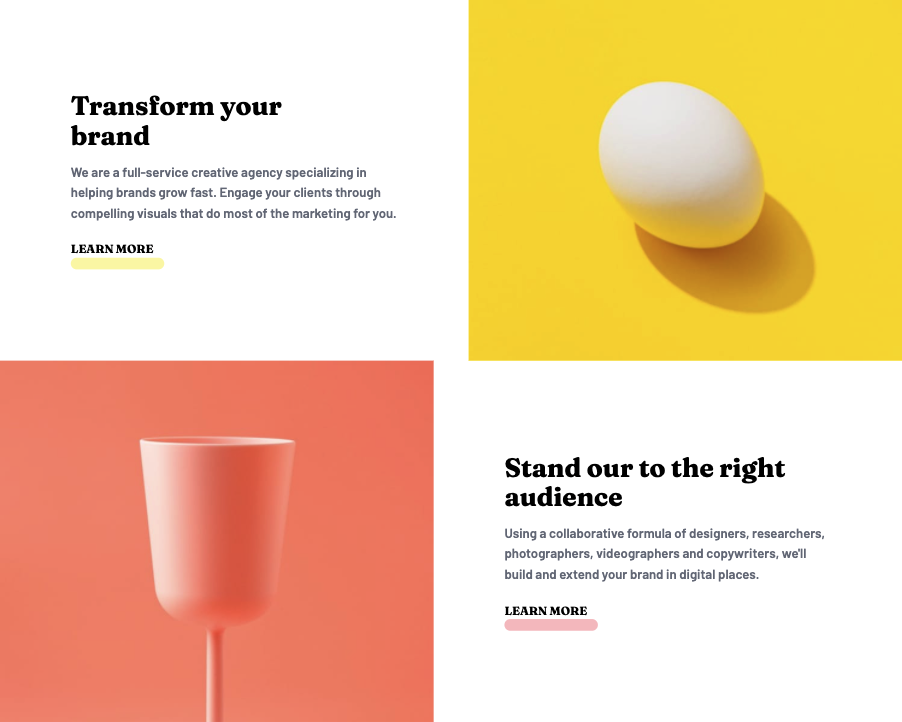
 <section class="section-one flex flex-col-reverse md:flex-row-reverse">
  <div class="basis-0 grow p-6 text-center md:text-left md:flex md:flex-col md:justify-center md:items-center">
    <div>
      <h2 class="font-fraunces text-4xl mb-4 md:text-left md:max-w-md">Stand our to the right audience</h2>
      <p class="font-barlow text-gray-500 text-lg p-4 mb-6 md:max-w-md md:p-0">Using a collaborative formula of designers, researchers, photographers, videographers and copywriters, we'll build and extend your brand in digital places.</p>
      <div class="flex flex-col">
        <a href="#" class="font-fraunces uppercase z-1">Learn More</a>
        <span class="bg-rose-300/75 w-32 mx-auto h-4 rounded-full md:m-0"></span>
      </div>
    </div>
  </div>
  <div class="basis-0 grow">
    <img src="images/desktop/image-stand-out.jpg" alt="" class="w-full" />
  </div>
</section>回答 2
Stack Overflow用户
回答已采纳
发布于 2022-04-09 14:04:04
如果您删除您的p-6类,并添加以下的div,它将工作。
<link rel="stylesheet" href="https://cdnjs.cloudflare.com/ajax/libs/tailwindcss/2.2.19/tailwind.min.css" integrity="sha512-wnea99uKIC3TJF7v4eKk4Y+lMz2Mklv18+r4na2Gn1abDRPPOeef95xTzdwGD9e6zXJBteMIhZ1+68QC5byJZw==" crossorigin="anonymous" referrerpolicy="no-referrer" />

<section class="section-one flex flex-col-reverse md:flex-row-reverse">
  <div class="basis-0 grow remove-this-p-6 text-center md:text-left md:flex md:flex-col md:justify-center md:items-center">
    <div class="p-6"> <!-- add here your padding -->
      <h2 class="font-fraunces text-4xl mb-4 md:text-left md:max-w-md">Stand our to the right audience</h2>
      <p class="font-barlow text-gray-500 text-lg p-4 mb-6 md:max-w-md md:p-0">Using a collaborative formula of designers, researchers, photographers, videographers and copywriters, we'll build and extend your brand in digital places.</p>
      <div class="flex flex-col">
        <a href="#" class="font-fraunces uppercase z-1">Learn More</a>
        <span class="bg-rose-300/75 w-32 mx-auto h-4 rounded-full md:m-0"></span>
      </div>
    </div>
  </div>
  <div class="basis-0 grow">
    <img src="https://via.placeholder.com/500" alt="" class="w-full" />
  </div>
</section>

 <section class="section-one flex flex-col-reverse md:flex-row-reverse ">
  <div class="basis-0 grow">
    <img src="https://via.placeholder.com/500" alt="" class="w-full" />
  </div>
  <div class="basis-0 grow remove-this-p-6 text-center md:text-left md:flex md:flex-col md:justify-center md:items-center">
    <div class="p-6"><!-- add here your pading -->
      <h2 class="font-fraunces text-4xl mb-4 md:text-left md:max-w-md">Stand our to the right audience</h2>
      <p class="font-barlow text-gray-500 text-lg p-4 mb-6 md:max-w-md md:p-0">Using a collaborative formula of designers, researchers, photographers, videographers and copywriters, we'll build and extend your brand in digital places.</p>
      <div class="flex flex-col">
        <a href="#" class="font-fraunces uppercase z-1">Learn More</a>
        <span class="bg-rose-300/75 w-32 mx-auto h-4 rounded-full md:m-0"></span>
      </div>
    </div>
  </div>
</section>
Stack Overflow用户
发布于 2022-04-09 13:18:09
通过使用网格,您可以实现这一点。
我已经为您做了代码,请检查这里:https://play.tailwindcss.com/wldkQ1txrU
页面原文内容由Stack Overflow提供。腾讯云小微IT领域专用引擎提供翻译支持
原文链接:
https://stackoverflow.com/questions/71805620
复制相关文章
相似问题
腾讯云开发者

Copyright © 2013 - 2026 Tencent Cloud. All Rights Reserved. 腾讯云 版权所有
深圳市腾讯计算机系统有限公司 ICP备案/许可证号:粤B2-20090059  粤公网安备44030502008569号
腾讯云计算(北京)有限责任公司 京ICP证150476号 | 京ICP备11018762号