
故事书+ MUI5 + Nextjs -主题问题?
故事书+ MUI5 + Nextjs -主题问题?
提问于 2022-04-08 10:28:32
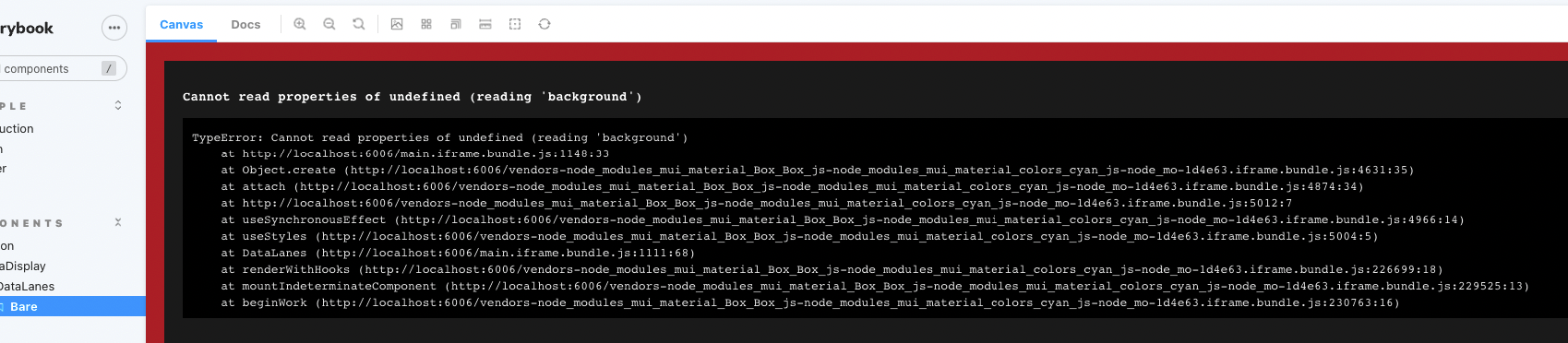
我终于设法让某人使用了mui4,但是在升级了mui5之后,我无法让它开始工作。
Npx sb init —builder webpack5
- updated sb main.js和
- 一起安装的
- 抱怨说,“可压缩的”模块无法找到,因此无法安装。
- Ran
npm i core-js@3.8.2给出了关于es-弱映射+其他未找到的映射。 - 添加了web pack 5作为开发依赖项
npm install webpack@5 --save-dev - npx sb@next --prerelease.
。
再加上我在网上遇到的所有其他建议,你可以在这些文件中看到(在这些文件中留下一些评论,这样你就可以看到我在某些情况下还尝试了什么)。
.storybook>main.js
const path = require('path');
const toPath = filePath => path.join(process.cwd(), filePath);

module.exports = {
    stories: ['../src/**/*.stories.mdx', '../src/**/*.stories.@(js|jsx|ts|tsx)'],
    addons: [
        '@storybook/addon-links',
        '@storybook/addon-essentials',
        '@storybook/addon-interactions',
        // 'storybook-addon-designs',
        // 'storybook-anima',
        // '@storybook/addon-actions',
        {
            name: '@storybook/addon-docs',
            options: {
                configureJSX: true,
                babelOptions: {},
                sourceLoaderOptions: null,
                transcludeMarkdown: true,
            },
        },
        '@storybook/builder-webpack5',
    ],
    framework: '@storybook/react',
    core: {
        // builder: '@storybook/builder-webpack5',
        builder: 'webpack5',
    },
    typescript: { reactDocgen: false },
    features: {
        emotionAlias: false,
        modernInlineRendering: true,
    },

    webpackFinal: async (config, { configType }) => {
        config.resolve.modules = [path.resolve(__dirname, '..', '.'), 'node_modules'];
        config.resolve.alias = {
            ...config.resolve.alias,
            '@emotion/core': toPath('node_modules/@emotion/react'),
            'emotion-theming': toPath('node_modules/@emotion/react'),
            // 'core-js/modules/es.weak-map.js': toPath('core-js/modules/es6.weak-map.js'),
        };

        return config;
        // return {
        //     ...config,
        //     resolve: {
        //         ...config.resolve,
        //         alias: {
        //             ...config.resolve.alias,
        //             '@emotion/core': toPath('node_modules/@emotion/react'),
        //             'emotion-theming': toPath('node_modules/@emotion/react'),
        //         },
        //     },
        // };
    },
};
.package.json
{    "dependencies": {
        "@auth0/nextjs-auth0": "^1.7.0",
        "@emotion/react": "^11.8.2",
        "@emotion/styled": "^11.8.1",
        "@material-ui/core": "^4.12.0",
        "@material-ui/icons": "^4.11.2",
        "@material-ui/lab": "^4.0.0-alpha.60",
        "@mui/icons-material": "^5.5.1",
        "@mui/lab": "^5.0.0-alpha.75",
        "@mui/material": "^5.5.3",
        "@mui/styles": "^5.5.3",
        "core-js": "^3.8.2",
        "cors": "^2.8.5",
        "next": "^12.1.4",
        "react": "latest",
    },
    "devDependencies": {
        "@storybook/addon-actions": "^6.5.0-alpha.59",
        "@storybook/addon-essentials": "^6.5.0-alpha.59",
        "@storybook/addon-interactions": "^6.5.0-alpha.59",
        "@storybook/addon-links": "^6.5.0-alpha.59",
        "@storybook/builder-webpack5": "^6.5.0-alpha.59",
        "@storybook/manager-webpack5": "^6.5.0-alpha.59",
        "@storybook/node-logger": "^6.5.0-alpha.59",
        "@storybook/preset-create-react-app": "^4.1.0",
        "@storybook/react": "^6.5.0-alpha.59",
        "@storybook/testing-library": "^0.0.9",
        "@svgr/webpack": "^6.2.1",
        "compressible": "^2.0.18",
        "webpack": "^5.72.0"
    },
    "eslintConfig": {
        "overrides": [
            {"files": ["**/*.stories.*"],
                "rules": {"import/no-anonymous-default-export": "off"}
            }]
    },
    "resolutions": {"@storybook/{app}/webpack": "^5"}
}
我的故事
// import { ThemeProvider } from '@mui/styles';
import { ThemeProvider as MUIThemeProvider, createTheme } from '@mui/material/styles';
import { ThemeProvider } from 'emotion-theming';

import React from 'react';
//import theme from 'src/themes/theme.js';

// import DuplicateComponent from 'src/components/helpers/DuplicateComponent';
// import TickerTicket from 'src/components/modules/dashboard/TickerTicket';
import DataLanes from '.';

export default {
    title: 'components/common/dataDisplay/DataLanes',
    component: DataLanes,
};

export const Bare = () => (
    // <MUIThemeProvider theme={theme}>
    // <ThemeProvider theme={theme}>
        <DataLanes borderBottom>
            <div>1</div>
            <div>2</div>
            <div>3</div>
        </DataLanes>
    // </ThemeProvider>
    // </MUIThemeProvider>
);
我的组件
import { Box } from '@mui/material';
import clsx from 'clsx';
import React from 'react';
import PropTypes from 'prop-types';
import useStyles from './styles';


export default function DataLanes(props) {
    const classes = useStyles();
    const { borderBottom, borderTop, className, children, ...others } = props;

    return (
        <Box
            className={clsx(classes.dataLanes, className, {
                borderBottom: borderBottom,
                borderTop: borderTop,
            })}
            {...others}
        >
            {children}
        </Box>
    );
}
的造型
import makeStyles from '@mui/styles/makeStyles';
const useStyles = makeStyles(theme => ({
    dataLanes: {
        width: '100%',
        background: theme.palette.background.paper,
        display: 'flex',
        paddingTop: theme.spacing(1),
        paddingBottom: theme.spacing(1),
        overflowY: 'auto',
        '& > * ': {
            flexGrow: 1,
            borderRight: `1px solid ${theme.palette.grey[300]}`,
        },

        '&.borderBottom': {
            borderBottom: `1px solid ${theme.palette.grey[300]}`,
        },
        '&.borderTop': {
            borderTop: `1px solid ${theme.palette.grey[300]}`,
        },
    },
}));

export default useStyles;有什么想法吗?好像是background: theme.palette.background.paper,在style.js里。
回答 1
Stack Overflow用户
发布于 2022-07-02 13:34:25
对于我在MUI和故事书中遇到的类似问题,在preview.js中的.storybook文件夹中的更改解决了这个问题。
.storybook>preview.js
import React from 'react';
import { addDecorator } from '@storybook/react';
import { ThemeProvider } from '@mui/material/styles';
import { theme } from '../src/Theme'; //. Please replace the path for the theme with yours.

export const parameters = {
  actions: { argTypesRegex: '^on[A-Z].*' },
  controls: {
    matchers: {
      color: /(background|color)$/i,
      date: /Date$/,
    },
  },
};

addDecorator(story => <ThemeProvider theme={theme}>{story()}</ThemeProvider>);页面原文内容由Stack Overflow提供。腾讯云小微IT领域专用引擎提供翻译支持
原文链接:
https://stackoverflow.com/questions/71795445
复制相关文章
相似问题
腾讯云开发者

Copyright © 2013 - 2026 Tencent Cloud. All Rights Reserved. 腾讯云 版权所有
深圳市腾讯计算机系统有限公司 ICP备案/许可证号:粤B2-20090059  粤公网安备44030502008569号
腾讯云计算(北京)有限责任公司 京ICP证150476号 | 京ICP备11018762号