
孵化DataGridView细胞
孵化DataGridView细胞
提问于 2022-04-06 20:11:24
我在C#中有一个C#项目,它有DataGridView控件。
我在寻找一些东西来表达DataGridView细胞不会被重视。
在excel应用程序中,孵化是一个很好的方法。因此,我想孵化类似于你在下图中看到的DataGridView单元格。
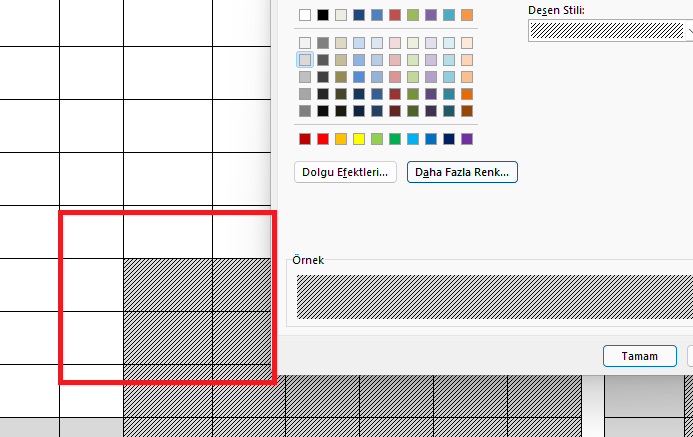
我想我应该使用CellPainting事件。但我没能做到。如果有人做过类似的事?谢谢。
回答 1
Stack Overflow用户
回答已采纳
发布于 2022-04-06 20:56:28
您可以处理CellPainting事件,然后使用HatchBrush填充单元格。您还需要在滚动事件中使控件失效,并启用双缓冲以防止闪烁。
下面是一个示例:
private void Form1_Load(object sender, EventArgs e)
{
    var dt = new DataTable();
    dt.Columns.Add("C1");
    dt.Columns.Add("C2");
    dt.Columns.Add("C3");
    dt.Rows.Add("X", "X", "O");
    dt.Rows.Add("X", DBNull.Value, DBNull.Value);
    dt.Rows.Add(DBNull.Value, DBNull.Value, DBNull.Value);
    dataGridView1.DataSource = dt;
    dataGridView1.CellPainting += DataGridView1_CellPainting;
    dataGridView1.Scroll += (_, __) => dataGridView1.Invalidate();
    dataGridView1.GetType().GetProperty("DoubleBuffered",
        System.Reflection.BindingFlags.NonPublic |
        System.Reflection.BindingFlags.Instance).SetValue(dataGridView1, true);
}
private void DataGridView1_CellPainting(object sender,
    DataGridViewCellPaintingEventArgs e)
{
    if (e.ColumnIndex < 0 || e.RowIndex < 0)
        return;
    if(e.Value==DBNull.Value)
    {
        using(var b= new HatchBrush(HatchStyle.ForwardDiagonal,
            Color.Black, Color.White))
        {
            e.Graphics.FillRectangle(b, e.CellBounds);
            e.Paint(e.ClipBounds, DataGridViewPaintParts.All &
                ~DataGridViewPaintParts.Background);
            e.Handled = true;
        }
    }
}上面的例子是使用ForwardDiagonal作为HatchStyle。
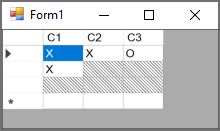
在上面的例子中,我已经填充了以DBNull.Value为值的单元格的背景。您可以使用任何其他条件,例如,将单元格作为ReadOnly。
以下是结果的截图:
页面原文内容由Stack Overflow提供。腾讯云小微IT领域专用引擎提供翻译支持
原文链接:
https://stackoverflow.com/questions/71773053
复制相关文章
相似问题
腾讯云开发者

Copyright © 2013 - 2026 Tencent Cloud. All Rights Reserved. 腾讯云 版权所有
深圳市腾讯计算机系统有限公司 ICP备案/许可证号:粤B2-20090059  粤公网安备44030502008569号
腾讯云计算(北京)有限责任公司 京ICP证150476号 | 京ICP备11018762号