
响应本机任务:“compileJava”任务(当前目标为1.8)和“compileKotlin”任务(当前目标为11)
大家好,我试图创建和运行一个反应本地应用程序。我运行npx react-native init rn4,但当我运行npm run android时,出现了以下错误:
> Task :react-native-gradle-plugin:compileKotlin
'compileJava' task (current target is 1.8) and 'compileKotlin' task (current target is 11) jvm target compatibility should be set to the same Java version.
w: C:\Users\emanu\App\rn4\node_modules\react-native-gradle-plugin\src\main\kotlin\com\facebook\react\ReactExtension.kt: (10, 37): 'BaseVariant' is deprecated. Deprecated in Java
w: C:\Users\emanu\App\rn4\node_modules\react-native-gradle-plugin\src\main\kotlin\com\facebook\react\ReactExtension.kt: (119, 30): 'BaseVariant' is deprecated. Deprecated in Java
w: C:\Users\emanu\App\rn4\node_modules\react-native-gradle-plugin\src\main\kotlin\com\facebook\react\ReactExtension.kt: (135, 26): 'BaseVariant' is deprecated. Deprecated in Java
w: C:\Users\emanu\App\rn4\node_modules\react-native-gradle-plugin\src\main\kotlin\com\facebook\react\ReactExtension.kt: (155, 32): 'BaseVariant' is deprecated. Deprecated in Java
w: C:\Users\emanu\App\rn4\node_modules\react-native-gradle-plugin\src\main\kotlin\com\facebook\react\ReactExtension.kt: (161, 31): 'BaseVariant' is deprecated. Deprecated in Java
w: C:\Users\emanu\App\rn4\node_modules\react-native-gradle-plugin\src\main\kotlin\com\facebook\react\ReactExtension.kt: (169, 36): 'BaseVariant' is deprecated. Deprecated in Java
w: C:\Users\emanu\App\rn4\node_modules\react-native-gradle-plugin\src\main\kotlin\com\facebook\react\ReactPlugin.kt: (99, 48): 'reactRoot: DirectoryProperty' is deprecated. reactRoot was confusing and has been replace with rootto point to your root project and reactNativeDir to point to the folder of the react-native NPM package
w: C:\Users\emanu\App\rn4\node_modules\react-native-gradle-plugin\src\main\kotlin\com\facebook\react\TaskConfiguration.kt: (10, 37): 'ApplicationVariant' is deprecated. Deprecated in Java
w: C:\Users\emanu\App\rn4\node_modules\react-native-gradle-plugin\src\main\kotlin\com\facebook\react\TaskConfiguration.kt: (11, 37): 'BaseVariant' is deprecated. Deprecated in Java
w: C:\Users\emanu\App\rn4\node_modules\react-native-gradle-plugin\src\main\kotlin\com\facebook\react\TaskConfiguration.kt: (12, 37): 'LibraryVariant' is deprecated. Deprecated in Java
w: C:\Users\emanu\App\rn4\node_modules\react-native-gradle-plugin\src\main\kotlin\com\facebook\react\TaskConfiguration.kt: (28, 51): 'BaseVariant' is deprecated. Deprecated in Java
w: C:\Users\emanu\App\rn4\node_modules\react-native-gradle-plugin\src\main\kotlin\com\facebook\react\TaskConfiguration.kt: (131, 12): 'ApplicationVariant' is deprecated. Deprecated in Java
w: C:\Users\emanu\App\rn4\node_modules\react-native-gradle-plugin\src\main\kotlin\com\facebook\react\TaskConfiguration.kt: (132, 12): 'LibraryVariant' is deprecated. Deprecated in Java
w: C:\Users\emanu\App\rn4\node_modules\react-native-gradle-plugin\src\main\kotlin\com\facebook\react\TaskConfiguration.kt: (250, 14): 'BaseVariant' is deprecated. Deprecated in Java

> Task :react-native-gradle-plugin:compileJava
6 actionable tasks: 6 executed
Note: C:\Users\emanu\App\rn4\node_modules\react-native-gradle-plugin\src\main\java\com\facebook\react\codegen\generator\SchemaJsonParser.java uses or overrides a deprecated API.
Note: Recompile with -Xlint:deprecation for details.

FAILURE: Build failed with an exception.

* Where:
Build file 'C:\Users\emanu\App\rn4\android\app\build.gradle' line: 1

* What went wrong:
A problem occurred evaluating project ':app'.
> Failed to apply plugin 'com.android.internal.application'.
   > Android Gradle plugin requires Java 11 to run. You are currently using Java 1.8.
     You can try some of the following options:
       - changing the IDE settings.
       - changing the JAVA_HOME environment variable.
       - changing `org.gradle.java.home` in `gradle.properties`.

* Try:
> Run with --stacktrace option to get the stack trace.
> Run with --info or --debug option to get more log output.
> Run with --scan to get full insights.

* Get more help at https://help.gradle.org

BUILD FAILED in 59s

error Failed to install the app. Make sure you have the Android development environment set up: https://reactnative.dev/docs/environment-setup.
Error: Command failed: gradlew.bat app:installDebug -PreactNativeDevServerPort=8081
Note: C:\Users\emanu\App\rn4\node_modules\react-native-gradle-plugin\src\main\java\com\facebook\react\codegen\generator\SchemaJsonParser.java uses or overrides a deprecated API.
Note: Recompile with -Xlint:deprecation for details.

FAILURE: Build failed with an exception.

* Where:
Build file 'C:\Users\emanu\App\rn4\android\app\build.gradle' line: 1

* What went wrong:
A problem occurred evaluating project ':app'.
> Failed to apply plugin 'com.android.internal.application'.
   > Android Gradle plugin requires Java 11 to run. You are currently using Java 1.8.
     You can try some of the following options:
       - changing the IDE settings.
       - changing the JAVA_HOME environment variable.
       - changing `org.gradle.java.home` in `gradle.properties`.

* Try:
> Run with --stacktrace option to get the stack trace.
> Run with --info or --debug option to get more log output.
> Run with --scan to get full insights.

* Get more help at https://help.gradle.org

BUILD FAILED in 59s

    at makeError (C:\Users\emanu\App\rn4\node_modules\execa\index.js:174:9)
    at C:\Users\emanu\App\rn4\node_modules\execa\index.js:278:16
    at processTicksAndRejections (node:internal/process/task_queues:96:5)
    at async runOnAllDevices (C:\Users\emanu\App\rn4\node_modules\@react-native-community\cli-platform-android\build\commands\runAndroid\runOnAllDevices.js:109:5)
    at async Command.handleAction (C:\Users\emanu\App\rn4\node_modules\@react-native-community\cli\build\index.js:192:9)
info Run CLI with --verbose flag for more details.我还运行了cd android && ./gradlew clean,输出是:
FAILURE: Build failed with an exception.

* Where:
Build file 'C:\Users\emanu\App\rn4\android\app\build.gradle' line: 1

* What went wrong:
A problem occurred evaluating project ':app'.
> Failed to apply plugin 'com.android.internal.application'.
   > Android Gradle plugin requires Java 11 to run. You are currently using Java 1.8.
     You can try some of the following options:
       - changing the IDE settings.
       - changing the JAVA_HOME environment variable.
- changing `org.gradle.java.home` in `gradle.properties`.这是android/gradle/wrapper/gradle-wrapper.properties中的文件
distributionBase=GRADLE_USER_HOME
distributionPath=wrapper/dists
distributionUrl=https\://services.gradle.org/distributions/gradle-7.3.3-all.zip
zipStoreBase=GRADLE_USER_HOME
zipStorePath=wrapper/dists这是我运行./gradlew --version时的输出
------------------------------------------------------------
Gradle 7.3.3
------------------------------------------------------------

Build time:   2021-12-22 12:37:54 UTC
Revision:     6f556c80f945dc54b50e0be633da6c62dbe8dc71

Kotlin:       1.5.31
Groovy:       3.0.9
Ant:          Apache Ant(TM) version 1.10.11 compiled on July 10 2021
JVM:          1.8.0_302 (Oracle Corporation 25.302-b08)
OS:           Windows 10 10.0 amd64
我读过类似的文章,但一直没能解决。有了几天前我创建的文件夹,我在运行这个应用程序时没有问题。
有人能帮我吗?非常感谢!
回答 6
Stack Overflow用户
发布于 2022-04-08 16:39:51
如果您使用的是Reactinative女巫巧克力,则必须将JDK版本更新为11。
为了执行更新,在PowerShell中执行此操作(具有管理权限):
choco install -y openjdk11在此之后,第一次(仅仅是第一次)运行npm android时,您会收到很多警告,但是项目的构建将正常工作。
如果继续收到错误,可能需要调整项目的gradle版本,使其与新的JDK版本兼容。
您可以通过编辑文件YOUR_PROJECT\android\gradle\wrapper\gradle-wrapper.properties来实现这一点。
将distributionUrl版本更新为7.4.2
我希望我能帮上忙
Stack Overflow用户
发布于 2022-05-16 12:50:41
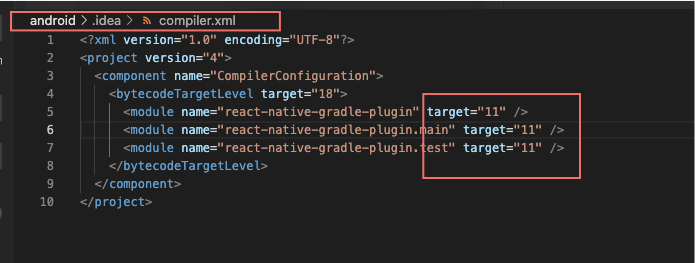
Stack Overflow用户
发布于 2022-08-26 01:47:25
我刚刚安装了jdk11,然后运行对我有用的cd ./android/ && ./gradlew clean
https://stackoverflow.com/questions/71771423
复制相似问题
腾讯云开发者

Copyright © 2013 - 2026 Tencent Cloud. All Rights Reserved. 腾讯云 版权所有
深圳市腾讯计算机系统有限公司 ICP备案/许可证号:粤B2-20090059  粤公网安备44030502008569号
腾讯云计算(北京)有限责任公司 京ICP证150476号 | 京ICP备11018762号