
Tkinter文本自动填充
我正在尝试使用tkinter为python制作一个简单的、个性化的IDE。我以前见过它,所有形式的语法都高亮显示到内置的终端,但是没有自动填充的问题。我知道你可以用很多方法在条目中自动填充,但是在搜索文本条目的自动填充之后,我什么也找不到。如果我能得到一些帮助,那就太棒了!我正在寻找类似于这里所见的东西。
类似想法的代码:
from ttkwidgets.autocomplete import AutocompleteEntry
from tkinter import *

countries = [
        'Antigua and Barbuda', 'Bahamas','Barbados','Belize', 'Canada',
        'Costa Rica ', 'Cuba', 'Dominica', 'Dominican Republic', 'El Salvador ',
        'Grenada', 'Guatemala ', 'Haiti', 'Honduras ', 'Jamaica', 'Mexico',
        'Nicaragua', 'Saint Kitts and Nevis', 'Panama ', 'Saint Lucia',
        'Saint Vincent and the Grenadines', 'Trinidad and Tobago', 'United States of America'
        ]

ws = Tk()
ws.title('PythonGuides')
ws.geometry('400x300')
ws.config(bg='#f25252')

frame = Frame(ws, bg='#f25252')
frame.pack(expand=True)

Label(
    frame,
    bg='#f25252',
    font = ('Times',21),
    text='Countries in North America '
    ).pack()

entry = AutocompleteEntry(
    frame,
    width=30,
    font=('Times', 18),
    completevalues=countries
    )
entry.pack()

ws.mainloop()链接到AutocompleteEntry源代码
回答 2
Stack Overflow用户
发布于 2022-04-06 18:03:49
对于基本的自动完成特性,基本算法相当简单:
- 截取键释放(发生在tkinter自动插入键入的文本之后)
- 获取光标前的单词并调用回调以查找可能的匹配
- 添加第一个可能的匹配项,并选择添加的部分,这样以后的按键将替换它。
您还可以为选项卡键添加一个绑定,以查看是否有可见的自动完成文本,并将光标移到末尾。
这是一个非常复杂的例子来说明这一原则,尽管它缺乏任何防弹、优化或处理边缘情况的方法,例如当背景间距、输入一个单词的中间位置、选择替代的位置等。
首先要说明的是:这不是实现自动完成的最佳方式,它只是说明了这些概念。
import tkinter as tk

class AutocompleteText(tk.Text):
    def __init__(self, *args, **kwargs):
        self.callback = kwargs.pop("autocomplete", None)
        super().__init__(*args, **kwargs)

        # bind on key release, which will happen after tkinter
        # inserts the typed character
        self.bind("<Any-KeyRelease>", self._autocomplete)

        # special handling for tab, which needs to happen on the
        # key _press_
        self.bind("<Tab>", self._handle_tab)

    def _handle_tab(self, event):
        # see if any text has the "autocomplete" tag
        tag_ranges= self.tag_ranges("autocomplete")
        if tag_ranges:
            # move the insertion cursor to the end of
            # the selected text, and then remove the "sel"
            # and "autocomplete" tags
            self.mark_set("insert", tag_ranges[1])
            self.tag_remove("sel", "1.0", "end")
            self.tag_remove("autocomplete", "1.0", "end")

            # prevent the default behavior of inserting a literal tab
            return "break"

    def _autocomplete(self, event):
        if event.char and self.callback:
            # get word preceeding the insertion cursor
            word = self.get("insert-1c wordstart", "insert-1c wordend")

            # pass word to callback to get possible matches
            matches = self.callback(word)

            if matches:
                # autocomplete on the first match
                remainder = matches[0][len(word):]

                # remember the current insertion cursor
                insert = self.index("insert")

                # insert at the insertion cursor the remainder of
                # the matched word, and apply the tag "sel" so that
                # it is selected. Also, add the "autocomplete" text
                # which will make it easier to find later.
                self.insert(insert, remainder, ("sel", "autocomplete"))

                # move the cursor back to the saved position
                self.mark_set("insert", insert)


def get_matches(word):
    # For illustrative purposes, pull possible matches from
    # what has already been typed. You could just as easily
    # return a list of pre-defined keywords.
    words = text.get("1.0", "end-1c").split()
    matches = [x for x in words if x.startswith(word)]
    return matches

root = tk.Tk()
text = AutocompleteText(root, autocomplete=get_matches)
text.pack(fill="both", expand=True)

root.mainloop()Stack Overflow用户
发布于 2022-10-25 16:47:31
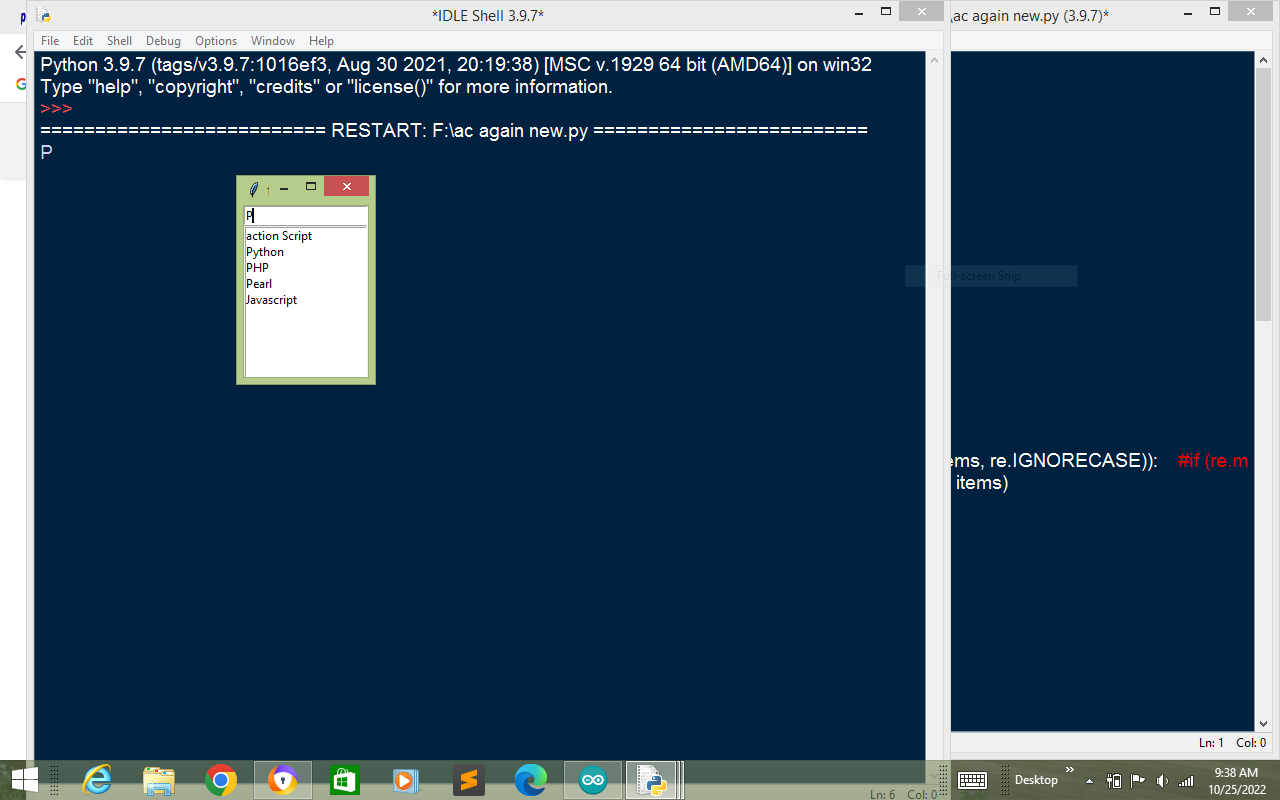
今天,我将告诉您如何使用没有OOP的Listbox创建Autocompeletion入口框。如果您不知道OOP,这个代码可能会帮助您。
您可以创建“自动完成输入”框和“搜索框-一段代码-一行差”。
from tkinter import *
import re

root=Tk()


def fun1(event, *args, **kwargs):
      global data
      if (e.get()==''):
            lb.place_forget()
            lb.delete(0, END)

      else:
            lb.delete(0, END)
            value=e.get()
            lb.place(x=0, y=20)

            for items in data:
                        if (re.search(value, items, re.IGNORECASE)):
                                    lb.insert(END, items)


            print(value)
            pass


def CurSelet(evt):


    valued=lb.get(ACTIVE)
    e.delete(0, END)
    e.insert(END, valued)
    lb.place_forget()

    print( valued)


def  down(ddd):

                  lb.focus()
                  lb.selection_set(0)

s=StringVar()


e=Entry(root,     textvariable=s)
e.grid(row=2, column=2)

s.trace('w', fun1)


e.bind('<Down>',     down)


for i in range(4,12):
      ee=Entry(root)
      ee.grid(row=i, column=2)


data=['Angular', 'action Script', 'Basic', 'GW-Basic' , 'C', 'C++', 'C#',
'Django' ,'Dot-Net',  'Flask' , 'Go-Lang', 'Html', 'Python', 'PHP', 'Pearl',
'Java', 'Javascript', 'Kotlin',  'Rust', 'R', 'S', 'Sr', 'Tekken 7', 'Tekken
Tag' ]

lb=Listbox(root)
lb.place_forget()
lb.bind("<Button-3>", CurSelet)
lb.bind("<Right>",  CurSelet)


root.mainloop()

print(Listbox.curselection)
这是搜索栏。如果你让AutoCompletion使用
if (re.match(value, items, re.IGNORECASE)): 代替if (re.search(值、项、re.IGNORECASE)):
只有re.match和re.search Defferane之间的搜索栏和自动完成。
https://stackoverflow.com/questions/71770128
复制相似问题
腾讯云开发者

Copyright © 2013 - 2026 Tencent Cloud. All Rights Reserved. 腾讯云 版权所有
深圳市腾讯计算机系统有限公司 ICP备案/许可证号:粤B2-20090059  粤公网安备44030502008569号
腾讯云计算(北京)有限责任公司 京ICP证150476号 | 京ICP备11018762号