
选择器的配置不是有效的配置,Swift
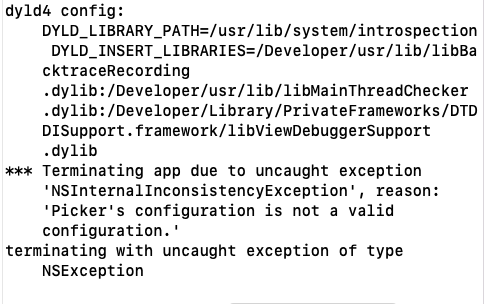
我正在开发由苹果公司在WWDC2020中提供的名为PHPicker的新图像选择API。当我第二次从选择器中选择图像时,我会得到这个错误。当代码第一次完美地工作时。第二次单击按钮打开选择器时,应用程序崩溃时会出现以下错误。“由于异常'NSInternalInconsistencyException‘终止应用程序,原因:’选择器的配置不是一个有效的配置.‘”。
 @IBAction func addVideo(_ sender: UIButton) {
        presentPicker(filter: .videos)
  }

 private func presentPicker(filter: PHPickerFilter?) {
        var configuration = PHPickerConfiguration(photoLibrary: .shared())

        // Set the filter type according to the user’s selection.
        configuration.filter = filter
        // Set the mode to avoid transcoding, if possible, if your app supports arbitrary image/video encodings.
        configuration.preferredAssetRepresentationMode = .current
        // Set the selection behavior to respect the user’s selection order.
        configuration.selection = .ordered
        // Set the selection limit to enable multiselection.
        configuration.selectionLimit = 1
        // Set the preselected asset identifiers with the identifiers that the app tracks.
        configuration.preselectedAssetIdentifiers = selectedAssetIdentifiers

        let picker = PHPickerViewController(configuration: configuration)
        picker.delegate = self
        present(picker, animated: true)
    }


func picker(_ picker: PHPickerViewController, didFinishPicking results: [PHPickerResult]) {
        dismiss(animated: true)

        let existingSelection = self.selection
        var newSelection = [String: PHPickerResult]()
        for result in results {
            let identifier = result.assetIdentifier!
            newSelection[identifier] = existingSelection[identifier] ?? result
        }

        // Track the selection in case the user deselects it later.
        selection = newSelection
        selectedAssetIdentifiers = results.map(\.assetIdentifier!)
        selectedAssetIdentifierIterator = selectedAssetIdentifiers.makeIterator()

        if selection.isEmpty {
            displayEmptyImage()
        } else {
            displayImage()
        }
}我使用的代码与苹果在他们的网站上提供的代码相同。https://developer.apple.com/documentation/photokit/phpickerviewcontroller。我刚刚把selectionLimit从0改为1。
回答 2
Stack Overflow用户
发布于 2022-05-10 14:50:49
显然,只有当preselectedAssetIdentifiers大于1 (这是默认的)时,preselectedAssetIdentifiers属性才是有效的(开玩笑的,只是在头文件中)。
以下是Apple论坛的回答,供参考:https://developer.apple.com/forums/thread/705493
Stack Overflow用户
发布于 2022-04-06 11:18:28
您的代码一定有问题。我已经复制粘贴了您的解决方案,它在模拟器(iOS 15.0)上正确工作。
https://stackoverflow.com/questions/71765492
复制相似问题
腾讯云开发者

Copyright © 2013 - 2026 Tencent Cloud. All Rights Reserved. 腾讯云 版权所有
深圳市腾讯计算机系统有限公司 ICP备案/许可证号:粤B2-20090059  粤公网安备44030502008569号
腾讯云计算(北京)有限责任公司 京ICP证150476号 | 京ICP备11018762号