
不工作的Plotly.js组件框架中的PowerApps图表
不工作的Plotly.js组件框架中的PowerApps图表
提问于 2022-04-04 11:21:58
我不是JavaScript/类型记录方面的专家,所以我可能在这里遗漏了一些琐碎的东西。但是,是否有人有PowerApps组件框架(PCF)与Plotly.js结合使用的经验?我在控制台中创建了一个PowerApps/CanvasApp组件
pac pcf init --namespace PlotlyChartComponent --name PlotlyChartComponent --template field这些是已安装的依赖项:
package.json
{
  "name": "pcf-project",
  "version": "1.0.0",
  "description": "Project containing your PowerApps Component Framework (PCF) control.",
  "scripts": {
    "build": "pcf-scripts build",
    "clean": "pcf-scripts clean",
    "rebuild": "pcf-scripts rebuild",
    "start": "pcf-scripts start",
    "refreshTypes": "pcf-scripts refreshTypes"
  },
  "dependencies": {
    "assert": "^2.0.0",
    "glslify": "^7.1.1",
    "mapbox-gl": "^2.7.1",
    "plotly.js": "^2.11.1",
    "react": "^16.8.4",
    "react-plotly.js": "^2.5.1",
    "stream": "^0.0.2"
  },
  "devDependencies": {
    "@types/node": "^16.4",
    "@types/plotly.js": "^1.54.20",
    "@types/powerapps-component-framework": "^1.3.0",
    "@typescript-eslint/eslint-plugin": "^4.29.0",
    "@typescript-eslint/parser": "^4.29.0",
    "eslint": "^7.32.0",
    "eslint-plugin-import": "^2.23.4",
    "eslint-plugin-node": "^11.1.0",
    "eslint-plugin-promise": "^5.1.0",
    "pcf-scripts": "^1",
    "pcf-start": "^1",
    "typescript": "^4.3"
  }
}
实际代码如下所示:
index.ts
import {IInputs, IOutputs} from "./generated/ManifestTypes";

import * as Plotly from 'plotly.js';

export class PlotlyChartComponentl implements ComponentFramework.StandardControl<IInputs, IOutputs> {

    private _container: HTMLDivElement;

    private labelElement: HTMLLabelElement;
    private chartElement: HTMLDivElement;


    /**
     * Empty constructor.
     */
    constructor() {}

    /**
     * Used to initialize the control instance. Controls can kick off remote server calls and other initialization actions here.
     * Data-set values are not initialized here, use updateView.
     * @param context The entire property bag available to control via Context Object; It contains values as set up by the customizer mapped to property names defined in the manifest, as well as utility functions.
     * @param notifyOutputChanged A callback method to alert the framework that the control has new outputs ready to be retrieved asynchronously.
     * @param state A piece of data that persists in one session for a single user. Can be set at any point in a controls life cycle by calling 'setControlState' in the Mode interface.
     * @param container If a control is marked control-type='standard', it will receive an empty div element within which it can render its content.
     */
    public init(context: ComponentFramework.Context<IInputs>, notifyOutputChanged: () => void, state: ComponentFramework.Dictionary, container:HTMLDivElement): void
    {
        this._container = document.createElement("div");

        this.labelElement = document.createElement("label");
        this.labelElement.innerHTML = "Test Plotly";

        this.chartElement = document.createElement("div");
        this.chartElement.setAttribute("id", "graph");

        //Plotly.newPlot('graph', [{
        //   x: [0, 1, 3, 2, 4, 1],
        //    type: 'histogram'
        //}]);

        this._container.appendChild(this.labelElement);
        this._container.appendChild(this.chartElement);

        container.appendChild(this._container);
    }


    /**
     * Called when any value in the property bag has changed. This includes field values, data-sets, global values such as container height and width, offline status, control metadata values such as label, visible, etc.
     * @param context The entire property bag available to control via Context Object; It contains values as set up by the customizer mapped to names defined in the manifest, as well as utility functions
     */
    public updateView(context: ComponentFramework.Context<IInputs>): void {}

    /**
     * It is called by the framework prior to a control receiving new data.
     * @returns an object based on nomenclature defined in manifest, expecting object[s] for property marked as “bound” or “output”
     */
    public getOutputs(): IOutputs
    {
        return {};
    }

    /**
     * Called when the control is to be removed from the DOM tree. Controls should use this call for cleanup.
     * i.e. cancelling any pending remote calls, removing listeners, etc.
     */
    public destroy(): void {}
}
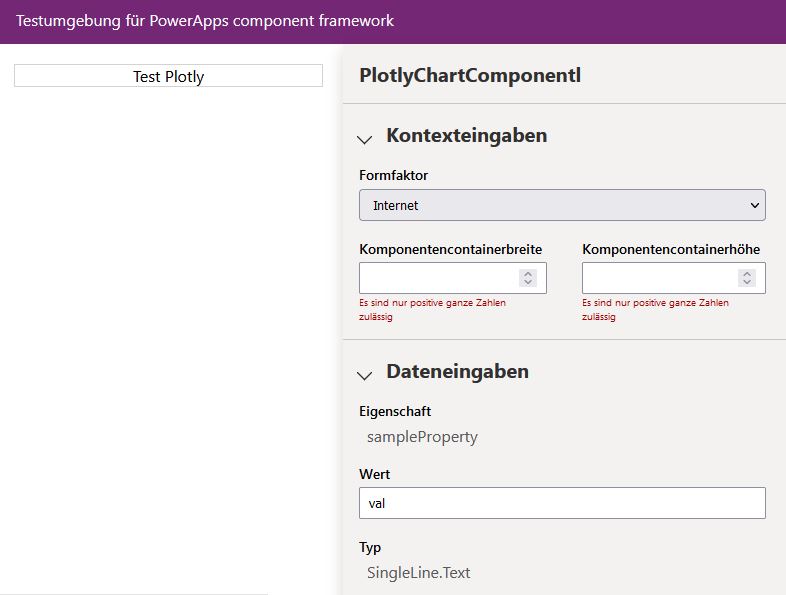
到现在为止还好。这将在PCF控制沙箱中给出一个结果
npm start watch
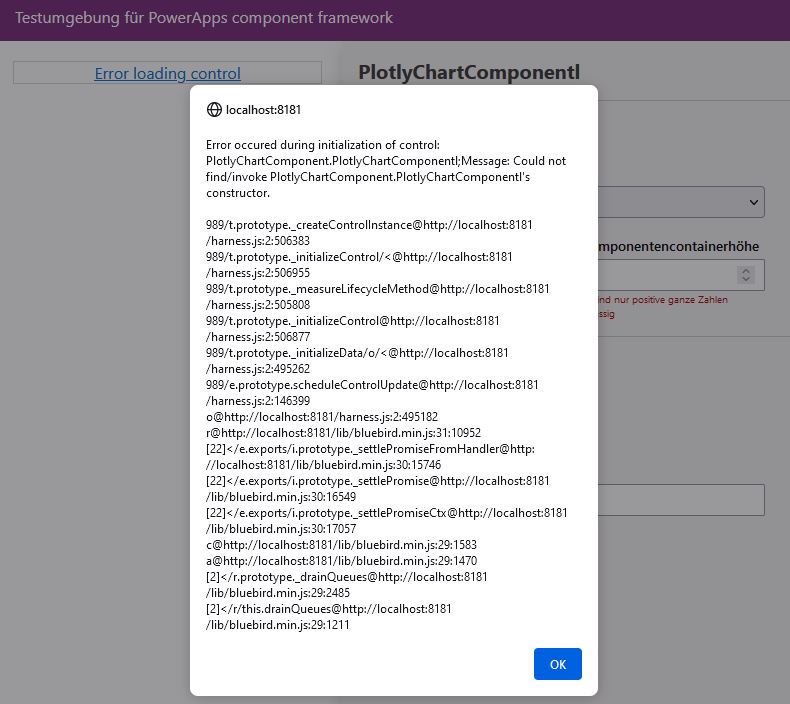
但是如果我取消对init中的图实例化的注释
    Plotly.newPlot('graph', [{
        x: [0, 1, 3, 2, 4, 1],
        type: 'histogram'
    }]);
在PCF Sandbox环境中,我得到以下错误:
有谁知道怎么解决这个问题吗?怎样才能更好地将数据摄取到将要绘制的类中?
回答 1
Stack Overflow用户
回答已采纳
发布于 2022-05-25 20:55:12
你只要换电话就行。首先将图表添加到容器中,然后调用Plotly。
页面原文内容由Stack Overflow提供。腾讯云小微IT领域专用引擎提供翻译支持
原文链接:
https://stackoverflow.com/questions/71736389
复制相关文章
相似问题
腾讯云开发者

Copyright © 2013 - 2026 Tencent Cloud. All Rights Reserved. 腾讯云 版权所有
深圳市腾讯计算机系统有限公司 ICP备案/许可证号:粤B2-20090059  粤公网安备44030502008569号
腾讯云计算(北京)有限责任公司 京ICP证150476号 | 京ICP备11018762号