
如何在THREE.js中通过物理材料使半透明的纹理可见?
如何在THREE.js中通过物理材料使半透明的纹理可见?
提问于 2022-04-02 18:23:04
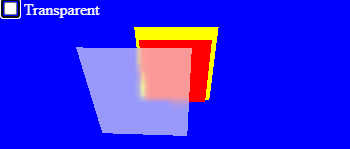
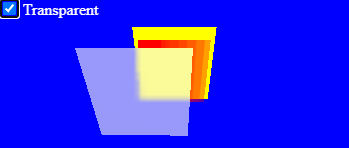
我想渲染一个半透明的PNG纹理背后的透明物理材料.然而,THREE.js根本不通过物理材料呈现半透明的纹理。
我发现在材质上设置transparent: false可以使它可见,但这显然会使我的纹理变得不透明,这不是我想要的。
如何通过物理材料使半透明的PNG纹理可见?
const renderer = new THREE.WebGLRenderer({
  canvas: document.getElementById('canvas'),
});

const scene = new THREE.Scene();
scene.background = new THREE.Color(0x0000ff);
scene.add(new THREE.AmbientLight(0xffffff, 1));

const texture = new THREE.TextureLoader().load('data:image/png;base64,iVBORw0KGgoAAAANSUhEUgAAAE4AAABOCAYAAACOqiAdAAAAAXNSR0IArs4c6QAAAARnQU1BAACxjwv8YQUAAAAJcEhZcwAADsMAAA7DAcdvqGQAAADdSURBVHhe7dAhCgIBFADR1SgYLDatHsv7n2ItXzDILg7Y3ivT57Cu63P57jHdcpvuuU63XKZ7ztO30/TTffo3xyk/Mi4yLjIuMi4yLjIuMi4yLjIuMi4yLjIuMi4yLjIuMi4yLjIuMi4yLjIuMi4yLjIuMi4yLjIuMi4yLjIuMi4yLjIuMi4yLjIuMi4yLjIuMi4yLjIuMi4yLjIuMi4yLjIuMi4yLjIuMi4yLjIuMi4yLjIuMi4yLjIuMi4yLjIuMi4yLjIuMi4yLjIuMi4yLjIuMi4yLjIuMi5ZlhcxLwSYJ4qy6wAAAABJRU5ErkJggg==');

const camera = new THREE.PerspectiveCamera(65, renderer.domElement.clientWidth / renderer.domElement.clientHeight, 0.1, 1000);

{
  const geometry = new THREE.PlaneBufferGeometry(4, 4);
  const material = new THREE.MeshStandardMaterial({
    color: 0xffff00,
    side: THREE.DoubleSide,
  });
  const plane = new THREE.Mesh(geometry, material);
  plane.position.z = 1;
  scene.add(plane);
}

{
  const geometry = new THREE.PlaneBufferGeometry(3, 3);
  const material = new THREE.MeshStandardMaterial({
    color: 0xff0000,
    side: THREE.DoubleSide,
    map: texture,
    transparent: true,
  });
  const plane = new THREE.Mesh(geometry, material);
  scene.add(plane);

  document.getElementById('transparent').onchange = (evt) => {
    material.transparent = evt.target.checked;
    material.needsUpdate = true;
  };
}

{
  const geometry = new THREE.PlaneBufferGeometry(3, 3);
  const material = new THREE.MeshPhysicalMaterial({
    side: THREE.DoubleSide,
    roughness: 0.3,
    transmission: 0.4,
    color: 0xffffff,
  });
  const plane = new THREE.Mesh(geometry, material);
  plane.position.z = -2;
  plane.position.x = 1;
  scene.add(plane);
}

const startTime = performance.now();

function render() {
  const now = performance.now();
  const angle = (now - startTime) * 0.002;
  camera.position.set(Math.cos(angle) * 2, Math.sin(angle) * 2, -5);
  camera.lookAt(0, 0, 0);

  renderer.render(scene, camera);

  requestAnimationFrame(render);
}

requestAnimationFrame(render);<script src="https://cdn.jsdelivr.net/npm/three@0.139.2/build/three.min.js"></script>
<div style="position: absolute; left: 0; top: 0; z-index: 1; color: white;">
<input type="checkbox" id="transparent" name="transparent" checked /><label for="transparent"> Transparent</label>
</div>
<canvas id="canvas" width="350" height="150" style="position: absolute; left: 0; top: 0;" />
回答 1
Stack Overflow用户
回答已采纳
发布于 2022-06-23 14:15:14
THREE.MeshPhysicalMaterial的“传输”功能是一种更高级的基于物理的透明性类型,需要额外的呈现通行证。目前,three.js (以及我所知道的大多数其他实时引擎)无法通过传输材料显示α混合(.transparent=true)或传输(.transmission>0)材料。如果您需要多层透明,您将需要坚持阿尔法混合,而不是传输,提供的.transparent=true和不透明度或纹理与阿尔法通道。
页面原文内容由Stack Overflow提供。腾讯云小微IT领域专用引擎提供翻译支持
原文链接:
https://stackoverflow.com/questions/71720113
复制相关文章
相似问题
腾讯云开发者

Copyright © 2013 - 2026 Tencent Cloud. All Rights Reserved. 腾讯云 版权所有
深圳市腾讯计算机系统有限公司 ICP备案/许可证号:粤B2-20090059  粤公网安备44030502008569号
腾讯云计算(北京)有限责任公司 京ICP证150476号 | 京ICP备11018762号