
从Excel列表中读取和迭代/操作Python Selenium
我有一个特定的用例,我想弄清楚,并希望得到一些建议/有用的资源。
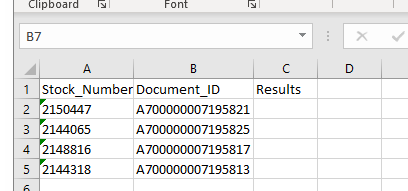
我正在尝试用两列迭代excel文件。第一栏将包含一个将在网站中搜索的数字。第二列编号将是我要执行的操作的目标id。理想的情况下,如果它也成功地执行了这个操作,我希望它能打印在C列中,但是我可以在以后为之工作。
例如,在列A2中开始搜索,将这个数字输入搜索栏。然后,搜索该数字后,在B2中搜索该数字并执行定义的操作,然后沿着A3移动到下一个单元格,并重复循环。
下面是我正在使用的代码:
import pandas as pd
import unittest
import time
from selenium import webdriver
from selenium.webdriver.support.select import Select
from selenium.webdriver.common.by import By
from selenium.webdriver.support.ui import WebDriverWait
from selenium.webdriver.support import expected_conditions as EC
from selenium.webdriver.common.keys import Keys
from selenium.webdriver.support import expected_conditions
from selenium.webdriver.common.action_chains import ActionChains
from selenium.webdriver import ActionChains
from openpyxl import Workbook, load_workbook
import pyautogui


PATH = "C:\Chrome Driver\chromedriver.exe"
driver = webdriver.Chrome(PATH)

email = 'test@test.com'
password = 'test123'

EMAILFIELD = (By.ID, "i0116")
PASSWORDFIELD = (By.ID, "i0118")
NEXTBUTTON = (By.ID, "idSIButton9")


driver.get("exampleURL")
driver.set_window_position(1500, 0)
driver.maximize_window()

# LOG IN

WebDriverWait(driver, 10).until(EC.element_to_be_clickable(EMAILFIELD)).send_keys(email)
WebDriverWait(driver, 10).until(EC.element_to_be_clickable(NEXTBUTTON)).click()
WebDriverWait(driver, 10).until(EC.element_to_be_clickable(PASSWORDFIELD)).send_keys(password)
WebDriverWait(driver, 10).until(EC.element_to_be_clickable(NEXTBUTTON)).click()
WebDriverWait(driver, 10).until(EC.element_to_be_clickable(NEXTBUTTON)).click()

# SEARCH FOR SN

SearchBOX = (By.ID, "post-search-input")
TestSN = '8643967'
ENTER = (By.ID, "search-submit")

WebDriverWait(driver, 10).until(EC.element_to_be_clickable(SearchBOX)).send_keys(TestSN)
WebDriverWait(driver, 10).until(EC.element_to_be_clickable(ENTER)).send_keys(Keys.RETURN)

# SET OPTIONS

Options = (By.XPATH, "//*[@id='show-settings-link']")
Page_Number = (By.XPATH, "//*[@id='edit_rs_document_per_page']")
Apply_Button = (By.XPATH, "//*[@id='screen-options-apply']")

WebDriverWait(driver, 10).until(EC.element_to_be_clickable(Options)).click()
WebDriverWait(driver, 10).until(EC.element_to_be_clickable(Page_Number)).send_keys("999")
WebDriverWait(driver, 10).until(EC.element_to_be_clickable(Apply_Button)).click()
WebDriverWait(driver, 10).until(EC.element_to_be_clickable(Options)).click()

# FIND & RETIRE

before_XPath = "//*[@class='wp-list-table widefat fixed striped table-view-list pages']/tbody/tr["
aftertd_XPath_1 = "]/td[1]"
aftertd_XPath_2 = "]/td[2]"
aftertd_XPath_3 = "]/td[3]"
before_XPath_1 = "//*[@class='wp-list-table widefat fixed striped table-view-list pages']/tbody/tr[1]/th["
before_XPath_2 = "//*[@class='wp-list-table widefat fixed striped table-view-list pages']/tbody/tr[2]/td["
aftertd_XPath = "]/td["
after_XPath = "]"
aftertr_XPath = "]"

time.sleep(10)
search_text = ('0900766b813a9d80')

num_rows = len(driver.find_elements(By.XPATH, "//*[@class='wp-list-table widefat fixed striped table-view-list pages']/tbody/tr"))
num_columns = len(driver.find_elements(By.XPATH, "//*[@class='wp-list-table widefat fixed striped table-view-list pages']/tbody/tr[2]/td"))

elem_found = False


for t_row in range(2, (num_rows + 1)):
    for t_column in range(1, (num_columns + 1)):
        FinalXPath = before_XPath + str(t_row) + aftertd_XPath + str(t_column) + aftertr_XPath
        cell_text = driver.find_element(By.XPATH, FinalXPath).text

        #if ((cell_text.casefold()) == (search_text.casefold())):

        if search_text[:3] == "A70":
            retire_xpath = driver.find_element(By.XPATH, "//*[@id='retire-"+ str(search_text[-7:])+"']")
            time.sleep(6)
            driver.execute_script("arguments[0].click();", retire_xpath)
            time.sleep(5)
            #driver.switch_to.alert.accept()
            break
        elif search_text[:3] == "090":
            print(search_text)
            post_parent_num = driver.find_element(By.XPATH, f"//div[@class='post_name' and text()='{search_text}']//following-sibling::div[@class='post_parent']").get_attribute('innerText')
            print(post_parent_num)
            retire_xpath = driver.find_element(By.XPATH, "//*[@id='retire-"+ post_parent_num +"']")
            time.sleep(6)
            driver.execute_script("arguments[0].click();", retire_xpath)
            time.sleep(5)
            #driver.switch_to.alert.accept()
            break
        else:
            print("retire/already retired")
'TestSN‘是列作为值经过迭代的位置,'search_text’将是列Bs值。我不知道从哪里开始,我觉得这将是一个大的循环?有人能帮我指路吗?
提前谢谢你,
炖菜
import pandas as pd
import unittest
import time
from selenium import webdriver
from selenium.webdriver.support.select import Select
from selenium.webdriver.common.by import By
from selenium.webdriver.support.ui import WebDriverWait
from selenium.webdriver.support import expected_conditions as EC
from selenium.webdriver.common.keys import Keys
from selenium.webdriver.support import expected_conditions
from selenium.webdriver.common.action_chains import ActionChains
from selenium.webdriver import ActionChains
from openpyxl import Workbook, load_workbook
import pyautogui
import xlrd
import openpyxl

path = 'C://Users/E0651690/Python Scripts/test_file.xlsx'

def getRowCount (file,sheetName):
    workbook = openpyxl.load_workbook(file)
    sheet = workbook.get_sheet_by_name(sheetName)
    return(sheet.max_row)

def getColumnCount(file,sheetName):
    workbook = openpyxl.load_workbook(file)
    sheet = workbook.get_sheet_by_name(sheetName)
    return(sheet.max_column)

def readData(file,sheetName,rownum,columnno):
    workbook = openpyxl.load_workbook(file)
    sheet = workbook.get_sheet_by_name(sheetName)
    return sheet.cell(row=rownum, column=columnno).value

def writeData(file,sheetName,rownum,columnno,data):
    workbook = openpyxl.load_workbook(file)
    sheet = workbook.get_sheet_by_name(sheetName)

rows=getRowCount(path, "Sheet1")

driver = webdriver.Chrome(executable_path="C:\Chrome Driver\chromedriver.exe")

email = 'username'
password = 'password'

EMAILFIELD = (By.ID, "i0116")
PASSWORDFIELD = (By.ID, "i0118")
NEXTBUTTON = (By.ID, "idSIButton9")


driver.get("URL")
driver.set_window_position(1500, 0)
driver.maximize_window()

WebDriverWait(driver, 10).until(EC.element_to_be_clickable(EMAILFIELD)).send_keys(email)
WebDriverWait(driver, 10).until(EC.element_to_be_clickable(NEXTBUTTON)).click()
WebDriverWait(driver, 10).until(EC.element_to_be_clickable(PASSWORDFIELD)).send_keys(password)
WebDriverWait(driver, 10).until(EC.element_to_be_clickable(NEXTBUTTON)).click()
WebDriverWait(driver, 10).until(EC.element_to_be_clickable(NEXTBUTTON)).click()

SearchBOX = (By.ID, "post-search-input")
ENTER = (By.ID, "search-submit")

for r in range (2,rows+1):
    stock_number = readData(path,"Sheet1",r,1)
    document_id = readData(path, "Sheet1",r,2)

    WebDriverWait(driver, 10).until(EC.element_to_be_clickable(SearchBOX)).send_keys(stock_number)
    WebDriverWait(driver, 10).until(EC.element_to_be_clickable(ENTER)).send_keys(Keys.RETURN)

    Options = (By.XPATH, "//*[@id='show-settings-link']")
    Page_Number = (By.XPATH, "//*[@id='edit_rs_document_per_page']")
    Apply_Button = (By.XPATH, "//*[@id='screen-options-apply']")

    WebDriverWait(driver, 10).until(EC.element_to_be_clickable(Options)).click()
    WebDriverWait(driver, 10).until(EC.element_to_be_clickable(Page_Number)).send_keys("999")
    WebDriverWait(driver, 10).until(EC.element_to_be_clickable(Apply_Button)).click()
    WebDriverWait(driver, 10).until(EC.element_to_be_clickable(Options)).click()


    before_XPath = "//*[@class='wp-list-table widefat fixed striped table-view-list pages']/tbody/tr["
    aftertd_XPath_1 = "]/td[1]"
    aftertd_XPath_2 = "]/td[2]"
    aftertd_XPath_3 = "]/td[3]"
    before_XPath_1 = "//*[@class='wp-list-table widefat fixed striped table-view-list pages']/tbody/tr[1]/th["
    before_XPath_2 = "//*[@class='wp-list-table widefat fixed striped table-view-list pages']/tbody/tr[2]/td["
    aftertd_XPath = "]/td["
    after_XPath = "]"
    aftertr_XPath = "]"

    time.sleep(10)

    num_rows = len(driver.find_elements(By.XPATH, "//*[@class='wp-list-table widefat fixed striped table-view-list pages']/tbody/tr"))
    num_columns = len(driver.find_elements(By.XPATH, "//*[@class='wp-list-table widefat fixed striped table-view-list pages']/tbody/tr[2]/td"))

    for t_row in range(2, (num_rows + 1)):
        for t_column in range(1, (num_columns + 1)):
            FinalXPath = before_XPath + str(t_row) + aftertd_XPath + str(t_column) + aftertr_XPath
            cell_text = driver.find_element(By.XPATH, FinalXPath).text

        if document_id[:3] == "A70":
            retire_xpath = driver.find_element(By.XPATH, "//*[@id='retire-"+ str(document_id[-7:])+"']")
            time.sleep(6)
            driver.execute_script("arguments[0].click();", retire_xpath)
            time.sleep(5)
            #driver.switch_to.alert.accept()
            writeData(path, "Sheet1", r, 3, "Retired")

        elif document_id[:3] == "090":
            print(document_id)
            post_parent_num = driver.find_element(By.XPATH, f"//div[@class='post_name' and text()='{document_id}']//following-sibling::div[@class='post_parent']").get_attribute('innerText')
            print(post_parent_num)
            retire_xpath = driver.find_element(By.XPATH, "//*[@id='retire-"+ post_parent_num +"']")
            time.sleep(6)
            driver.execute_script("arguments[0].click();", retire_xpath)
            time.sleep(5)
            #driver.switch_to.alert.accept()
            writeData(path, "Sheet1", r, 3, "Retired")

        else:
            writeData(path, "Sheet1", r, 3, "Failed")
我正在使用的excel屏幕截图:
回答 1
Stack Overflow用户
发布于 2022-04-01 14:33:25
很容易使用pandas来处理excel文件。
首先,您需要使用pandas或Anaconda安装openpyxl和pip,这取决于您处理环境的方式。(如果尚未安装)
然后使用pandas读取excel文件
import pandas as pd

df = pd.read_excel('./path_to_your_excel.xlsx')
假设这是您的excel的一部分:
TestSN  Action
123     read
456     delete
789 update然后,您将使用pandas.iterrows遍历这些行。当迭代代码经过每一行和一行数据时,将使用列名提供数据,如下面的示例所示。同时,您可以保留一个操作结果列表,该列表将为每一行附加结果。
action_results = []
for idx, row in df.iterrows():
    # Code here will run for each row
    # The loop will stop when reaching the last row of excel
    # Using row['TestSN'] and row['Action']
    # run your selenium code here
    ...
    TestSN = row['TestSN']
    ...

    action_results.append(True) # Or False depending on how it went
最后,您将将操作结果列添加到您的dataframe中并保存它。
df['Action result'] = action_results
df.to_excel('./path_to_new_excel.xlsx')
在函数中定义selenium代码,将序列号和操作作为输入,结果作为输出,并在excel行上迭代时使用,这也可能是一个好主意。
完整代码:
import pandas as pd

df = pd.read_excel('./path_to_your_excel.xlsx')

action_results = []
for idx, row in df.iterrows():
    # Code here will run for each row
    # The loop will stop when reaching the last row of excel
    # Using row['TestSN'] and row['Action']
    # run your selenium code here
    ...
    TestSN = row['TestSN']
    ...

    action_results.append(True) # Or False depending on how it went

df['Action result'] = action_results
df.to_excel('./path_to_new_excel.xlsx')https://stackoverflow.com/questions/71708335
复制相似问题
腾讯云开发者

Copyright © 2013 - 2026 Tencent Cloud. All Rights Reserved. 腾讯云 版权所有
深圳市腾讯计算机系统有限公司 ICP备案/许可证号:粤B2-20090059  粤公网安备44030502008569号
腾讯云计算(北京)有限责任公司 京ICP证150476号 | 京ICP备11018762号