
UniformGrid的行属性
我对WPF很陌生,并试图了解如何使用UniformGrid:https://learn.microsoft.com/en-us/windows/communitytoolkit/controls/uniformgrid。
如果没有为
Rows和Columns提供值,则UniformGrid将根据可见项的总数创建正方形布局。如果为Rows和Columns提供了固定的大小,那么将不会显示其他无法适应所提供的单元格数的子级。
基于本文,我认为如果我将一个10项的集合绑定到一个统一的网格中,并指定1行和3列,那么它将只显示3项,而其他7项将被切断。
但是,我已经构建了一个示例应用程序,并且在我的集合中包含了1行、3列和10项,显示了4行。下面是我的示例应用程序:
<Window x:Class="UniformGridTest.MainWindow"
        xmlns="http://schemas.microsoft.com/winfx/2006/xaml/presentation"
        xmlns:x="http://schemas.microsoft.com/winfx/2006/xaml"
        xmlns:d="http://schemas.microsoft.com/expression/blend/2008"
        xmlns:mc="http://schemas.openxmlformats.org/markup-compatibility/2006"
        xmlns:local="clr-namespace:UniformGridTest"
        mc:Ignorable="d"
        Title="MainWindow" Height="450" Width="800"
        Name="MyMainWindow">
    <ItemsControl ItemsSource="{Binding ActiveList}" Background="Black">
        <ItemsControl.ItemsPanel>
            <ItemsPanelTemplate>
                <UniformGrid HorizontalAlignment="Stretch" VerticalAlignment="Center" Rows="1" Columns="3"/>
            </ItemsPanelTemplate>
        </ItemsControl.ItemsPanel>
        <ItemsControl.ItemTemplate>
            <DataTemplate>
                <Button Content="{Binding ItemDescription}" Background="Black" Foreground="White"/>
            </DataTemplate>
        </ItemsControl.ItemTemplate>
    </ItemsControl>
</Window>using System.Collections.ObjectModel;
using System.ComponentModel;
using System.Windows;
namespace UniformGridTest
{
/// <summary>
/// Interaction logic for MainWindow.xaml
/// </summary>
public partial class MainWindow : Window
{
private readonly PlatformSelectorViewModel platformSelectorViewModel = new PlatformSelectorViewModel();
public MainWindow()
{
InitializeComponent();
DataContext = platformSelectorViewModel;
}
}
public class PlatformSelectorViewModel
{
public ObservableCollection<SelectorItem> ActiveList { get; }
public PlatformSelectorViewModel()
{
ActiveList = new ObservableCollection<SelectorItem>();
ActiveList.Add(new SelectorItem() { ItemDescription = "Super Nintendo Entertainment System" });
ActiveList.Add(new SelectorItem() { ItemDescription = "Nintendo Entertainment System" });
ActiveList.Add(new SelectorItem() { ItemDescription = "Sega Genesis" });
ActiveList.Add(new SelectorItem() { ItemDescription = "Sega CD" });
ActiveList.Add(new SelectorItem() { ItemDescription = "Turbo Grafx 16" });
ActiveList.Add(new SelectorItem() { ItemDescription = "Nintendo Gamecube" });
ActiveList.Add(new SelectorItem() { ItemDescription = "Nintendo Wii" });
ActiveList.Add(new SelectorItem() { ItemDescription = "Sony Playstation" });
ActiveList.Add(new SelectorItem() { ItemDescription = "Nintendo PSP" });
ActiveList.Add(new SelectorItem() { ItemDescription = "Nintendo Playstation 2" });
ActiveList.Add(new SelectorItem() { ItemDescription = "Arcade" });
}
}
public class SelectorItem : INotifyPropertyChanged
{
private string itemDescription;
public string ItemDescription
{
get { return itemDescription; }
set
{
itemDescription = value;
PropertyChanged(this, new PropertyChangedEventArgs("ItemDescription"));
}
}
private bool isSelected;
public bool IsSelected
{
get { return isSelected; }
set
{
isSelected = value;
PropertyChanged(this, new PropertyChangedEventArgs("IsSelected"));
}
}
public event PropertyChangedEventHandler PropertyChanged = delegate { };
}
}结果:
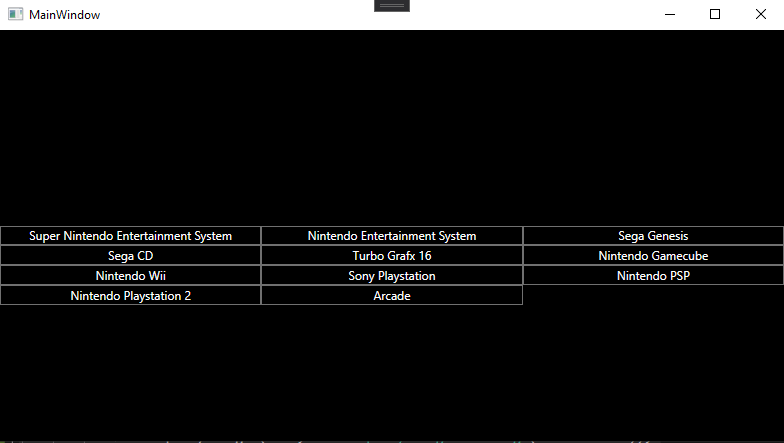
根据UniformGrid上的文档,我预期我会得到1行3项的一致布局,而其他7项不会显示。我是误解了文档,还是做错了导致显示更多行的错误?
回答 1
Stack Overflow用户
发布于 2022-04-01 12:09:51
首先,您引用了错误的文档,您的文档是UWP,而不是WPF。
行为应该是相同的,但在WPF的参考文档中没有明确说明。但是,似乎有一个问题源于将VerticalAlignment设置为Center,而与ItemsControl无关,对于孤立的UniformGrid来说是一样的。
每当UniformGrid包含超过它可以显示的最大项数(Rows x Columns) 和时,VerticalAlignment被设置为默认Stretch以外的任何其他值,所有项目都会显示,而不管行数如何,但要考虑列数。
您可以做的是删除VerticalAlignment并尝试通过调整ItemsControl来补偿它,使其符合您的初衷。
<ItemsPanelTemplate>
   <UniformGrid HorizontalAlignment="Stretch" Rows="1" Columns="3"/>
</ItemsPanelTemplate>https://stackoverflow.com/questions/71706077
复制相似问题
腾讯云开发者

Copyright © 2013 - 2026 Tencent Cloud. All Rights Reserved. 腾讯云 版权所有
深圳市腾讯计算机系统有限公司 ICP备案/许可证号:粤B2-20090059  粤公网安备44030502008569号
腾讯云计算(北京)有限责任公司 京ICP证150476号 | 京ICP备11018762号