
SwiftUI:@StateObject deinit不调用?
SwiftUI:@StateObject deinit不调用?
提问于 2022-03-31 16:26:13
我有以下代码:
struct ContentView: View {
    @Environment(\.managedObjectContext) private var viewContext

    @FetchRequest(
        sortDescriptors: [NSSortDescriptor(keyPath: \Item.timestamp, ascending: true)],
        animation: .default)
    private var items: FetchedResults<Item>

    var body: some View {
        NavigationView {
            List {
                ForEach(items) { item in
                    NavigationLink {
                        Text("Item at \(item.timestamp!, formatter: itemFormatter)")
                    } label: {
//                        Text(item.timestamp!, formatter: itemFormatter)
                        ItemCellView(model: ItemCellViewModel(item: item))
                    }
                }
                .onDelete(perform: deleteItems)
            }
            .toolbar {
                ToolbarItem(placement: .navigationBarTrailing) {
                    EditButton()
                }
                ToolbarItem {
                    Button(action: addItem) {
                        Label("Add Item", systemImage: "plus")
                    }
                }
            }
            Text("Select an item")
        }
    }

    private func addItem() {
        withAnimation {
            let newItem = Item(context: viewContext)
            newItem.timestamp = Date()

            do {
                try viewContext.save()
            } catch {
                // Replace this implementation with code to handle the error appropriately.
                // fatalError() causes the application to generate a crash log and terminate. You should not use this function in a shipping application, although it may be useful during development.
                let nsError = error as NSError
                fatalError("Unresolved error \(nsError), \(nsError.userInfo)")
            }
        }
    }

    private func deleteItems(offsets: IndexSet) {
        withAnimation {
            offsets.map { items[$0] }.forEach(viewContext.delete)

            do {
                try viewContext.save()
            } catch {
                // Replace this implementation with code to handle the error appropriately.
                // fatalError() causes the application to generate a crash log and terminate. You should not use this function in a shipping application, although it may be useful during development.
                let nsError = error as NSError
                fatalError("Unresolved error \(nsError), \(nsError.userInfo)")
            }
        }
    }
}

private let itemFormatter: DateFormatter = {
    let formatter = DateFormatter()
    formatter.dateStyle = .short
    formatter.timeStyle = .medium
    return formatter
}()

struct ContentView_Previews: PreviewProvider {
    static var previews: some View {
        ContentView().environment(\.managedObjectContext, PersistenceController.preview.container.viewContext)
    }
}


struct ItemCellView: View {

    @StateObject var model:ItemCellViewModel

    var body: some View {

        Text(model.item.timestamp!, formatter: itemFormatter)
            .foregroundColor(.blue)
    }

}

class ItemCellViewModel: ObservableObject {

    @Published var item:Item

    init(item:Item) {
        self.item = item
    }

    deinit {
        print("ItemCellViewModel EDINIT \(self)")
    }

}
它得出的结论是:
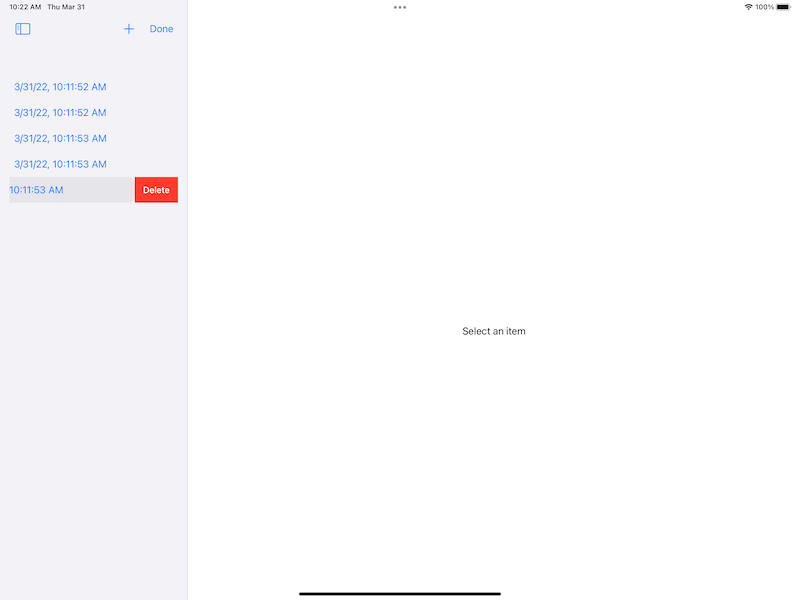
问题:
在我滑动以删除项目后,不会调用ItemCellViewModel deinit。有人能告诉我为什么即使在ItemCellViewModel离开之后,ItemCellView仍然存在吗?
这是我正在研究的一个代码基的简化版本。当视图被用户“删除”时,我需要这个模型消失。为什么SwiftUI让ItemCellViewModel在身边??
回答 2
Stack Overflow用户
回答已采纳
发布于 2022-03-31 18:00:13
视图不会在一个事实中被删除(仅从可见区域中删除),因为List缓存了一些视图(可见区域+ ~2),而StateObject是保持其状态的持久视图存储。所以观察到的行为是精心设计的。
Stack Overflow用户
发布于 2022-03-31 20:26:34
去掉视图模型对象,在SwiftUI中我们使用值类型,视图结构是SwiftUI用来代表我们创建和更新UIKit/AppKit视图的视图模型。在SwiftUI要点WWDC 2019中学习这个。而且,您也不能在ObservableObject中嵌套ObservableObject。若要修复此问题,请将ItemCellView更改为:
struct ItemCellView: View {

    @ObservedObject var item: Item

    var body: some View {

        Text(item.timestamp!, formatter: itemFormatter)
            .foregroundColor(.blue)
    }

}页面原文内容由Stack Overflow提供。腾讯云小微IT领域专用引擎提供翻译支持
原文链接:
https://stackoverflow.com/questions/71696080
复制相关文章
相似问题
腾讯云开发者

Copyright © 2013 - 2026 Tencent Cloud. All Rights Reserved. 腾讯云 版权所有
深圳市腾讯计算机系统有限公司 ICP备案/许可证号:粤B2-20090059  粤公网安备44030502008569号
腾讯云计算(北京)有限责任公司 京ICP证150476号 | 京ICP备11018762号