
Colab/Bigquery中的认证问题
我长期使用科拉布的BigQuery,从2020年起,我的账户就在谷歌的增强安全程序上。直到昨天,我才对自己的身份进行认证。
from google.colab import auth
auth.authenticate_user()
现在,我得到了一个400错误。这些都是它提供的细节:
access_type: offline
login_hint: (email)
response_type: none gsession
redirect_uri: https://colab.research.google.com/tun/m/auth-user-ephem
state: {"token":"(token)","endpoint":"(endpoint)","scopes":["openid","https://www.googleapis.com/auth/userinfo.email","https://www.googleapis.com/auth/cloud-platform","https://www.googleapis.com/auth/drive"]}
hd: (domain)
prompt: consent
client_id: (client_id)
scope: openid https://www.googleapis.com/auth/userinfo.email https://www.googleapis.com/auth/cloud-platform https://www.googleapis.com/auth/drive
我的问题是:在auth上是否有允许认证的配置?
回答 2
Stack Overflow用户
发布于 2022-04-02 10:47:33
我也遇到过这个问题。谷歌似乎已经改变了认证程序,这样你(或者你的组织)必须在应用程序列表中添加冒牌货,并允许你访问你的账户。
但是,还有一种方法可以恢复到没有任何特殊权限的旧身份验证行为:
import os
os.environ['USE_AUTH_EPHEM'] = '0'

from google.colab import auth
auth.authenticate_user()如果您查看源代码函数的authenticate_user(),您可以看到它读取USE_AUTH_EPHEM环境变量来决定是使用旧的还是新的身份验证流。
更新:
另一种(也可能是未来更可靠)的身份验证方法是在Colab中运行以下行。
!gcloud auth login --no-browser --update-adc这要求您在本地计算机上安装Google Cloud CLI,然后只需按照说明操作即可。如果一切顺利,您就可以从Colab内部访问BigQuery,而不需要调用auth.authenticate_user()。
Stack Overflow用户
发布于 2022-04-01 03:54:03
您可以尝试以下替代方法,在Google 中上传json密钥文件(用于身份验证),然后将安装到Google ,然后在python代码中显式使用它来验证BigQuery API请求。
from google.cloud import bigquery
from google.oauth2 import service_account
from google.colab import drive
import json
# Construct a BigQuery client object.

drive.mount('/content/drive/') # Mount to google drive

# Define full path from Google Drive.
# This example, the json key file is in /MyDrive/keys/
key_path = '/content/drive/MyDrive/keys/your-json-file.json'

credentials = service_account.Credentials.from_service_account_file(
    filename=key_path, scopes=["https://www.googleapis.com/auth/cloud-platform"],
)

client = bigquery.Client(credentials=credentials, project=credentials.project_id,)

query = """
    SELECT name, SUM(number) as total_people
    FROM `bigquery-public-data.usa_names.usa_1910_2013`
    WHERE state = 'TX'
    GROUP BY name, state
    ORDER BY total_people DESC
    LIMIT 20
"""

query_job = client.query(query)  # Make an API request.

print("The query data:")
for row in query_job:
    # Row values can be accessed by field name or index.
    print("name={}, count={}".format(row[0], row["total_people"]))
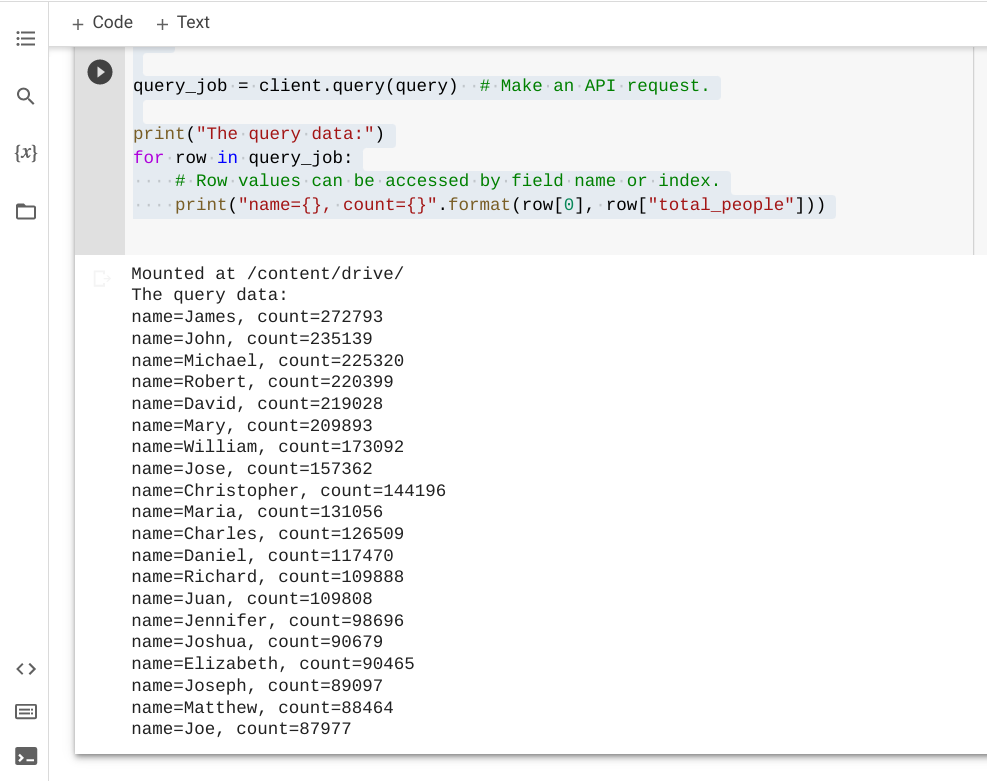
下面是在Google中执行上述示例代码的结果:
https://stackoverflow.com/questions/71683158
复制相似问题
腾讯云开发者

Copyright © 2013 - 2026 Tencent Cloud. All Rights Reserved. 腾讯云 版权所有
深圳市腾讯计算机系统有限公司 ICP备案/许可证号:粤B2-20090059  粤公网安备44030502008569号
腾讯云计算(北京)有限责任公司 京ICP证150476号 | 京ICP备11018762号